> ## Documentation Index
> Fetch the complete documentation index at: https://developer.box.com/llms.txt
> Use this file to discover all available pages before exploring further.
# Setup with Client Credentials Grant
export const MultiRelatedLinks = ({sections = []}) => {
if (!sections || sections.length === 0) {
return null;
}
return
;
};
export const Link = ({href, children, className, ...props}) => {
const localizedHref = localizeLink(href);
return
{children}
;
};
## Prerequisites
To set up a Platform App using server-side authentication, you need to ensure
you have access to the [Developer Console][devconsole] from your Box enterprise
account. Alternatively, you may sign up for a [developer account][devaccount].
## App creation steps
### Navigate to the Developer Console
Log into Box and go to the [Developer Console][devconsole].
Select **Platform Apps**, then click **New App**.
### Create a new app
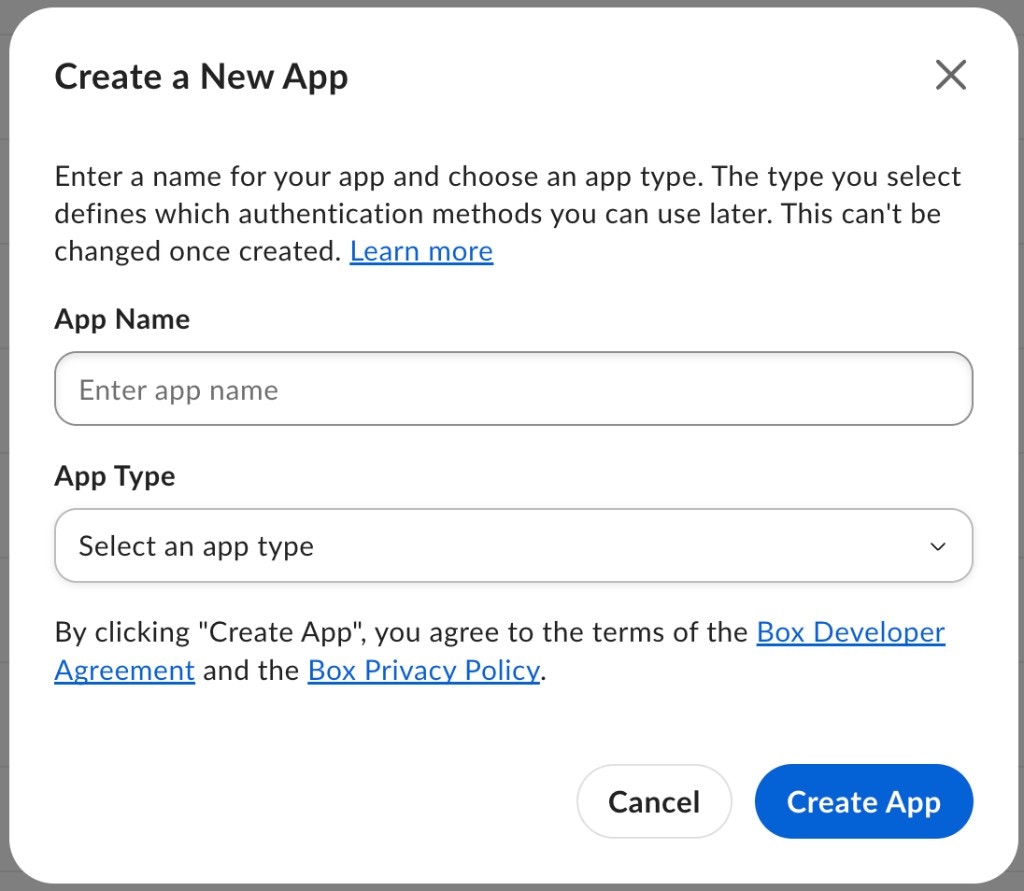
On the **Create a New App** screen, enter your app name
and select **Client Credentials Grant** from the **App Type** dropdown.
Once you make a selection, you are not able to change to a different
authentication method without creating a new application.
## App Authorization
Before the application can be used, a Box Admin or Co-Admin needs to authorize it.
If you're using a free developer account, your app is authorized automatically and you can skip the manual authorization step below.
On the **Configuration** tab in the [Developer Console][devconsole]:
* If you are a Box Admin or Co-Admin, click **Authorize** to authorize the app immediately.
* If you are not an Admin or Co-Admin, click **Submit** to send an authorization request to your Admin or Co-Admin. You receive an email once the request is approved or denied.
More information on this process is available in our
authorization guide.
## Basic configuration
### Application Access
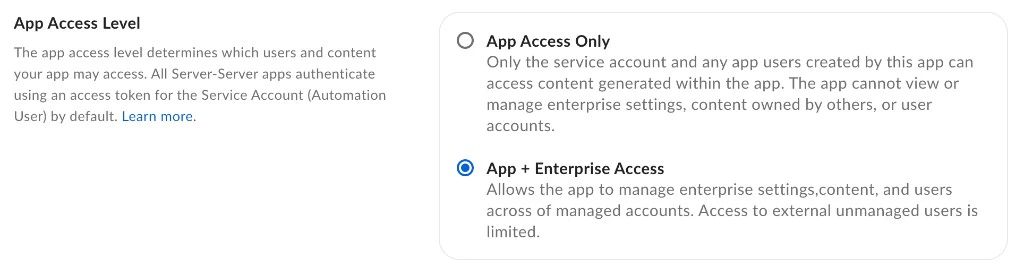
An application's access level determines which users and content your app may
access. By default, an application can only successfully interact with the
content of its Service Account and any App Users. To also
access existing Managed Users of an enterprise, navigate to the
**App Access Level** setting on the **Configuration** tab of the
[Developer console][devconsole] and set to **App + Enterprise Access**.
To authenticate as a Managed User or Admin, enable **Generate User Access Tokens** in the **Additional Configuration** section of the **Configuration** tab.
### Application Scopes
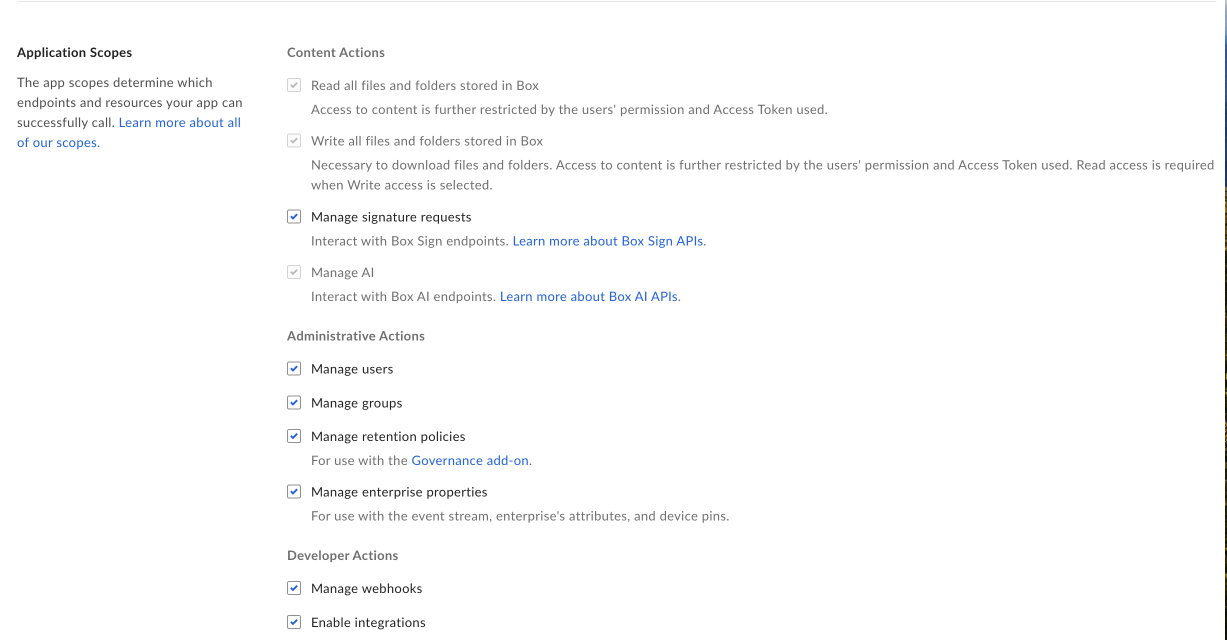
An application's scopes determine which endpoints and resources an application
can successfully call. See the scopes guide for detailed information
on each option.
### CORS Domains
If your application makes API calls from front-end browser code in
Javascript, the domain that these calls are made from needs to be
added to an allow-list due to [Cross Origin Resource Sharing][cors],
also known as CORS. If all requests are made from server-side code,
you may skip this section.
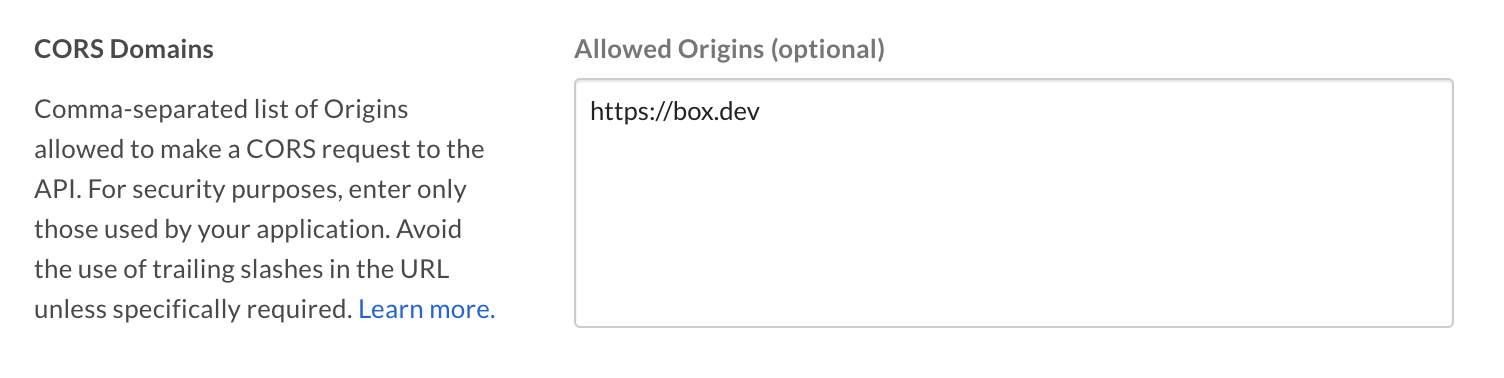
To add the full URI(s) to the allow-list, navigate to the **CORS Domain**
section at the bottom of the **Configuration** tab in the
[Developer console][devconsole].
## Using SDKs and Client Credentials Grant
To learn more about Client Credentials Grant for each SDK head over to:
* [.Net][.Net]
* [Java][Java]
* [Python][Python]
* [Node][Node]
* [IOS][IOS]
[.Net]: https://github.com/box/box-windows-sdk-v2/blob/legacy/docs/authentication.md#server-auth-with-ccg
[Java]: https://github.com/box/box-java-sdk/blob/legacy/doc/authentication.md#client-credentials-grant
[Python]: https://github.com/box/box-python-sdk/blob/legacy/docs/usage/authentication.md#client-credentials-grant
[Node]: https://github.com/box/box-node-sdk/blob/legacy/docs/authentication.md#client-credentials-grant-authentication
[IOS]: https://github.com/box/box-ios-sdk/blob/legacy/BoxSDK/docs/usage/authentication.md#client-credentials-grant
[devconsole]: https://app.box.com/developers/console
[devaccount]: https://account.box.com/signup/n/developer
[cors]: https://en.wikipedia.org/wiki/Cross-origin_resource_sharing
 ### CORS Domains
If your application makes API calls from front-end browser code in
Javascript, the domain that these calls are made from needs to be
added to an allow-list due to [Cross Origin Resource Sharing][cors],
also known as CORS. If all requests are made from server-side code,
you may skip this section.
To add the full URI(s) to the allow-list, navigate to the **CORS Domain**
section at the bottom of the **Configuration** tab in the
[Developer console][devconsole].
### CORS Domains
If your application makes API calls from front-end browser code in
Javascript, the domain that these calls are made from needs to be
added to an allow-list due to [Cross Origin Resource Sharing][cors],
also known as CORS. If all requests are made from server-side code,
you may skip this section.
To add the full URI(s) to the allow-list, navigate to the **CORS Domain**
section at the bottom of the **Configuration** tab in the
[Developer console][devconsole].
 ## Using SDKs and Client Credentials Grant
To learn more about Client Credentials Grant for each SDK head over to:
* [.Net][.Net]
* [Java][Java]
* [Python][Python]
* [Node][Node]
* [IOS][IOS]
[.Net]: https://github.com/box/box-windows-sdk-v2/blob/legacy/docs/authentication.md#server-auth-with-ccg
[Java]: https://github.com/box/box-java-sdk/blob/legacy/doc/authentication.md#client-credentials-grant
[Python]: https://github.com/box/box-python-sdk/blob/legacy/docs/usage/authentication.md#client-credentials-grant
[Node]: https://github.com/box/box-node-sdk/blob/legacy/docs/authentication.md#client-credentials-grant-authentication
[IOS]: https://github.com/box/box-ios-sdk/blob/legacy/BoxSDK/docs/usage/authentication.md#client-credentials-grant
[devconsole]: https://app.box.com/developers/console
[devaccount]: https://account.box.com/signup/n/developer
[cors]: https://en.wikipedia.org/wiki/Cross-origin_resource_sharing
## Using SDKs and Client Credentials Grant
To learn more about Client Credentials Grant for each SDK head over to:
* [.Net][.Net]
* [Java][Java]
* [Python][Python]
* [Node][Node]
* [IOS][IOS]
[.Net]: https://github.com/box/box-windows-sdk-v2/blob/legacy/docs/authentication.md#server-auth-with-ccg
[Java]: https://github.com/box/box-java-sdk/blob/legacy/doc/authentication.md#client-credentials-grant
[Python]: https://github.com/box/box-python-sdk/blob/legacy/docs/usage/authentication.md#client-credentials-grant
[Node]: https://github.com/box/box-node-sdk/blob/legacy/docs/authentication.md#client-credentials-grant-authentication
[IOS]: https://github.com/box/box-ios-sdk/blob/legacy/BoxSDK/docs/usage/authentication.md#client-credentials-grant
[devconsole]: https://app.box.com/developers/console
[devaccount]: https://account.box.com/signup/n/developer
[cors]: https://en.wikipedia.org/wiki/Cross-origin_resource_sharing