;
};
It is possible for a JWT application to act on behalf of another user
by leveraging the `as-user` header.
```sh theme={null}
curl https://api.box.com/2.0/folders/0 \
-H "as-user: [USER_ID]" \
-H "authorization: Bearer [ACCESS_TOKEN]"
```
In this situation the user ID is the Box identifier for a user. User IDs can
found for any user via the `GET /users` endpoint, which is only available to
admins, or by calling the `GET /users/me` endpoint with an authenticated user
session.
## Preconditions
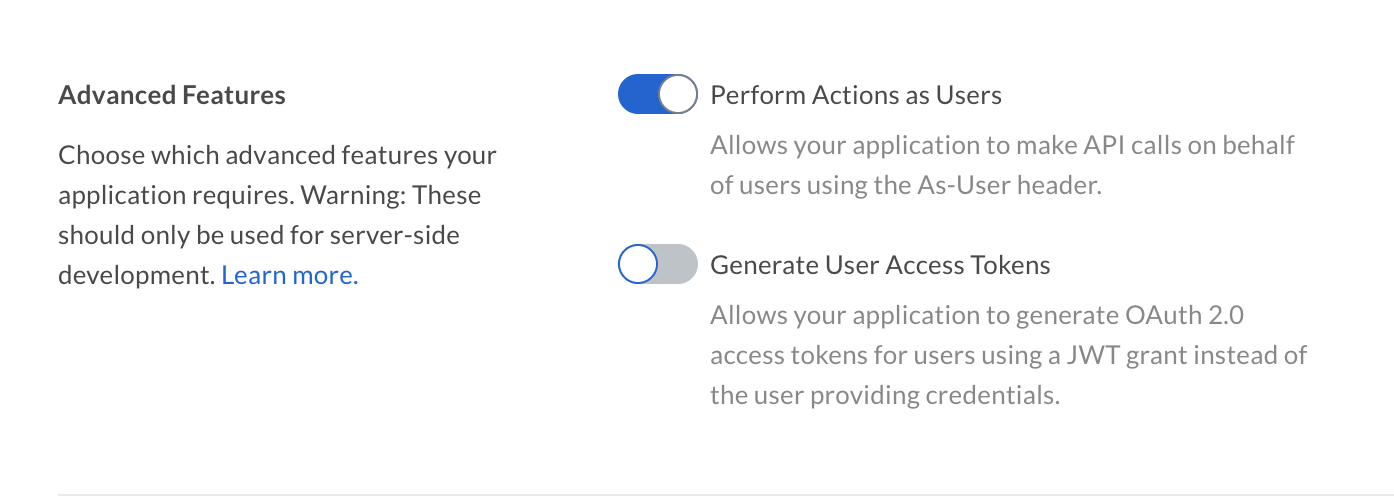
The application must be configured to perform actions as users in the
[Developer Console][devconsole].
Additionally, the authenticated user needs to be a user with Admin permissions,
meaning either an Admin or Co-Admin. See our guide on
User Types for more details.
## as-user using SDKs
All of the official Box SDKs support acting on behalf of a user using the
`as-user` header.
```csharp .NET theme={null}
var userClient = client.WithAsUserHeader("[USER_ID]");
```
```java Java theme={null}
BoxClient userClient = client.withAsUserHeader("[USER_ID]");
```
```python Python theme={null}
user_client = client.with_as_user_header('[USER_ID]')
```
```js Node theme={null}
const userClient = client.withAsUserHeader('[USER_ID]');
```
These methods return a new client instance with the as-user header applied,
leaving the original client unmodified.
## Limitations
* You cannot use the `user_id` of a Service Account in the `as-user` header.
* When impersonating a managed user, access is limited to content owned or controlled by the enterprise. Content owned by external users cannot be accessed through the `as-user` header.
* The `as-user` header cannot specify the same user ID as the authenticated user. If the specified user ID matches the current user, the request fails with a `403 Forbidden` error.
[devconsole]: https://app.box.com/developers/console
 Additionally, the authenticated user needs to be a user with Admin permissions,
meaning either an Admin or Co-Admin. See our guide on
User Types for more details.
## as-user using SDKs
All of the official Box SDKs support acting on behalf of a user using the
`as-user` header.
Additionally, the authenticated user needs to be a user with Admin permissions,
meaning either an Admin or Co-Admin. See our guide on
User Types for more details.
## as-user using SDKs
All of the official Box SDKs support acting on behalf of a user using the
`as-user` header.