;
};
## Overview
While leveraging an official Box SDK removes common hurdles of authentication,
it is possible to use the Box APIs without one. This guide reviews the steps to
manually complete the OAuth 2.0 flow.
1. Build the authorization URL
2. Redirect the user to the authorization URL
3. The user grants the application access to take actions on their behalf, which, if successful, provides an authorization code
4. Redirect the user back to the application
5. Exchange the authorization code for an Access Token
At the end of this flow, the application has an Access Token, which
can be used to make API calls on behalf of the user.
The Access Token acquired through the OAuth 2.0 flow is inherently tied to the
user who authorized the application.
It is possible to act as another user
using the `as-user` header.
## Prerequisites
Before continuing you will need to complete the following steps:
* Create a Platform App within the Box Developer Console, which leverages the OAuth 2.0 authentication method.
* Navigate to the configuration tab for the application to copy the `client_id` and `client_secret` values.
* Ensure at least one redirect URI is configured in the configuration tab for the application.
## 1. Build authorization URL
An authorization URL is comprised of the following parameters:
| Parameter | Status | Description |
| --------------------------------------------------------------------------------- | ----------- | ------------------------------------------------------------------------------------------------------ |
| `CLIENT_ID` | Required | Obtained from the configuration tab of the Developer Console |
| `REDIRECT_URI` | Optional | Configured in the Developer Console and where the user is sent once granting access to the application |
| `RESPONSE_TYPE` | Required | Always set to `code` |
| `STATE` | Recommended | Protects against cross-site request forgery |
If you configured multiple redirect URIs for the application, the authorization
URL must include the `redirect_uri` parameter matching one of the URIs
configured in the developer console. If the parameter is not specified, the
user will see a `redirect_uri_missing` error and will not be redirected back to
the app.
At the minimum this URL will always use the format:
`https://account.box.com/api/oauth2/authorize`?`client_id=CLIENTIDHERE`&`response_type=code`
```csharp .Net theme={null}
var baseUrl = "https://account.box.com/api/oauth2/authorize";
var clientId = "[CLIENT_ID]";
var authorizationUrl = $"{baseUrl}?client_id={clientId}&response_type=code";
```
```java Java theme={null}
String baseUrl = "https://account.box.com/api/oauth2/authorize";
String clientId = "[CLIENT_ID]";
String authorizationUrl = String.format("%s?client_id=%s&response_type=code", baseUrl, clientId);
```
```python Python theme={null}
base_url = 'https://account.box.com/api/oauth2/authorize'
client_id = '[CLIENT_ID]'
authorizationUrl = f'{base_url}?client_id=${client_id}&response_type=code'
```
```js Node theme={null}
var baseUrl = "https://account.box.com/api/oauth2/authorize";
var clientId = "[CLIENT_ID]";
var authorizationUrl = `${baseUrl}?client_id=${clientId}&response_type=code`;
```
## 2. Redirect the user
Next, redirect the user to the authorization URL. The way this is done depends
on the application framework. Most framework documentation provides extensive
guidance on this topic.
If the authorization URL is not valid for the app specified, the user will see
an error page rather than a grant access screen. For example, if the
`redirect_uri` parameter in the authorization URL does not match one of the URIs
configured for your app, the user will see a `redirect_uri_mismatch` error.
```csharp .Net theme={null}
var authorizationUrl = $"{baseUrl}?client_id={clientId}&response_type=code";
// redirectTo(authorizationUrl);
```
```java Java theme={null}
String authorizationUrl = String.format("%s?client_id=%s&response_type=code", baseUrl, clientId);
// response.redirect(authorizationUrl);
```
```python Python theme={null}
auth_url = f'{base_url}?client_id=${client_id}&response_type=code'
// redirect(auth_url, code=302)
```
```js Node theme={null}
var authorizationUrl = `${baseUrl}?client_id=${clientId}&response_type=code`;
// res.redirect(authorize_url)
```
Additional query parameters can be passed along when redirecting the user to
limit down the scope, or pass along some extra state. See the authorization
reference documentation for more information.
## 3. User grants application access
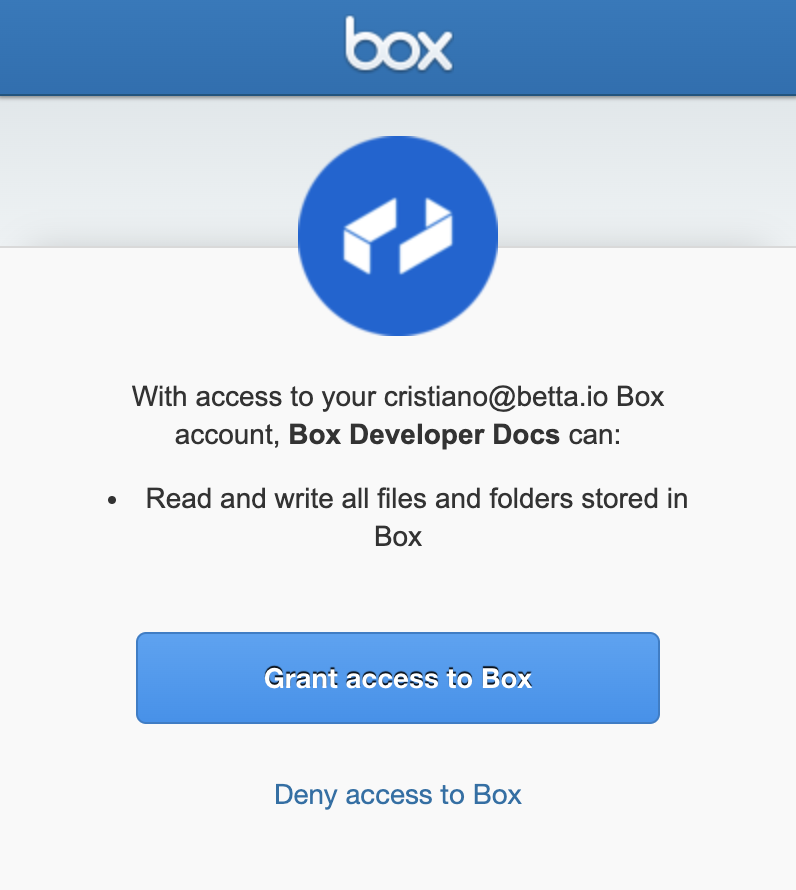
The user is redirected to their browser to log in to their account using the Box
UI. They are then presented with the list of requested scopes and the option to
approve the application to take actions on their behalf.
When the user accepts this request by clicking **Grant access to Box**, the
browser will redirect to the configured redirect URL with a query parameter
containing a short-lived authorization code.
If you configured multiple redirect URIs for the application, the authorization
URL must include the `redirect_uri` parameter matching one of the URIs
configured in the developer console. If the parameter is not specified, the
user will see a `redirect_uri_missing` error and will not be redirected back to
the app.
```sh theme={null}
https://your.domain.com/path?code=1234567
```
## 4. Exchange code
The provided authorization code is valid for 30 seconds and must be
exchanged for an Access Token before expiration.
```csharp .Net theme={null}
using System.Net;
using System.Net.Http;
using Newtonsoft.Json;
String authenticationUrl = "https://api.box.com/oauth2/token";
var client = new HttpClient();
var content = new FormUrlEncodedContent(new[]
{
new KeyValuePair("grant_type", "authorization_code"),
new KeyValuePair("code", "[CODE]"),
new KeyValuePair("client_id", "[CLIENT_ID]"),
new KeyValuePair("client_secret", "[CLIENT_SECRET]")
});
var response = client.PostAsync(authenticationUrl, content).Result;
class Token
{
public string access_token { get; set; }
}
var data = response.Content.ReadAsStringAsync().Result;
var token = JsonConvert.DeserializeObject(data);
var accessToken = token.access_token;
```
```java Java theme={null}
String authenticationUrl = "https://api.box.com/oauth2/token";
List params = new ArrayList();
params.add(new BasicNameValuePair("grant_type", "authorization_code"));
params.add(new BasicNameValuePair("code", "[CODE]"));
params.add(new BasicNameValuePair("client_id", "[CLIENT_ID]"));
params.add(new BasicNameValuePair("client_secret", "[CLIENT_SECRET]"));
CloseableHttpClient httpClient = HttpClientBuilder.create().disableCookieManagement().build();
HttpPost request = new HttpPost(authenticationUrl);
request.setEntity(new UrlEncodedFormEntity(params));
CloseableHttpResponse httpResponse = httpClient.execute(request);
HttpEntity entity = httpResponse.getEntity();
String response = EntityUtils.toString(entity);
httpClient.close();
class Token {
String access_token;
}
Token token = (Token) gson.fromJson(response, Token.class);
String accessToken = token.access_token;
```
```python Python theme={null}
authentication_url = "https://api.box.com/oauth2/token";
params = urlencode({
'grant_type': 'authorization_code',
'code': '[CODE]',
'client_id': '[CLIENT_ID]',
'client_secret': '[CLIENT_SECRET]'
}).encode()
request = Request(authentication_url, params)
response = urlopen(request).read()
access_token = json.loads(response)['access_token']
```
```js Node theme={null}
const authenticationUrl = "https://api.box.com/oauth2/token";
let accessToken = await axios
.post(
authenticationUrl,
querystring.stringify({
grant_type: "authorization_code",
code: "[CODE]",
client_id: "[CLIENT_ID]",
client_secret: "[CLIENT_SECRET]",
})
)
.then((response) => response.data.access_token);
```
To learn how to use an Access Token visit our guide on Making API calls.
[1]: https://support.box.com/hc/en-us/articles/360043693554-Box-Verified-Enterprise-Supported-Apps
 When the user accepts this request by clicking **Grant access to Box**, the
browser will redirect to the configured redirect URL with a query parameter
containing a short-lived authorization code.
When the user accepts this request by clicking **Grant access to Box**, the
browser will redirect to the configured redirect URL with a query parameter
containing a short-lived authorization code.