;
};
Downscoping is a way to exchange an existing Access Token for a new one that is
more restricted.
## Reasons to downscope
An application might need to share the Access Token with an
environment that it does not fully control. A common example of this would be
when using Box UI Elements in a web browser.
When an application needs to pass an Access Token to the browser there is a
potential security risk that needs to be resolved. In order to limit this risk the
Access Token can be exchanged for a new token with much stricter permissions.
## High-level overview
A downscoped token is a token that has fewer permissions (scopes) than the
original token, as well as the optional additional restriction to only allow
access to a specific file.
The new token takes the permissions of the original token and restricts them
to the tokens passed in, as well as the resource provided.
## Downscoping in practice
To downscope a token, pass the `POST /oauth2/token` endpoint an existing Access
Token, a list of scopes, as well as an optional file URL to restrict the token to.
| Parameter | Description |
| -------------------- | -------------------------------------------------------------------------------------------------------------------------------------------------------------------------------------------------------------------------------------------------------------------------------------------------------------------------------------------- |
| `subject_token` | The original token to downscope. This can be a token that was acquired through OAuth 2.0 or JWT token exchange. |
| `scope` | A space-delimited list of scopes to limit the new token to. Any valid scope for the application can be used, though a special set of scopes for Box UI elements is available |
| `resource` | An optional full URL path to the file the token should be restricted to. |
| `box_shared_link` | An optional shared link URL for a file or folder on Box. Password protected links are not supported. This option cannot be used in addition to the `resource` option nor can it be a shared link created on a weblink. |
| `subject_token_type` | Always set to `urn:ietf:params:oauth:token-type:access_token` |
| `grant_type` | Always set to `urn:ietf:params:oauth:grant-type:token-exchange` |
## Downscoped Access Token Object
A downscoped Access Token returned by the `POST /oauth2/token` endpoint contains
extra information on the specific restrictions.
```json theme={null}
{
"access_token": "1!DgsZ6V9kMWZu2StrxwQDF5BudQNen-xUmU2cfcVKArE....",
"expires_in": 4175,
"token_type": "bearer",
"restricted_to": [
{
"scope": "item_preview",
"object": {
"type": "folder",
"id": "1234567890",
"sequence_id": "0",
"etag": "0",
"name": "Test"
}
}
],
"issued_token_type": "urn:ietf:params:oauth:token-type:access_token"
}
```
Most importantly here is the list of `restricted_to` entries that will contain
each combination of `object` and `scope` that the new token has the permissions for.
A downscoped token does not include a refresh token. To get a new downscoped
token, refresh the original refresh token and use that new token to get a
downscoped token.
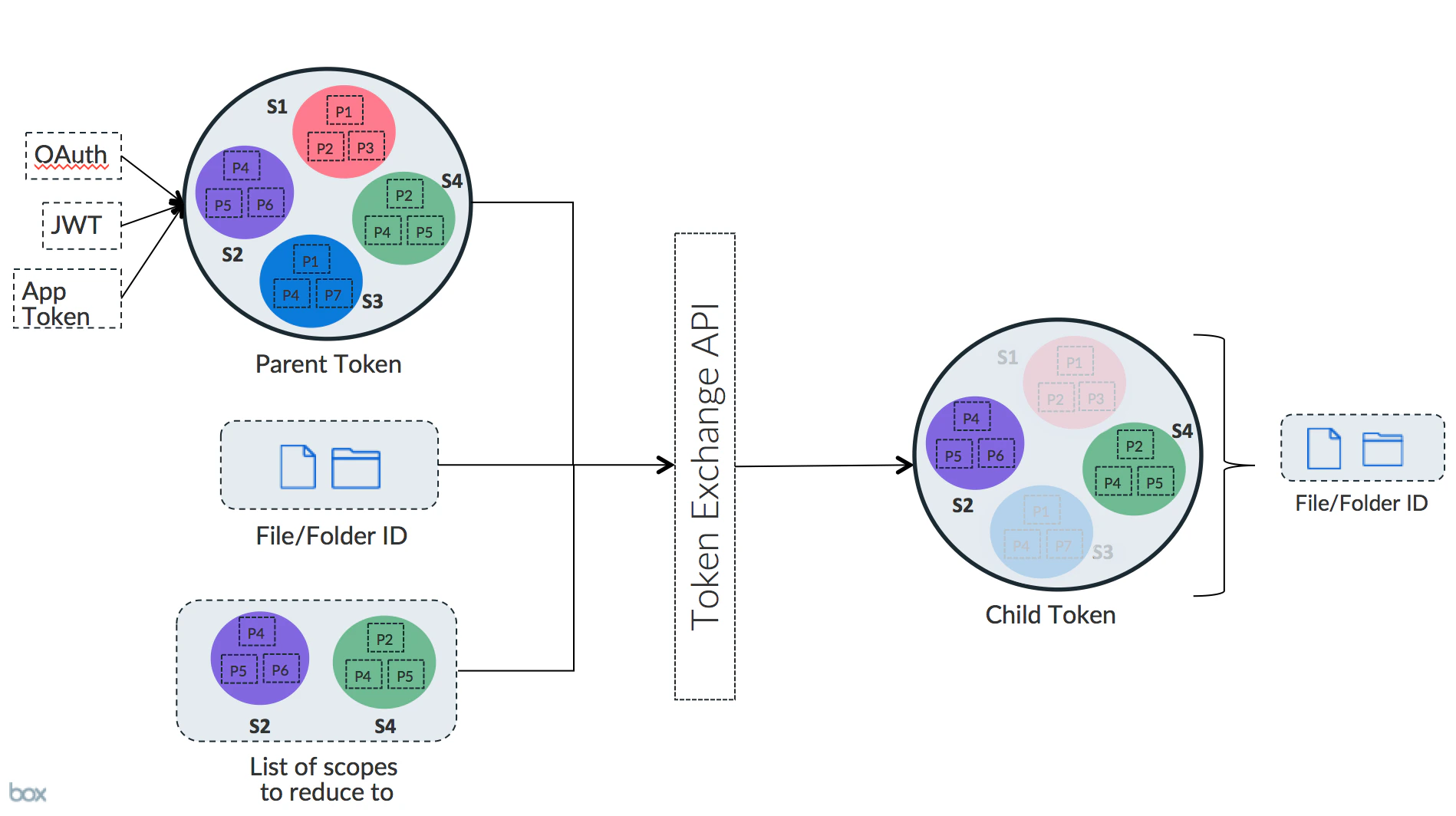 The new token takes the permissions of the original token and restricts them
to the tokens passed in, as well as the resource provided.
## Downscoping in practice
To downscope a token, pass the `POST /oauth2/token` endpoint an existing Access
Token, a list of scopes, as well as an optional file URL to restrict the token to.
| Parameter | Description |
| -------------------- | -------------------------------------------------------------------------------------------------------------------------------------------------------------------------------------------------------------------------------------------------------------------------------------------------------------------------------------------- |
| `subject_token` | The original token to downscope. This can be a token that was acquired through OAuth 2.0 or JWT token exchange. |
| `scope` | A space-delimited list of scopes to limit the new token to. Any valid scope for the application can be used, though a special set of scopes for Box UI elements is available |
| `resource` | An optional full URL path to the file the token should be restricted to. |
| `box_shared_link` | An optional shared link URL for a file or folder on Box. Password protected links are not supported. This option cannot be used in addition to the `resource` option nor can it be a shared link created on a weblink. |
| `subject_token_type` | Always set to `urn:ietf:params:oauth:token-type:access_token` |
| `grant_type` | Always set to `urn:ietf:params:oauth:grant-type:token-exchange` |
## Downscoped Access Token Object
A downscoped Access Token returned by the `POST /oauth2/token` endpoint contains
extra information on the specific restrictions.
```json theme={null}
{
"access_token": "1!DgsZ6V9kMWZu2StrxwQDF5BudQNen-xUmU2cfcVKArE....",
"expires_in": 4175,
"token_type": "bearer",
"restricted_to": [
{
"scope": "item_preview",
"object": {
"type": "folder",
"id": "1234567890",
"sequence_id": "0",
"etag": "0",
"name": "Test"
}
}
],
"issued_token_type": "urn:ietf:params:oauth:token-type:access_token"
}
```
Most importantly here is the list of `restricted_to` entries that will contain
each combination of `object` and `scope` that the new token has the permissions for.
The new token takes the permissions of the original token and restricts them
to the tokens passed in, as well as the resource provided.
## Downscoping in practice
To downscope a token, pass the `POST /oauth2/token` endpoint an existing Access
Token, a list of scopes, as well as an optional file URL to restrict the token to.
| Parameter | Description |
| -------------------- | -------------------------------------------------------------------------------------------------------------------------------------------------------------------------------------------------------------------------------------------------------------------------------------------------------------------------------------------- |
| `subject_token` | The original token to downscope. This can be a token that was acquired through OAuth 2.0 or JWT token exchange. |
| `scope` | A space-delimited list of scopes to limit the new token to. Any valid scope for the application can be used, though a special set of scopes for Box UI elements is available |
| `resource` | An optional full URL path to the file the token should be restricted to. |
| `box_shared_link` | An optional shared link URL for a file or folder on Box. Password protected links are not supported. This option cannot be used in addition to the `resource` option nor can it be a shared link created on a weblink. |
| `subject_token_type` | Always set to `urn:ietf:params:oauth:token-type:access_token` |
| `grant_type` | Always set to `urn:ietf:params:oauth:grant-type:token-exchange` |
## Downscoped Access Token Object
A downscoped Access Token returned by the `POST /oauth2/token` endpoint contains
extra information on the specific restrictions.
```json theme={null}
{
"access_token": "1!DgsZ6V9kMWZu2StrxwQDF5BudQNen-xUmU2cfcVKArE....",
"expires_in": 4175,
"token_type": "bearer",
"restricted_to": [
{
"scope": "item_preview",
"object": {
"type": "folder",
"id": "1234567890",
"sequence_id": "0",
"etag": "0",
"name": "Test"
}
}
],
"issued_token_type": "urn:ietf:params:oauth:token-type:access_token"
}
```
Most importantly here is the list of `restricted_to` entries that will contain
each combination of `object` and `scope` that the new token has the permissions for.