> ## Documentation Index
> Fetch the complete documentation index at: https://developer.box.com/llms.txt
> Use this file to discover all available pages before exploring further.
# Get started with Box AI
> Create a platform app, enable the AI scope, and generate a developer token to start using the Box AI API.
export const SignupCTA = ({children}) => {
return
;
};
export const Link = ({href, children, className, ...props}) => {
const localizedHref = localizeLink(href);
return
{children}
;
};
To implement Box AI API in your solutions, you need
to make sure you have access to the functionality.
You will also need a platform application with
enabled Box AI scope, and a developer token to
authenticate your calls.
A free developer account gives you access to the Box AI API. Try document summarization, question answering, and metadata extraction through the API.
To use Box AI API, make sure it is enabled by an
admin in the Admin Console. If you want to use
the Box AI APIs in your sandbox, request access
from the Box AI team using [this form][form].
## Create a platform application
First you need to create a platform application
you will use to make calls. To create
an application, follow the guide
on creating platform apps.
## Enable Box AI API access
To interact with Box AI API,
you need the `ai.readwrite` scope
added for your application.
Before you add the scope,
make sure that the Box Admin has granted you
the access to Box AI API. If you can't see the
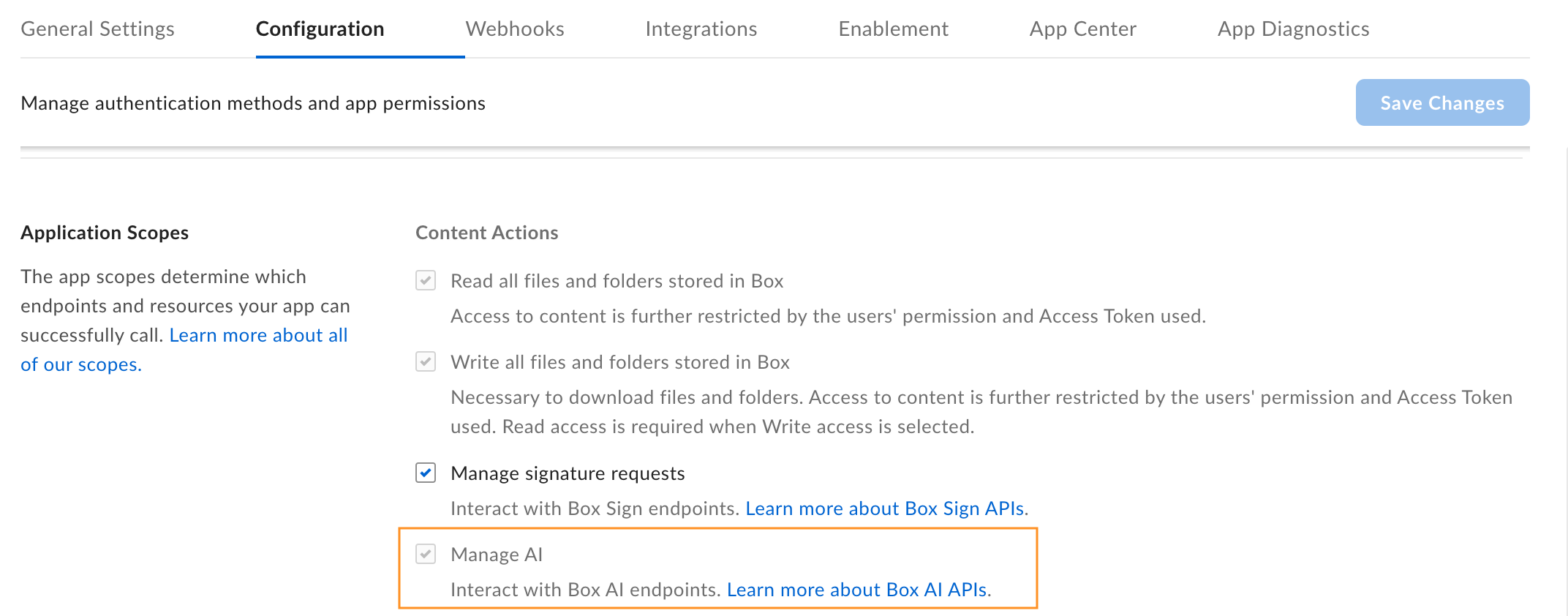
**Manage AI** option in your app configuration
settings, contact your admin.
To add a scope:
1. Open your application in Developer Console.
2. Go to **Configuration** > **Required Access Scopes** > **Content Actions**
3. Select the **Manage AI** scope. Box Platform will automatically include the scope when making the call. If you are added as an collaborator for a given app, but do not have Box AI API access, you will see the **Manage AI** scope checked and grayed out. This means the app owner has the AI scope enabled but you cannot change this setting.
4. Submit your app for authorization or enablement. If you want to enable Box AI API for an existing application, you must re-authorize it.
## Generate a developer token
You need a developer token
to authenticate your app when sending requests.
To generate a token:
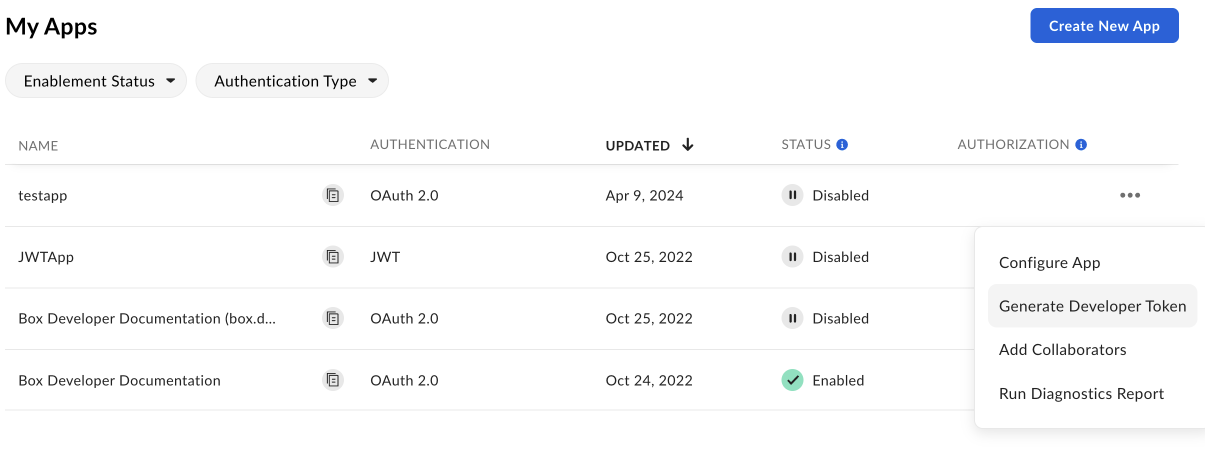
1. Go to **Developer Console** > **My Platform Apps**.
2. Click the **Options menu** button (…) on the right.
3. Select **Generate Developer Token**. The token will be automatically generated and saved to clipboard.
You can also open your app, go to
**Configuration** > **Developer Token**
and generate the token.
A developer token is only valid for one hour.
For additional details, see developer token.
After you generate the token, you can use it in cURL
or other clients, such as Postman, to make
calls.
[oauthscopes]: /guides/api-calls/permissions-and-errors/scopes#scopes-oauth-2-authorization
[form]: https://forms.gle/Nsh3TwM3W8qg4U35A
 4. Submit your app for authorization or enablement. If you want to enable Box AI API for an existing application, you must re-authorize it.
## Generate a developer token
You need a developer token
to authenticate your app when sending requests.
To generate a token:
1. Go to **Developer Console** > **My Platform Apps**.
2. Click the **Options menu** button (…) on the right.
3. Select **Generate Developer Token**. The token will be automatically generated and saved to clipboard.
4. Submit your app for authorization or enablement. If you want to enable Box AI API for an existing application, you must re-authorize it.
## Generate a developer token
You need a developer token
to authenticate your app when sending requests.
To generate a token:
1. Go to **Developer Console** > **My Platform Apps**.
2. Click the **Options menu** button (…) on the right.
3. Select **Generate Developer Token**. The token will be automatically generated and saved to clipboard.
 You can also open your app, go to
**Configuration** > **Developer Token**
and generate the token.
You can also open your app, go to
**Configuration** > **Developer Token**
and generate the token.