> ## Documentation Index
> Fetch the complete documentation index at: https://developer.box.com/llms.txt
> Use this file to discover all available pages before exploring further.
# Multiple signers and signing order
> Assign signer, approver, and final copy reader roles, and control the order in which Box Sign notifies each person.
export const MultiRelatedLinks = ({sections = []}) => {
if (!sections || sections.length === 0) {
return null;
}
return
{sections.map((section, index) => )}
;
};
export const RelatedLinks = ({title, items = []}) => {
const getBadgeClass = badge => {
if (!badge) return "badge-default";
const badgeType = badge.toLowerCase().replace(/\s+/g, "-");
return `badge-${badge === "ガイド" ? "guide" : badgeType}`;
};
if (!items || items.length === 0) {
return null;
}
return ;
};
A Box Sign request can include several people, each with a different job. Set a
role for every person, and use `order` when they need to act one after another.
Set both when you
[create the request](/guides/box-sign/create-sign-request).
## Signer roles
Each person needs a role: `signer`, `approver`, or `final_copy_reader`.
| Role | What they do |
| ------------------- | ----------------------------------------------------------------------------------------- |
| `signer` | Adds data to the document: signature, initials, date, text, checkboxes, or radio buttons. |
| `approver` | Approves the request before preparation (if enabled) and before any signer is notified. |
| `final_copy_reader` | Does not sign. Receives a copy of the signed document and [signing log][log]. |
If you do not give the requester a role, Box Sign adds them as
`final_copy_reader`.
Approvers and final copy readers cannot have signature properties. If you assign
signature properties to them, Box Sign changes their role to `signer`. In the
prepare UI, each signer has a color so you can see which fields belong to which
person.
For more detail on what each role can do, see the [roles for signers][roles]
support article.
## Signing order
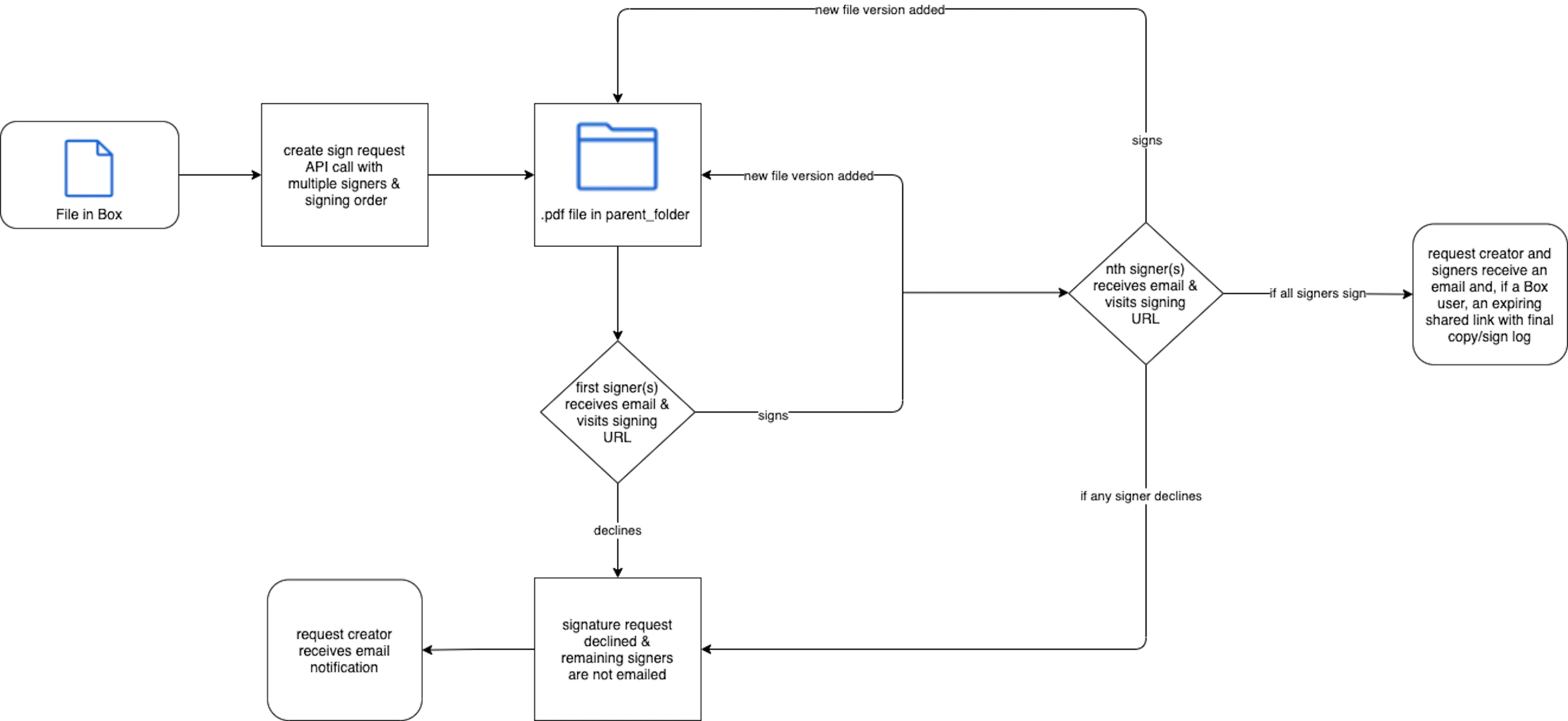
If you omit `order`, Box Sign notifies every signer at the same time. If you set
`order`, only the lowest number is notified first. After they sign, the next
group is notified. Signers that share an `order` value receive the request at the
same time.
Box Sign adds a new file version to `parent_folder` as each signer completes. A
decline stops the request for everyone who has not signed yet, and the request
status becomes `declined`.
```sh theme={null}
curl -i -X POST "https://api.box.com/2.0/sign_requests" \
-H "authorization: Bearer " \
-H "content-type: application/json" \
-d '{
"is_document_preparation_needed": true,
"parent_folder": {
"type": "folder",
"id": "0987654321"
},
"source_files": [
{
"type": "file",
"id": "123456789"
}
],
"signers": [
{
"email": "institution@example.com",
"role": "signer",
"order": 1
},
{
"email": "student@example.com",
"role": "signer",
"order": 2
},
{
"email": "dean@example.com",
"role": "approver"
},
{
"email": "legal@example.com",
"role": "final_copy_reader"
}
]
}'
```
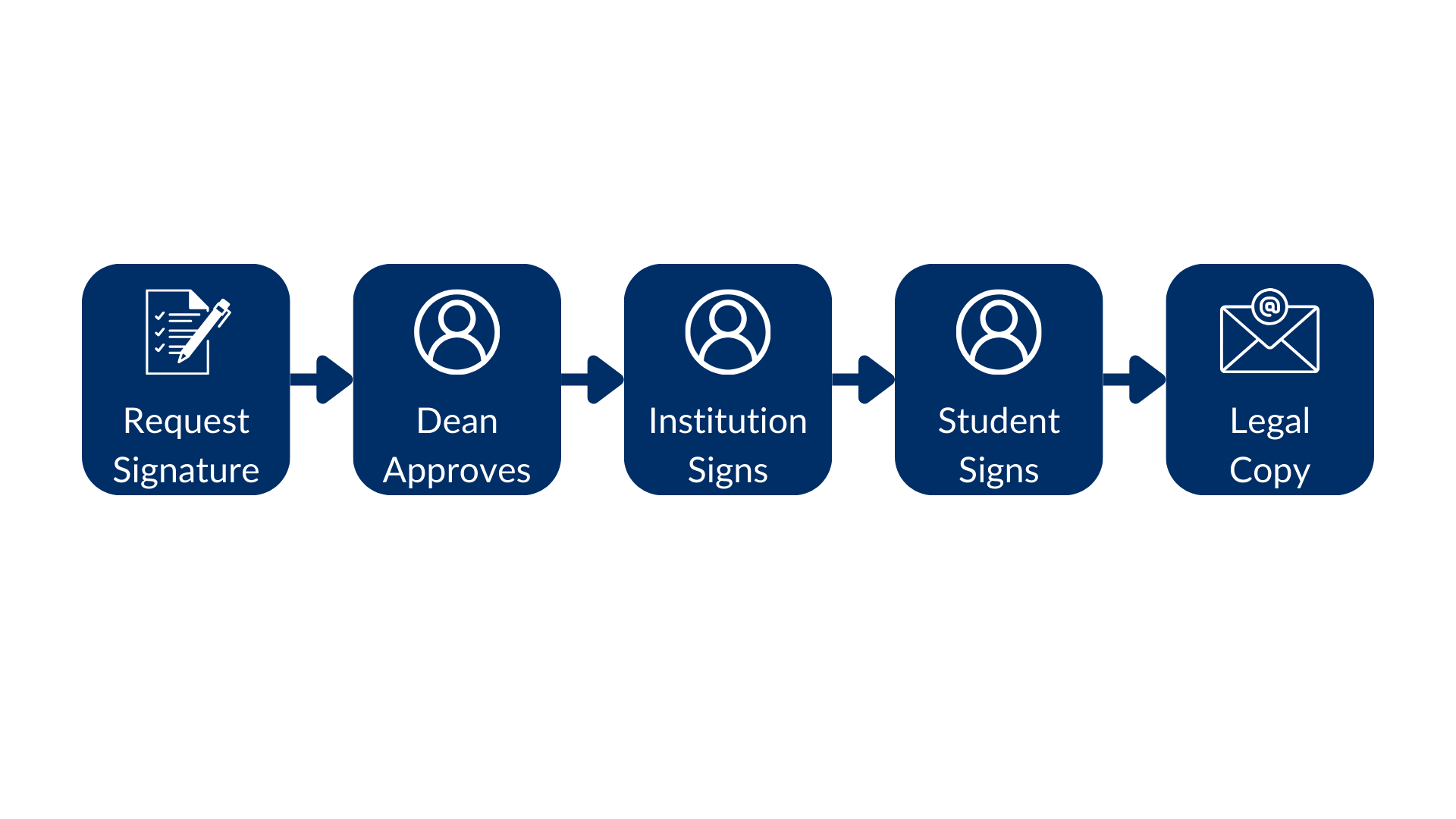 In this example, the dean approves first, then the institution signs, then the
student signs, and legal receives the final copy.
When you create the request from a template, keep signer order in the `POST`
body the same as the order on the template so the correct person gets each
field. See [Create a sign request with a template](/guides/box-sign/document-types/sign-templates).
[roles]: https://support.box.com/hc/en-us/articles/4404105660947-Roles-for-signers
[log]: https://support.box.com/hc/en-us/articles/4404095202579-Viewing-the-signing-log
In this example, the dean approves first, then the institution signs, then the
student signs, and legal receives the final copy.
When you create the request from a template, keep signer order in the `POST`
body the same as the order on the template so the correct person gets each
field. See [Create a sign request with a template](/guides/box-sign/document-types/sign-templates).
[roles]: https://support.box.com/hc/en-us/articles/4404105660947-Roles-for-signers
[log]: https://support.box.com/hc/en-us/articles/4404095202579-Viewing-the-signing-log