> ## Documentation Index
> Fetch the complete documentation index at: https://developer.box.com/llms.txt
> Use this file to discover all available pages before exploring further.

# Building Commands and Help Feature

export const ProgressBar = ({pages = [], ...props}) => {
  const [currentStep, setCurrentStep] = useState(0);
  const [isDarkMode, setIsDarkMode] = useState(false);
  useEffect(() => {
    const checkDarkMode = () => {
      const isDark = document.documentElement.classList.contains('dark');
      console.log('ProgressBar - isDarkMode:', isDark);
      setIsDarkMode(isDark);
    };
    checkDarkMode();
    const observer = new MutationObserver(() => {
      checkDarkMode();
    });
    observer.observe(document.documentElement, {
      attributes: true,
      attributeFilter: ['class']
    });
    return () => {
      observer.disconnect();
    };
  }, []);
  useEffect(() => {
    if (pages.length > 0) {
      const currentPath = window.location.pathname;
      const stepIndex = pages.findIndex(page => {
        const pagePath = page.startsWith('/') ? page : `/${page}`;
        return currentPath.endsWith(pagePath) || currentPath.includes(pagePath);
      });
      if (stepIndex !== -1) {
        setCurrentStep(stepIndex + 1);
      }
    }
  }, [pages]);
  if (!pages || pages.length === 0) {
    return null;
  }
  const step = currentStep;
  const total = pages.length;
  console.log('ProgressBar - Rendering with isDarkMode:', isDarkMode);
  const progressBarContainerStyle = {
    width: '100%',
    marginBottom: '32px',
    display: 'flex',
    alignItems: 'center',
    gap: '16px'
  };
  const stepsContainerStyle = {
    display: 'flex',
    alignItems: 'center',
    gap: '8px',
    flexShrink: 0
  };
  const progressBarTrackStyle = {
    flex: 1,
    height: '22px',
    backgroundColor: 'rgba(169, 210, 244, 0.06)',
    border: isDarkMode ? '1px solid rgba(230, 241, 247, 0.67)' : '1px solid #e3ecf3',
    borderRadius: '4px',
    overflow: 'hidden',
    position: 'relative'
  };
  const progressBarFillStyle = {
    height: '100%',
    backgroundColor: 'rgba(113, 192, 248, 0.23)',
    width: `${step / total * 100}%`,
    transition: 'width 0.3s ease'
  };
  const getStepStyle = (stepNumber, isActive) => {
    if (isDarkMode) {
      return {
        width: '22px',
        height: '22px',
        borderRadius: '4px',
        display: 'flex',
        alignItems: 'center',
        justifyContent: 'center',
        fontSize: '12px',
        fontWeight: '600',
        position: 'relative',
        zIndex: 1,
        transition: 'all 0.3s ease',
        backgroundColor: isActive ? 'rgba(113, 192, 248, 0.23)' : 'transparent',
        color: isActive ? '#60a5fa' : '#a0aec0',
        border: isActive ? '1px solid #e3ecf3' : '1px solid #e0e6eb',
        cursor: 'pointer',
        textDecoration: 'none'
      };
    }
    if (isActive) {
      return {
        width: '22px',
        height: '22px',
        borderRadius: '4px',
        display: 'flex',
        alignItems: 'center',
        justifyContent: 'center',
        fontSize: '12px',
        fontWeight: '600',
        position: 'relative',
        zIndex: 1,
        transition: 'all 0.3s ease',
        backgroundColor: 'rgba(169, 210, 244, 0.32)',
        color: '#374151',
        border: '1px solid #e1eef8',
        cursor: 'pointer',
        textDecoration: 'none'
      };
    }
    return {
      width: '22px',
      height: '22px',
      borderRadius: '4px',
      display: 'flex',
      alignItems: 'center',
      justifyContent: 'center',
      fontSize: '12px',
      fontWeight: '600',
      position: 'relative',
      zIndex: 1,
      transition: 'all 0.3s ease',
      backgroundColor: '#fbfbfb',
      color: '#9ca3af',
      border: '1px solid #e3ecf3',
      cursor: 'pointer',
      textDecoration: 'none'
    };
  };
  return <div style={progressBarContainerStyle} {...props}>
      <div style={stepsContainerStyle}>
        {Array.from({
    length: total
  }, (_, index) => {
    const stepNumber = index + 1;
    const pageIndex = index;
    const pagePath = pages[pageIndex];
    const fullPath = pagePath.startsWith('/') ? pagePath : `/${pagePath}`;
    const isActive = stepNumber === step;
    return <a key={stepNumber} href={fullPath} style={getStepStyle(stepNumber, isActive)}>
              {stepNumber}
            </a>;
  })}
      </div>
      <div style={progressBarTrackStyle}>
        <div style={progressBarFillStyle}></div>
      </div>
    </div>;
};

export const ResetButton = ({id, children = "Clear credentials", ...props}) => {
  const [isCleared, setIsCleared] = useState(false);
  const clearLocalStorageData = () => {
    const keysToRemove = [];
    try {
      if (id) {
        const ids = id.split(",").map(key => key.trim());
        ids.forEach(idPrefix => {
          const prefix = `com.box.developer.${idPrefix}`;
          for (let i = 0; i < localStorage.length; i++) {
            const key = localStorage.key(i);
            if (key && key.startsWith(prefix)) {
              keysToRemove.push(key);
            }
          }
        });
      } else {
        for (let i = 0; i < localStorage.length; i++) {
          const key = localStorage.key(i);
          if (key && key.startsWith("com.box.developer.")) {
            keysToRemove.push(key);
          }
        }
      }
      keysToRemove.forEach(key => {
        localStorage.removeItem(key);
      });
    } catch (error) {
      console.error("ResetButton: Error clearing localStorage:", error);
    }
  };
  const clearCookiesData = () => {
    if (!id) return;
    const keys = id.split(",").map(key => key.trim());
    keys.forEach(key => {
      try {
        document.cookie = `${key}=; expires=Thu, 01 Jan 1970 00:00:00 UTC; path=/;`;
      } catch (error) {}
    });
  };
  const clearAllData = () => {
    clearLocalStorageData();
    clearCookiesData();
    setIsCleared(true);
    setHasValues(false);
    setTimeout(() => {
      setIsCleared(false);
    }, 2000);
  };
  const handleClick = () => {
    clearAllData();
  };
  const handleKeyDown = e => {
    if (e.key === "Enter" || e.key === " ") {
      e.preventDefault();
      handleClick();
    }
  };
  return <div className="flex justify-center my-6">
      <button onClick={handleClick} onKeyDown={handleKeyDown} aria-label={children} className={`flex items-center gap-3 px-6 py-3 rounded-xl text-base font-semibold transition-all duration-300 outline-none cursor-pointer ${isCleared ? "bg-green-600 hover:bg-green-700 text-white shadow-md" : "bg-orange-500 hover:bg-orange-600 text-white shadow-md"}`} {...props}>
        {isCleared ? <>
            <Icon icon="circle-check" color="#ffffff" />
            {}
            <span>{children}</span>
          </> : <>
            <Icon icon="shield" color="#ffffff" />
            {}
            <span>{children}</span>
          </>}
      </button>
    </div>;
};

export const YouTube = ({id, title = 'YouTube video player', width = '100%', height = '400', ...props}) => {
  if (!id) {
    return <div style={{
      border: '2px solid #ff4444',
      borderRadius: '8px',
      padding: '20px',
      backgroundColor: '#fff5f5',
      color: '#cc0000'
    }}>
        <h4>⚠️ YouTube Error</h4>
        <p>Missing required prop: <code>id</code></p>
        <p>Usage: &lt;YouTube id="whxT3Bdx3E0" /&gt;</p>
      </div>;
  }
  return <iframe width={width} height={height} src={`https://www.youtube.com/embed/${id}`} title={title} frameBorder="0" allow="accelerometer; autoplay; clipboard-write; encrypted-media; gyroscope; picture-in-picture; web-share" allowFullScreen style={{
    borderRadius: '8px',
    marginBlock: '1rem'
  }} {...props} />;
};

export const Link = ({href, children, className, ...props}) => {
  const [localizedHref, setLocalizedHref] = useState(href);
  const supportedLocales = useMemo(() => ['ja'], []);
  useEffect(() => {
    const getLocaleFromPath = path => {
      const match = path.match(/^\/([a-z]{2})(?:\/|$)/);
      if (match) {
        const potentialLocale = match[1];
        if (supportedLocales.includes(potentialLocale)) {
          return potentialLocale;
        }
      }
      return null;
    };
    const hasLocalePrefix = path => {
      const match = path.match(/^\/([a-z]{2})(?:\/|$)/);
      return match ? supportedLocales.includes(match[1]) : false;
    };
    const currentPath = window.location.pathname;
    const currentLocale = getLocaleFromPath(currentPath);
    if (href && href.startsWith('/') && !hasLocalePrefix(href)) {
      if (currentLocale) {
        setLocalizedHref(`/${currentLocale}${href}`);
      } else {
        setLocalizedHref(href);
      }
    } else {
      setLocalizedHref(href);
    }
  }, [href, supportedLocales]);
  return <a href={localizedHref} className={className} {...props}>
      {children}
    </a>;
};

<ProgressBar
  pages={[
                        "guides/cli/quick-start/create-oauth-app",
                        "guides/cli/quick-start/install-and-configure",
                        "guides/cli/quick-start/build-commands-help",
                        "guides/cli/quick-start/options-and-bulk-commands",
                        "guides/cli/quick-start/powershell-script-templates",
                        "guides/cli/quick-start/next-steps"
                      ]}
/>

A full list of CLI commands and usage information can be found in the
[GitHub repository][github].

<Warning>
  Only Service Accounts and Admins are able to use some commands.
  If your user is not authorized with the necessary scopes or you
  configured your CLI to obtain a default token for another user, calls may
  fail. Add `-v` or `--verbose` to your command for verbose error logging.
</Warning>

If you do not see a command for an endpoint you need, you can build a
[custom request][custom].

<Tip>
  Use repository documentation in conjunction with reference documentation to
  see information the help command does not provide. This includes
  restrictions, token permission requirements, fields, etc.
</Tip>

<YouTube id="66wlIyS07Aw" />

## First: Reset browser storage

Now that you've imported the Box API credentials into the CLI you should take a
moment to remove these credentials from your browser's storage.

<ResetButton id="cli,credentials,observable_events">
  Clear credentials
</ResetButton>

<Warning>
  Removing your API credentials from the browser storage ensures that no other
  script can read your **Client ID** or **Client Secret**
</Warning>

## Creating a folder with help

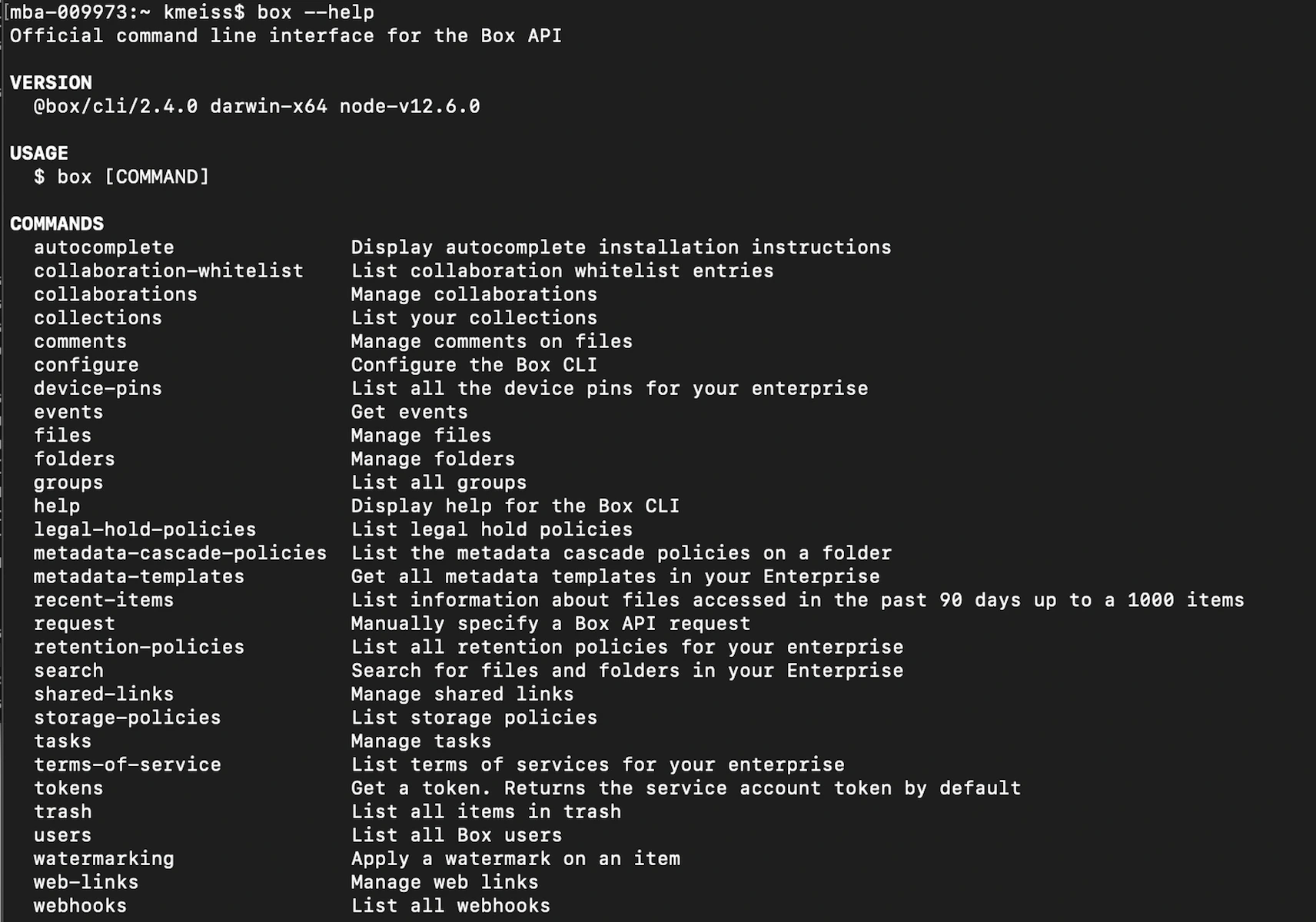
Every CLI command begins with `box`. Add the option `--help` to any
command for help building it. For example, executing `box --help` will bring you
to a list of all possible object commands. Options are discussed more in
<Link href="/guides/cli/quick-start/options-and-bulk-commands/#options">step 4</Link>.

<Frame center>
    <img src="https://mintcdn.com/box/_tECS-SYBYV9K-kZ/images/guides/cli/help.png?fit=max&auto=format&n=_tECS-SYBYV9K-kZ&q=85&s=316c836878c85a574354c60a7d0a7aaa" alt="Help" width="1712" height="1200" data-path="images/guides/cli/help.png" />
</Frame>

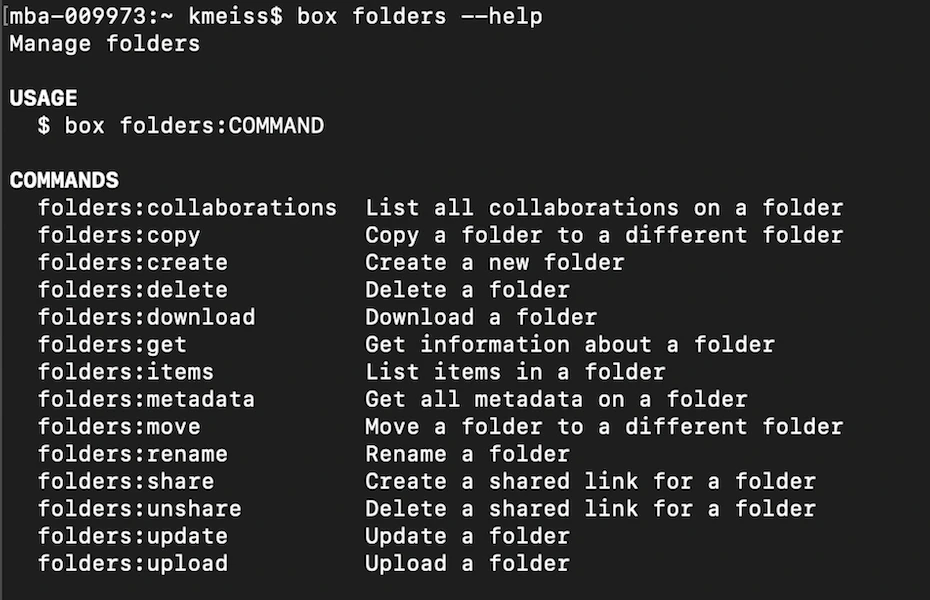
Then, for example, use the folder object and execute the command
`box folders --help`. This provides a list of all eligible actions for this
object.

<Frame center>
    <img src="https://mintcdn.com/box/_tECS-SYBYV9K-kZ/images/guides/cli/folders-help.png?fit=max&auto=format&n=_tECS-SYBYV9K-kZ&q=85&s=f49950f628f38cb4486afb898667fd44" alt="Help" width="930" height="600" data-path="images/guides/cli/folders-help.png" />
</Frame>

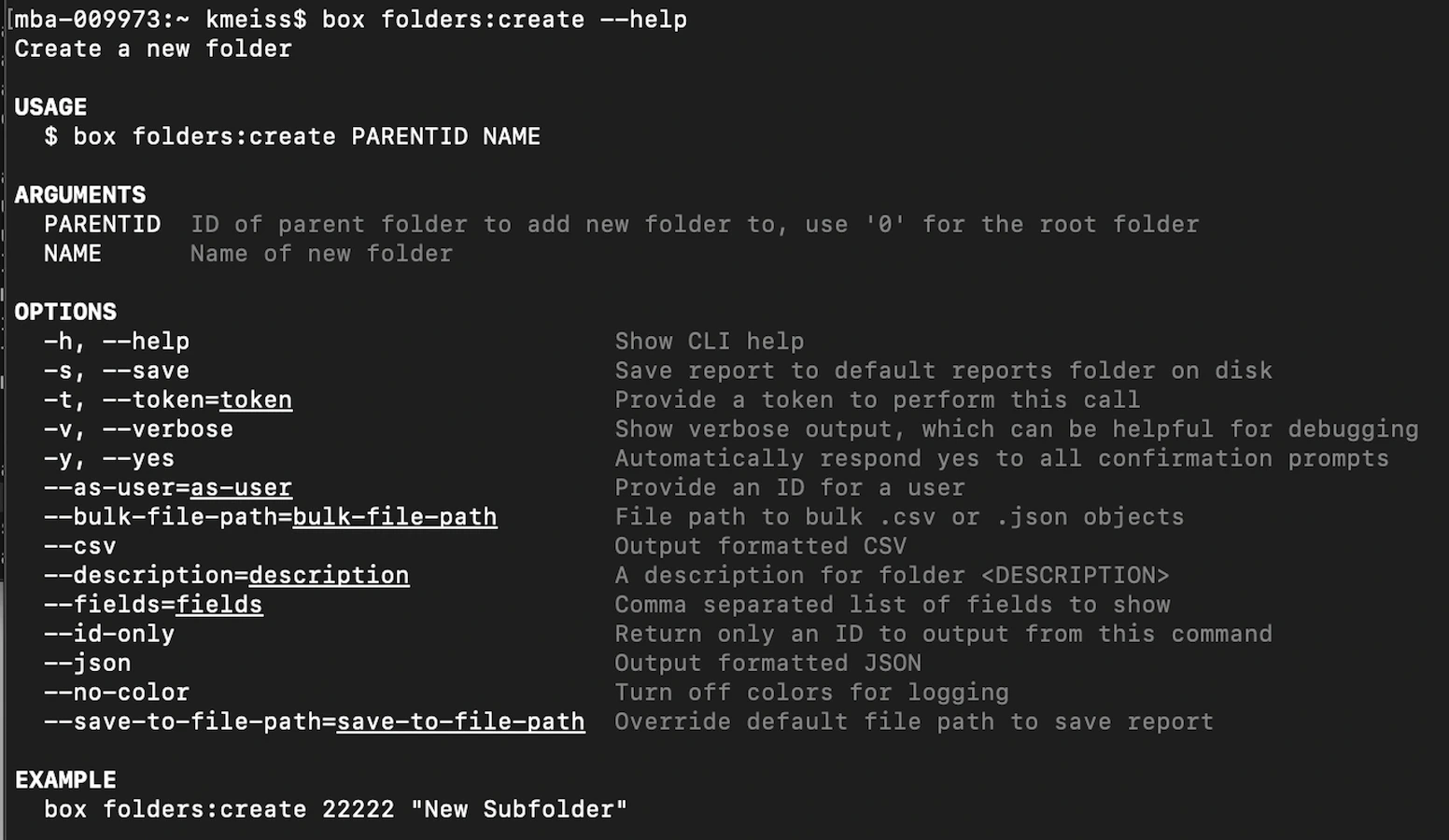
Discover the required arguments for creating a folder: `box folders:create --help`

<Frame center>
    <img src="https://mintcdn.com/box/_tECS-SYBYV9K-kZ/images/guides/cli/folders-create-help.png?fit=max&auto=format&n=_tECS-SYBYV9K-kZ&q=85&s=c5573a5935d0187eff355788c3dadb9f" alt="Help" width="1552" height="900" data-path="images/guides/cli/folders-create-help.png" />
</Frame>

Execute the command `box folders:create 0 "My CLI Folder"` and note the folder
ID returned in the response.

<Tip>
  The root level of the folder tree, the All Files page, is always represented
  by folder ID 0.
</Tip>

Log into **your** Box account. Can you see this folder in your folder tree?

<Warning>
  If you set up the Box CLI using JWT authentication, you will not see the
  folder in your Box account. The folder will live in the service account
  of the application that was created after application approval.
</Warning>

## Summary

* You used the **help** feature to create a folder

[github]: https://github.com/box/boxcli#command-topics-1

[custom]: https://github.com/box/boxcli/blob/master/docs/request.md

[sa]: /platform/user-types/#service-account