> ## Documentation Index
> Fetch the complete documentation index at: https://developer.box.com/llms.txt
> Use this file to discover all available pages before exploring further.
# Connect Slack to Box Group Collaborations
export const Link = ({href, children, className, ...props}) => {
const localizedHref = localizeLink(href);
return
{children}
;
};
Slack is a popular communication and productivity tool, allowing for real-time
coordination when working with individuals or groups in and outside of the
company.
When connected to a custom Box application, the Slack channel structure, along
with the [slash command][slack-slash-commands] and [event API][slack-event-api]
systems, can be used to provide a logical grouping and collaboration system for
Box files and folders.
## Overview
This quick start guide will walk you through all the steps needed to group Box
users based on the channels they are in within a Slack workspace, and then
permit individuals within those Slack channels to share Box files and folders
with that group using a Slack slash command.
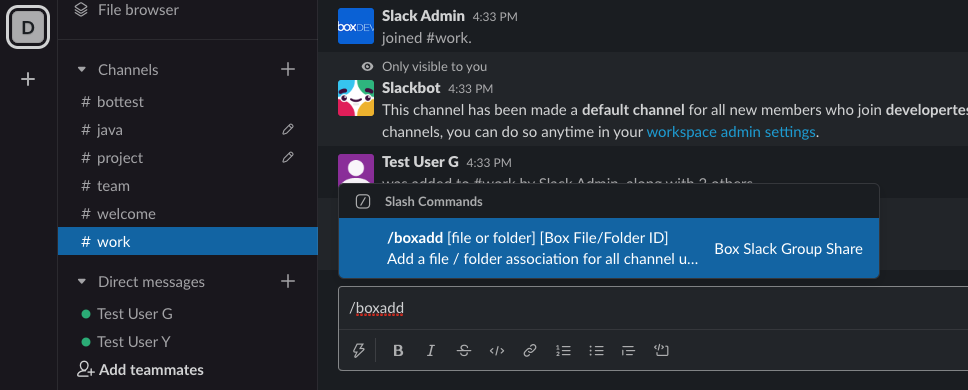
At the end of this tutorial you will have a Slack bot that will be deployed to a
channel in your workspace. This bot will create a Box group containing all the
people present in the channel, and then listen for a `/boxadd` command in the
channel. It will then parse that command and automatically collaborate the Box
file or folder with the entire group of users in the channel.
This guide will take you through the following steps.
1. Setup and configure your Slack app to handle the event notification and Slash command structures.
2. Setup and configure your Box application to connect the web application to Box.
3. Listen for Slack events and commands when users join and leave channels, or share a Box file or folder with the group.
4. Structure Box groups and file / folder collaborations based on the Slack events or slash commands.
5. And finally, deploy the application to your workspace and invite the Slack app bot to your channels to begin listening for events.
## Requirements
This quick start guide has two requirements that are worth noting before we proceed.
1. **User emails need to match between Box and Slack**: We are connecting a Slack user account to a Box user account by comparing the Slack user email address. Therefore, a matching Box user account using the same email address must be present in your Box enterprise.
2. **You must have a publicly accessible server**: Slack will need to send event and command notification data to a public URL for your application. This guide assumes that you have a public location where your application code will be hosted, such as `https://mysite.com/`. If you don't have access to any public hosting then application platforms like [Heroku][heroku], serverless options like [AWS lambda][aws-lambda], or exposing localhost with services like [ngrok][ngrok] are all options that you might want to consider.
I am ready to get started
[slack-slash-commands]: https://api.slack.com/interactivity/slash-commands
[slack-event-api]: https://api.slack.com/events-api
[step6]: /guides/collaborations/connect-slack-to-group-collabs/test-bot
[heroku]: https://heroku.com/
[aws-lambda]: https://aws.amazon.com/lambda/
[ngrok]: https://ngrok.com/
 This guide will take you through the following steps.
1. Setup and configure your Slack app to handle the event notification and Slash command structures.
2. Setup and configure your Box application to connect the web application to Box.
3. Listen for Slack events and commands when users join and leave channels, or share a Box file or folder with the group.
4. Structure Box groups and file / folder collaborations based on the Slack events or slash commands.
5. And finally, deploy the application to your workspace and invite the Slack app bot to your channels to begin listening for events.
## Requirements
This quick start guide has two requirements that are worth noting before we proceed.
1. **User emails need to match between Box and Slack**: We are connecting a Slack user account to a Box user account by comparing the Slack user email address. Therefore, a matching Box user account using the same email address must be present in your Box enterprise.
2. **You must have a publicly accessible server**: Slack will need to send event and command notification data to a public URL for your application. This guide assumes that you have a public location where your application code will be hosted, such as `https://mysite.com/`. If you don't have access to any public hosting then application platforms like [Heroku][heroku], serverless options like [AWS lambda][aws-lambda], or exposing localhost with services like [ngrok][ngrok] are all options that you might want to consider.
This guide will take you through the following steps.
1. Setup and configure your Slack app to handle the event notification and Slash command structures.
2. Setup and configure your Box application to connect the web application to Box.
3. Listen for Slack events and commands when users join and leave channels, or share a Box file or folder with the group.
4. Structure Box groups and file / folder collaborations based on the Slack events or slash commands.
5. And finally, deploy the application to your workspace and invite the Slack app bot to your channels to begin listening for events.
## Requirements
This quick start guide has two requirements that are worth noting before we proceed.
1. **User emails need to match between Box and Slack**: We are connecting a Slack user account to a Box user account by comparing the Slack user email address. Therefore, a matching Box user account using the same email address must be present in your Box enterprise.
2. **You must have a publicly accessible server**: Slack will need to send event and command notification data to a public URL for your application. This guide assumes that you have a public location where your application code will be hosted, such as `https://mysite.com/`. If you don't have access to any public hosting then application platforms like [Heroku][heroku], serverless options like [AWS lambda][aws-lambda], or exposing localhost with services like [ngrok][ngrok] are all options that you might want to consider.