> ## Documentation Index
> Fetch the complete documentation index at: https://developer.box.com/llms.txt
> Use this file to discover all available pages before exploring further.
# Box Doc Gen
export const MultiRelatedLinks = ({sections = []}) => {
if (!sections || sections.length === 0) {
return null;
}
return
;
};
export const Link = ({href, children, className, ...props}) => {
const localizedHref = localizeLink(href);
return
{children}
;
};
Box Doc Gen API is available only for Enterprise Advanced accounts.
Box Doc Gen allows you to generate business documents such as offer letters, sales contracts, invoices or agreements.
You can generate documents based on Box Doc Gen templates uploaded to Box, with data fields that can be dynamically filled using Box Doc Gen API.
Box Doc Gen only supports the ability to leverage English template tags when
using Box Doc Gen templates. We recommend that customers test and review that Box Doc Gen supports their desired language requirements.
## Prerequisites
To use Box Doc Gen, you must have access to Microsoft Word, as it is required
for creating and authoring your document templates. You can utilize the Box Doc
Gen Add-in for a code-free experience or apply tagging scripts within Word to
prepare your documents.
Box Doc Gen is designed to facilitate the dynamic generation of business
documents, but it is important to note that Box does not have control over
users’ access to Microsoft Word. Users must ensure they have the necessary
permissions and access to Microsoft Word to create and author document
templates effectively.
## Box Doc Gen API capabilities
Box Doc Gen API allows you to:
* mark documents as Box Doc Gen templates,
* generate documents based on Box Doc Gen templates you store in Box,
* examine the details of Box Doc Gen templates and document generation jobs.
## Box Doc Gen API version
Box Doc Gen API was released in Box API version `2025.0`. All API requests to Box Doc Gen API endpoints must specify a valid API version by setting the `box-version` header to `2025.0`.
For more details, see Box API versioning.
## Box Doc Gen workflow
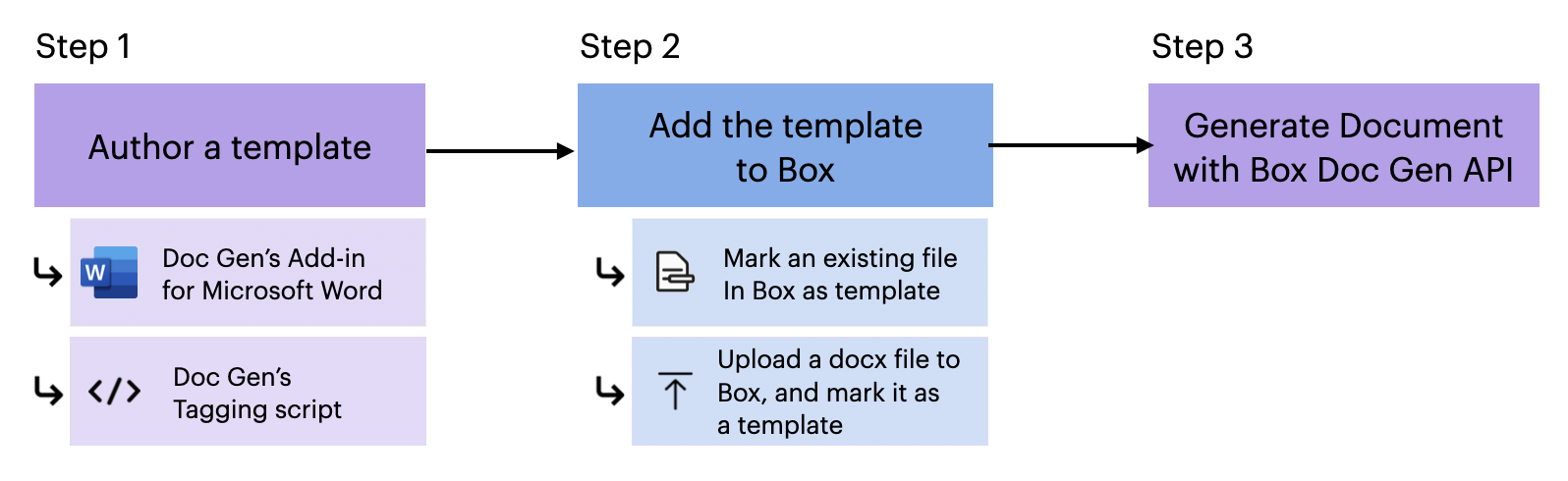
1. Author your Doc Gen Template
* Use [Doc Gen Add-in for Microsoft Word][template-addin] to create a template without any code.
* You can also leverage [Doc Gen's tagging script][tagging-script] to author the template.
2. [Add the template to Box][upload-template] using the Box Doc Gen UI. At this point, you can:
* Mark an existing file In Box as Doc Gen template.
* Create or Upload a document and mark it as a Box Doc Gen template.
3. Generate the document using Box Doc Gen API.
[template-addin]: https://support.box.com/hc/en-us/articles/36587535449747-Installing-Box-Doc-Gen-Add-in
[template-tags]: https://support.box.com/hc/en-us/articles/36151895655059-Creating-A-Box-Doc-Gen-Template-Manually
[json-template]: https://support.box.com/hc/en-us/articles/36148012877843-Creating-a-Box-Doc-Gen-Template-using-JSON-data
[tagging-script]: https://support.box.com/hc/en-us/articles/36149723736723-Template-tags-reference
[upload-template]: https://support.box.com/hc/en-us/articles/36587432368275-Managing-Box-Doc-Gen-Templates-in-Relay
 1. Author your Doc Gen Template
* Use [Doc Gen Add-in for Microsoft Word][template-addin] to create a template without any code.
* You can also leverage [Doc Gen's tagging script][tagging-script] to author the template.
2. [Add the template to Box][upload-template] using the Box Doc Gen UI. At this point, you can:
* Mark an existing file In Box as Doc Gen template.
* Create or Upload a document and mark it as a Box Doc Gen template.
3. Generate the document using Box Doc Gen API.
[template-addin]: https://support.box.com/hc/en-us/articles/36587535449747-Installing-Box-Doc-Gen-Add-in
[template-tags]: https://support.box.com/hc/en-us/articles/36151895655059-Creating-A-Box-Doc-Gen-Template-Manually
[json-template]: https://support.box.com/hc/en-us/articles/36148012877843-Creating-a-Box-Doc-Gen-Template-using-JSON-data
[tagging-script]: https://support.box.com/hc/en-us/articles/36149723736723-Template-tags-reference
[upload-template]: https://support.box.com/hc/en-us/articles/36587432368275-Managing-Box-Doc-Gen-Templates-in-Relay
1. Author your Doc Gen Template
* Use [Doc Gen Add-in for Microsoft Word][template-addin] to create a template without any code.
* You can also leverage [Doc Gen's tagging script][tagging-script] to author the template.
2. [Add the template to Box][upload-template] using the Box Doc Gen UI. At this point, you can:
* Mark an existing file In Box as Doc Gen template.
* Create or Upload a document and mark it as a Box Doc Gen template.
3. Generate the document using Box Doc Gen API.
[template-addin]: https://support.box.com/hc/en-us/articles/36587535449747-Installing-Box-Doc-Gen-Add-in
[template-tags]: https://support.box.com/hc/en-us/articles/36151895655059-Creating-A-Box-Doc-Gen-Template-Manually
[json-template]: https://support.box.com/hc/en-us/articles/36148012877843-Creating-a-Box-Doc-Gen-Template-using-JSON-data
[tagging-script]: https://support.box.com/hc/en-us/articles/36149723736723-Template-tags-reference
[upload-template]: https://support.box.com/hc/en-us/articles/36587432368275-Managing-Box-Doc-Gen-Templates-in-Relay