;
};
## Motivation
Box UI Elements are initialized on the client and make API calls directly to
Box. Thus, a valid access token must live on the client because all Box API
requests need to be authenticated.
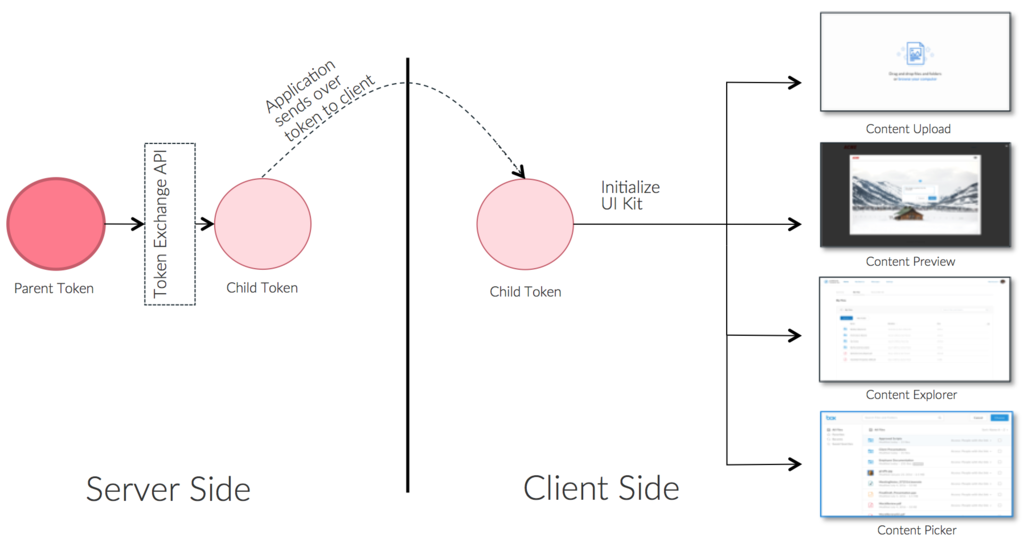
Token Exchange is a mechanism to
exchange a "parent token" (a token for your managed or app user, service
account, or application) to a "child token" which is scoped down to the minimum
set of required permissions so it can be securely sent down to the client
without elevating client privileges.
The Box UI Elements are designed to adapt to the permissions on the token, so an
additional advantage of using Token Exchange with them is that front-end
developers won't have to manually toggle UI controls on/off as long as the
correct set of permissions are present on the client token. This behavior mimics
the experience in the Box application as well. For example, if a user with
"Preview only" permissions to a folder does not see the "Download" button
present in the UI.
This blueprint covers how to use Token Exchange with UI Elements in your
application and example use cases.
* **Making API calls from client more secure:** As a general security practice, we recommend generating and sending downscoped tokens per every action performed by the user to limit exposure on the client. For example, even if a user should have preview and share access to a file, instead of sending the user token to the client which would give them complete user-level access, we suggest downscoping the token using Token Exchange and sending them a "preview only" token when they wish to preview a file and a "share" token when they want to share a file.
* **Creating a custom permissions model:** If you are building an application using UI Elements and the default Box access levels don't fit your permission model, you can start out with a fully scoped token for all your users and trim them down using Token Exchange on the fly to map to your custom permissions model.
* **Using Box services transactionally (no Box user accounts):** If you are not creating users in Box and are using Box services transactionally, you won't have access to user level tokens. In such cases, you can use Token Exchange to scope down the Service Account token to an appropriately scoped token.
* **Creating a user only to give them access to another user's content:** If you need to provide an end user "one time" access to another app/managed user's content, Token Exchange can be used to downscope the app/managed user token to the specific permissions and file/folders you want to give the end user access to, and pass it down to UI Elements to give them access to that content. For example, using Token Exchange, you can downscope a user token to have read-only access to content and pass it down to another user.
## Implementation
The solution for all of the above is using Token Exchange to exchange a parent
token for a downscoped token and initializing the UI Element using that token.
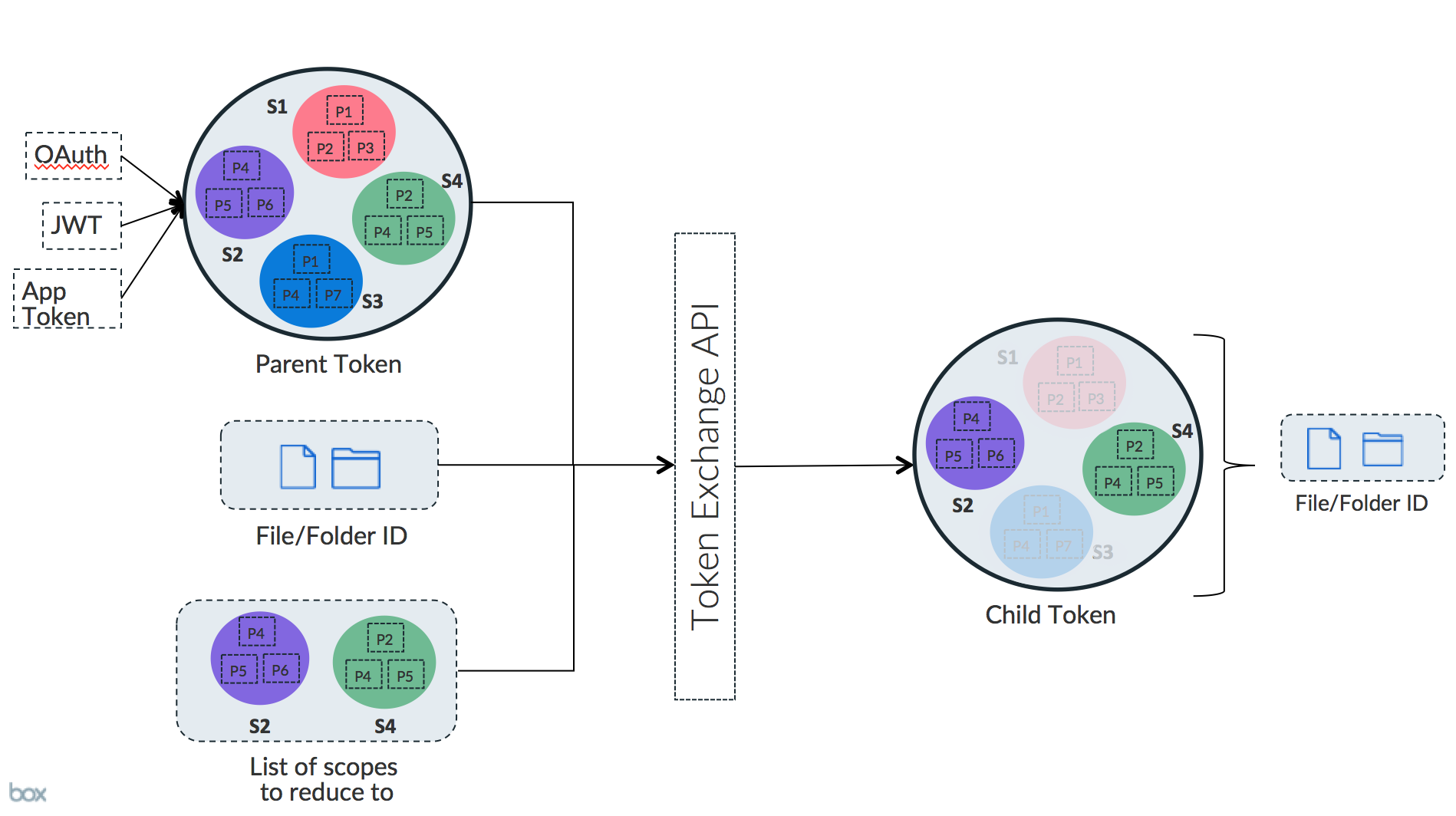
Token Exchange takes in the "parent token", "list of scopes" and optionally a
file/folder ID as the input arguments, and returns a token that is scoped down
to those exact set of scopes and the respective file/folder ID, if present in
the input arguments.
**Dedicated scopes designed for UI Elements**
We have designed a set of scopes that work seamlessly with the UI Elements.
While token exchange works with all Box scopes, we recommend using these
scopes along with UI Elements since they include the exact set of permissions
required for base functionality as well as incremental permissions for added
functionality.
## Developer Flow
Now that you understand the different scopes, let's walk through a
scenario for using Token Exchange with a UI Element.
**Scenario:** Provide a user with the ability to browse a folder tree using the
Box Content Explorer UI Element and allow them to preview and download files.
Sharing should be turned off.
**Steps:**
* Create a Managed User, App User or Service Account depending on your use case. You will use this user or application's token as the parent token for Token Exchange. To generate the user token follow:
* Authentication with OAuth guide if you would like to create a Managed User
* Authentication with JWT guide if you would like to create an App User or Service Account
* Add the user you created above as a Collaborator to the content using the Create Collaborator API as shown below. This step gives the user access to the content if not already under the user's account. If the file/folder was created under this user's account, then the user by default has "Owner" access to the folder so you can skip the collaboration step.
```sh theme={null}
curl https://api.box.com/2.0/collaborations \
-H "authorization: Bearer [ACCESS_TOKEN]" \
-d '{"item": { "id": "123456", "type": "folder"}, "accessible_by": { "id": "USER_ID", "type": "user" }, "role": "editor"}' \
-X POST
```
**Access Levels in Box**
There are [7 different access levels][accesslevels] that a Box user can be
collaborated as on a file/folder in Box. If the file/folder was created under
this user's account, then the user has "Owner" access to the folder by
default so you can skip the collaboration step.
* Use the Token Exchange API to exchange the parent token for a child token that contains the base scope for Content Explorer (`base_explorer`), `item_download` and `item_preview` scopes enabled for the specific `folder_id` `123456`. We strongly recommend performing this step on the application server.
### Request
```sh theme={null}
curl https://api.box.com/oauth2/token \
-d 'subject_token=ACCESS_TOKEN' \
-d 'subject_token_type=urn:ietf:params:oauth:token-type:access_token' \
-d 'scope=item_upload item_preview base_explorer' \
-d 'resource=https://api.box.com/2.0/folders/123456' \
-d 'grant_type=urn:ietf:params:oauth:grant-type:token-exchange' \
-X POST
```
### Response
```json theme={null}
{
"access_token": "CHILD_TOKEN",
"expires_in": 4247,
"token_type": "bearer",
"restricted_to": [
{
"scope": "base_explorer",
"object": {
"type": "folder",
"id": "123456",
"sequence_id": "0",
"etag": "0",
"name": "FOLDER_NAME"
}
},
{
"scope": "item_download",
"object": {
"type": "folder",
"id": "123456",
"sequence_id": "0",
"etag": "0",
"name": "FOLDER_NAME"
}
},
{
"scope": "item_preview",
"object": {
"type": "folder",
"id": "123456",
"sequence_id": "0",
"etag": "0",
"name": "FOLDER_NAME"
}
}
],
"issued_token_type": "urn:ietf:params:oauth:token-type:access_token"
}
```
The `CHILD_TOKEN` obtained above is scoped down to only include download and
preview permissions for folder id `123456` and its children.
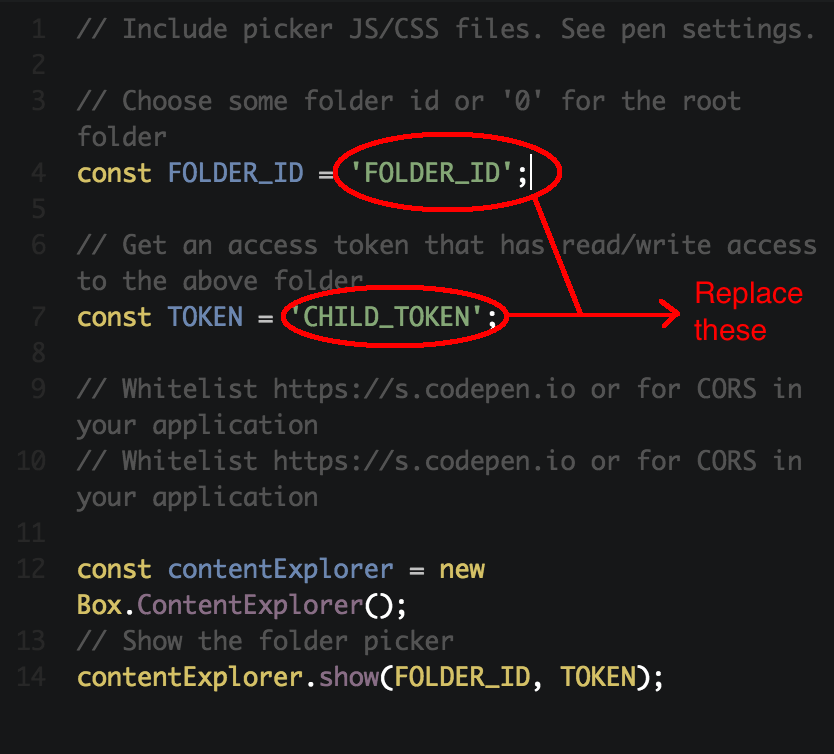
Use this `CHILD_TOKEN` in your Content Explorer UI Element. To see a quick demo,
you can use our [Content Explorer UI Element CodePen
Sample](https://codepen.io/box-platform/pen/wdWWdN) and replace the access token
and folder id values in the JS Tab.
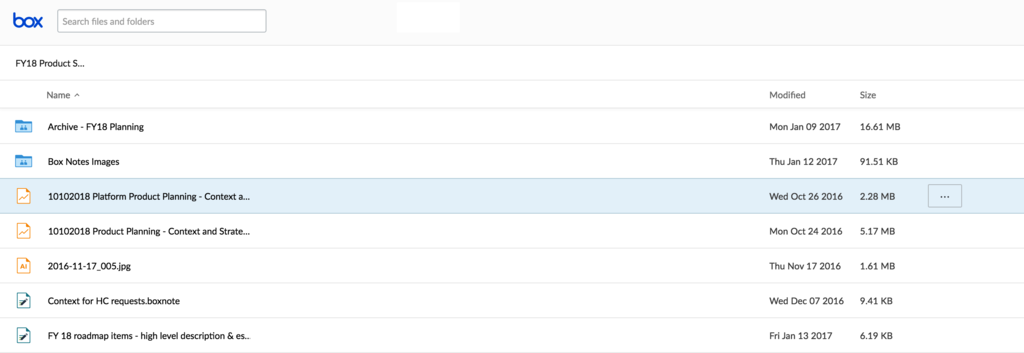
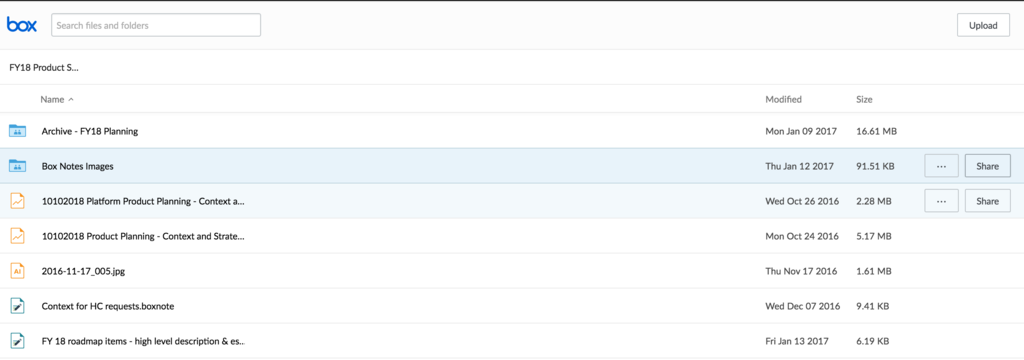
Click "Run". You should see the Content Explorer initialized at the folder you
specified. Also, notice that your Content Explorer no longer shows the "Share"
button as it would have with the parent (user) token.
## When NOT to use Token Exchange
* **Does not replace Users or Groups in Box:** We recommend not using Token Exchange as a replacement to creating users in Box. One way to determine whether you should create Box users, is by doing an assessment to determine if it makes logical sense for every end user of your application to have a copy of their own content. Here are some benefits of maintaining user level accounts in Box, which you wouldn't get by using Token Exchange alone.
* **Content isolation/security:** It's better to have user level accounts since in the case of the parent token accidentally leaking, you would only be compromising the content of a single user vs. all users of your enterprise.
* **Performance:** Creating users/groups in Box is also useful as your application does not have to determine the appropriate permissions at the time of accessing content since that is likely to affect the performance of your application.
* **User level tracking/auditing:** Several Box features such as auditing, access stats, retention, etc. leverage Box's user model. If it is essential for you to use those features for you then you would have to create user-level accounts.
* **Does not replace Collaborations in Box:** Collaborations is a more standard and easier to scale way to provide Box users with access to content. Also, managing content access through collaborations in Box requires your application to manage lesser code/data on which user should have access to what content. If you are using Token Exchange as a replacement to Collaborations, you will need to keep a mapping of every user -> every file and folder that they should have access to and that could get out of control pretty quickly.
* **Caching the downscoped tokens:** If performance is critical to your application, you should pre-cache downscoped tokens on the server side. If you are pre-caching tokens, we recommend implementing retries as the tokens expire within 1 hour.
**Token Lifespan**
The lifespan of parent and child tokens are not mutually dependent, for
example when generating a child token doesn't render the parent token
inactive. Similarly, generating more child tokens doesn't impact the previous
child tokens in any way.
## Example Scenarios
### Scenario #1: More secure client API calls
An equity-investment firm is building out a partner/investor portal to broadcast
information (view-only access) to investors published by the employees.
They create app users for each of their external customers and employees have
provisioned Box accounts which they used to publish content. All app users are
collaborated on published content as Viewer Uploader, so they can both preview
as well as upload content in their account as needed. Once an investor/partner
signs in they are taken to a portal where they can view as well as upload
information.
Since both preview and upload require the API calls to be made via the client,
instead of passing down a “Viewer Uploader” token, the application uses Token
Exchange to downscope the token appropriately based on the action that the user
is trying to perform. This ensures that if the token is compromised, data
leakage is minimized thereby improving the overall security posture of the
application.
### Scenario #2: A custom permissions model
A large fin-tech company is building a secure client vault to manage investments
for their clients. They are also using Box UI Elements to build out the content
management front end of their application.
They create app users as usual for each one of their clients and app advisors.
When they wanted to share content across app users, they collaborate the app
user(s) as "Editor" role (Box's role). This guarantees that every app user had
full access to every other user’s content.
To enable a user to access content via the UI Elements, the application does not
provide the app user token to the client directly as the app user may be
collaborated as an "Editor" into other user's content (highly privileged).
Instead, it uses Token Exchange using the app user token to generate a
downscoped token that limits:
* the scope of what the token can be used for (view, upload, download, browse, share, etc.) and/or
* the specific files that the user should have access to
### Scenario #3: Process Flows
A not-for-profit union bank is developing a loan processing application using
Box's secure content layer to facilitate the sharing of documents between loan
applicants and internal users (loan processors and underwriters). The basic
process is as follows:
* When customers apply for a loan they must submit documents through a custom-built web portal as a part of the process (proof of income, identity etc.)
* Box is used as the intermediary for sending/receiving docs
* Internal employees need to upload files for customers
* Internal employees can access documents through a custom web portal as well as Box Web app
The application developers used Token Exchange along with UI Elements to build
out a loan process management solution, where the application server downscopes
the loan application's app user token based on which operations the client needs
to perform, and passes it down to the clients (customers and loan officers).
Using these downscoped tokens, the UI Elements are able to show the right
controls/buttons to indicate to the user which actions they can perform
(example: upload button is grayed out from the content explorer UI Elements if
the downscoped token passed doesn't contain upload permissions).
### Scenario #4: Transactional Flows
A Learning Management System provider is using Box Platform to power preview in
their application. All users and associated permissions are managed by the
application outside Box. From Box's perspective, all API calls made by the
application are on its own behalf (any not any individual user), and all content
stored and previewed belongs to the application and not to a single user. In
this case, the application developer is using a sliver of Box's overall
capabilities (for example Preview) transactionally and none of the other secure
content sharing and collaboration capabilities. In fact, this is a key use case
for many customers.
Consider a straightforward use case of the application - the end user needs to
upload a file and then preview it in the application itself. To do this the
application is using the Content Uploader and Content Preview UI Elements,
respectively. Since both preview + upload are bandwidth heavy operations, the
application should not proxy the traffic and instead allow the client to perform
these operations directly against Box. To make calls against Box, all UI
Elements require a valid access token to be available on the client. But the
application should never pass down the privileged "service account" token to the
client which would give the client access to all content ever uploaded through
the application. Instead, the application uses Token Exchange to down-scope it's
service account token to an upload-only token to allow the client to upload
files via the Upload UI Element, and a separate preview-only token to let the
client preview via the Preview UI Element.
## Anti-patterns
These anti-patterns have been included here to help you identify patterns that
we do not recommend as they will either make your app development more
challenging, your application less secure or performing or both. If you find
yourself implementing any of these patterns on your app, please reach out to us
via Box support so we can help you out.
### Passing privileged tokens to client
Please NEVER DO THIS. This can potentially compromise the security of content in
your Box enterprise. Always use token exchange to provide end users with the
exact set of permissions.
### Proxying/filtering API responses
If you are proxying/filtering API responses from Box only to limit data/content
exposure to the client, you should try to see if using Token Exchange allows you
to limit the exposure. This is especially true for high-bandwidth operations
such as preview, download, and upload which are bandwidth intensive and so we
recommend that the client performs those operations directly with Box.
[accesslevels]: https://support.box.com/hc/en-us/articles/360044196413-Understanding-Collaborator-Permission-Levels
 * **Making API calls from client more secure:** As a general security practice, we recommend generating and sending downscoped tokens per every action performed by the user to limit exposure on the client. For example, even if a user should have preview and share access to a file, instead of sending the user token to the client which would give them complete user-level access, we suggest downscoping the token using Token Exchange and sending them a "preview only" token when they wish to preview a file and a "share" token when they want to share a file.
* **Creating a custom permissions model:** If you are building an application using UI Elements and the default Box access levels don't fit your permission model, you can start out with a fully scoped token for all your users and trim them down using Token Exchange on the fly to map to your custom permissions model.
* **Using Box services transactionally (no Box user accounts):** If you are not creating users in Box and are using Box services transactionally, you won't have access to user level tokens. In such cases, you can use Token Exchange to scope down the Service Account token to an appropriately scoped token.
* **Creating a user only to give them access to another user's content:** If you need to provide an end user "one time" access to another app/managed user's content, Token Exchange can be used to downscope the app/managed user token to the specific permissions and file/folders you want to give the end user access to, and pass it down to UI Elements to give them access to that content. For example, using Token Exchange, you can downscope a user token to have read-only access to content and pass it down to another user.
## Implementation
The solution for all of the above is using Token Exchange to exchange a parent
token for a downscoped token and initializing the UI Element using that token.
Token Exchange takes in the "parent token", "list of scopes" and optionally a
file/folder ID as the input arguments, and returns a token that is scoped down
to those exact set of scopes and the respective file/folder ID, if present in
the input arguments.
* **Making API calls from client more secure:** As a general security practice, we recommend generating and sending downscoped tokens per every action performed by the user to limit exposure on the client. For example, even if a user should have preview and share access to a file, instead of sending the user token to the client which would give them complete user-level access, we suggest downscoping the token using Token Exchange and sending them a "preview only" token when they wish to preview a file and a "share" token when they want to share a file.
* **Creating a custom permissions model:** If you are building an application using UI Elements and the default Box access levels don't fit your permission model, you can start out with a fully scoped token for all your users and trim them down using Token Exchange on the fly to map to your custom permissions model.
* **Using Box services transactionally (no Box user accounts):** If you are not creating users in Box and are using Box services transactionally, you won't have access to user level tokens. In such cases, you can use Token Exchange to scope down the Service Account token to an appropriately scoped token.
* **Creating a user only to give them access to another user's content:** If you need to provide an end user "one time" access to another app/managed user's content, Token Exchange can be used to downscope the app/managed user token to the specific permissions and file/folders you want to give the end user access to, and pass it down to UI Elements to give them access to that content. For example, using Token Exchange, you can downscope a user token to have read-only access to content and pass it down to another user.
## Implementation
The solution for all of the above is using Token Exchange to exchange a parent
token for a downscoped token and initializing the UI Element using that token.
Token Exchange takes in the "parent token", "list of scopes" and optionally a
file/folder ID as the input arguments, and returns a token that is scoped down
to those exact set of scopes and the respective file/folder ID, if present in
the input arguments.
 ## Developer Flow
Now that you understand the different scopes, let's walk through a
scenario for using Token Exchange with a UI Element.
**Scenario:** Provide a user with the ability to browse a folder tree using the
Box Content Explorer UI Element and allow them to preview and download files.
Sharing should be turned off.
**Steps:**
* Create a Managed User, App User or Service Account depending on your use case. You will use this user or application's token as the parent token for Token Exchange. To generate the user token follow:
* Authentication with OAuth guide if you would like to create a Managed User
* Authentication with JWT guide if you would like to create an App User or Service Account
* Add the user you created above as a Collaborator to the content using the Create Collaborator API as shown below. This step gives the user access to the content if not already under the user's account. If the file/folder was created under this user's account, then the user by default has "Owner" access to the folder so you can skip the collaboration step.
```sh theme={null}
curl https://api.box.com/2.0/collaborations \
-H "authorization: Bearer [ACCESS_TOKEN]" \
-d '{"item": { "id": "123456", "type": "folder"}, "accessible_by": { "id": "USER_ID", "type": "user" }, "role": "editor"}' \
-X POST
```
## Developer Flow
Now that you understand the different scopes, let's walk through a
scenario for using Token Exchange with a UI Element.
**Scenario:** Provide a user with the ability to browse a folder tree using the
Box Content Explorer UI Element and allow them to preview and download files.
Sharing should be turned off.
**Steps:**
* Create a Managed User, App User or Service Account depending on your use case. You will use this user or application's token as the parent token for Token Exchange. To generate the user token follow:
* Authentication with OAuth guide if you would like to create a Managed User
* Authentication with JWT guide if you would like to create an App User or Service Account
* Add the user you created above as a Collaborator to the content using the Create Collaborator API as shown below. This step gives the user access to the content if not already under the user's account. If the file/folder was created under this user's account, then the user by default has "Owner" access to the folder so you can skip the collaboration step.
```sh theme={null}
curl https://api.box.com/2.0/collaborations \
-H "authorization: Bearer [ACCESS_TOKEN]" \
-d '{"item": { "id": "123456", "type": "folder"}, "accessible_by": { "id": "USER_ID", "type": "user" }, "role": "editor"}' \
-X POST
```
 Click "Run". You should see the Content Explorer initialized at the folder you
specified. Also, notice that your Content Explorer no longer shows the "Share"
button as it would have with the parent (user) token.
Click "Run". You should see the Content Explorer initialized at the folder you
specified. Also, notice that your Content Explorer no longer shows the "Share"
button as it would have with the parent (user) token.
 ## When NOT to use Token Exchange
* **Does not replace Users or Groups in Box:** We recommend not using Token Exchange as a replacement to creating users in Box. One way to determine whether you should create Box users, is by doing an assessment to determine if it makes logical sense for every end user of your application to have a copy of their own content. Here are some benefits of maintaining user level accounts in Box, which you wouldn't get by using Token Exchange alone.
* **Content isolation/security:** It's better to have user level accounts since in the case of the parent token accidentally leaking, you would only be compromising the content of a single user vs. all users of your enterprise.
* **Performance:** Creating users/groups in Box is also useful as your application does not have to determine the appropriate permissions at the time of accessing content since that is likely to affect the performance of your application.
* **User level tracking/auditing:** Several Box features such as auditing, access stats, retention, etc. leverage Box's user model. If it is essential for you to use those features for you then you would have to create user-level accounts.
* **Does not replace Collaborations in Box:** Collaborations is a more standard and easier to scale way to provide Box users with access to content. Also, managing content access through collaborations in Box requires your application to manage lesser code/data on which user should have access to what content. If you are using Token Exchange as a replacement to Collaborations, you will need to keep a mapping of every user -> every file and folder that they should have access to and that could get out of control pretty quickly.
* **Caching the downscoped tokens:** If performance is critical to your application, you should pre-cache downscoped tokens on the server side. If you are pre-caching tokens, we recommend implementing retries as the tokens expire within 1 hour.
## When NOT to use Token Exchange
* **Does not replace Users or Groups in Box:** We recommend not using Token Exchange as a replacement to creating users in Box. One way to determine whether you should create Box users, is by doing an assessment to determine if it makes logical sense for every end user of your application to have a copy of their own content. Here are some benefits of maintaining user level accounts in Box, which you wouldn't get by using Token Exchange alone.
* **Content isolation/security:** It's better to have user level accounts since in the case of the parent token accidentally leaking, you would only be compromising the content of a single user vs. all users of your enterprise.
* **Performance:** Creating users/groups in Box is also useful as your application does not have to determine the appropriate permissions at the time of accessing content since that is likely to affect the performance of your application.
* **User level tracking/auditing:** Several Box features such as auditing, access stats, retention, etc. leverage Box's user model. If it is essential for you to use those features for you then you would have to create user-level accounts.
* **Does not replace Collaborations in Box:** Collaborations is a more standard and easier to scale way to provide Box users with access to content. Also, managing content access through collaborations in Box requires your application to manage lesser code/data on which user should have access to what content. If you are using Token Exchange as a replacement to Collaborations, you will need to keep a mapping of every user -> every file and folder that they should have access to and that could get out of control pretty quickly.
* **Caching the downscoped tokens:** If performance is critical to your application, you should pre-cache downscoped tokens on the server side. If you are pre-caching tokens, we recommend implementing retries as the tokens expire within 1 hour.