;
};
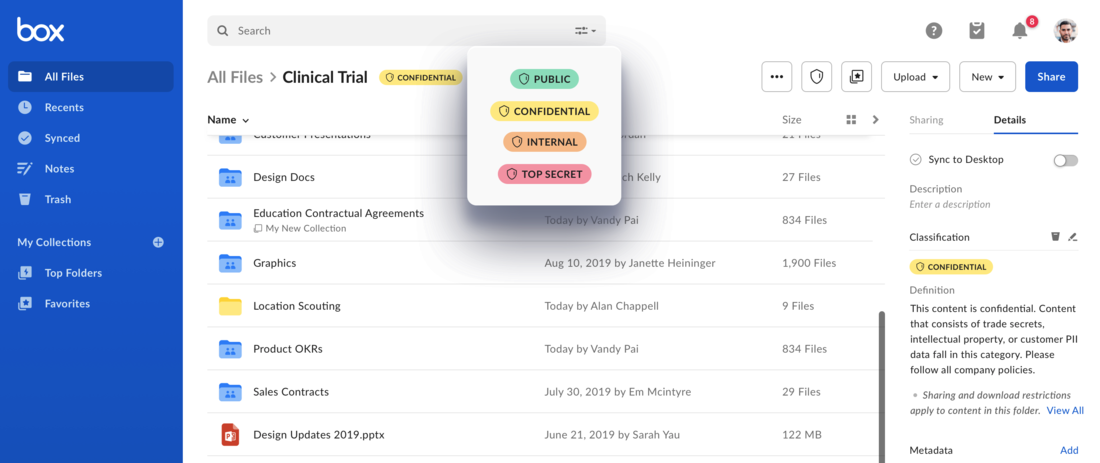
Box enables users and applications to apply a security classification label
to files, and cascade a classification label to folders and their contents.
Classifications help protect shared sensitive content from negligent access
through Box's Governance and Shield products.
The Classification API can be used to create new classification labels
and to assign classifications to files and folders.
Classifications use the Metadata APIs to create classification
labels, and to assign classifications to files and folders. For more details on
metadata templates and instances, please explore our guides
on Metadata.
## Classifications & Metadata
Working with classifications requires a developer to work with metadata
templates and instances.
* **The Classification Template:** to work with classifications, an enterprise needs to have a classification metadata template with at least one classification. This template needs to have a `scope`/`templateKey` of `enterprise.securityClassification-6VMVochwUWo`. This template will hold the possible classification levels, their label names, descriptions, and `colorID` values.
* **Template Instances**: to apply a classification to a file or folder, a developer applies an instance of the `enterprise.securityClassification-6VMVochwUWo` template to the item. When the template is applied, one of the classifications is selected from the list of classifications on the template.
 Classifications use the Metadata APIs to create classification
labels, and to assign classifications to files and folders. For more details on
metadata templates and instances, please explore our guides
on Metadata.
## Classifications & Metadata
Working with classifications requires a developer to work with metadata
templates and instances.
* **The Classification Template:** to work with classifications, an enterprise needs to have a classification metadata template with at least one classification. This template needs to have a `scope`/`templateKey` of `enterprise.securityClassification-6VMVochwUWo`. This template will hold the possible classification levels, their label names, descriptions, and `colorID` values.
* **Template Instances**: to apply a classification to a file or folder, a developer applies an instance of the `enterprise.securityClassification-6VMVochwUWo` template to the item. When the template is applied, one of the classifications is selected from the list of classifications on the template.
Classifications use the Metadata APIs to create classification
labels, and to assign classifications to files and folders. For more details on
metadata templates and instances, please explore our guides
on Metadata.
## Classifications & Metadata
Working with classifications requires a developer to work with metadata
templates and instances.
* **The Classification Template:** to work with classifications, an enterprise needs to have a classification metadata template with at least one classification. This template needs to have a `scope`/`templateKey` of `enterprise.securityClassification-6VMVochwUWo`. This template will hold the possible classification levels, their label names, descriptions, and `colorID` values.
* **Template Instances**: to apply a classification to a file or folder, a developer applies an instance of the `enterprise.securityClassification-6VMVochwUWo` template to the item. When the template is applied, one of the classifications is selected from the list of classifications on the template.