> ## Documentation Index
> Fetch the complete documentation index at: https://developer.box.com/llms.txt
> Use this file to discover all available pages before exploring further.
# Enum metadata field
export const MultiRelatedLinks = ({sections = []}) => {
if (!sections || sections.length === 0) {
return null;
}
return
;
};
export const Link = ({href, children, className, ...props}) => {
const localizedHref = localizeLink(href);
return
{children}
;
};
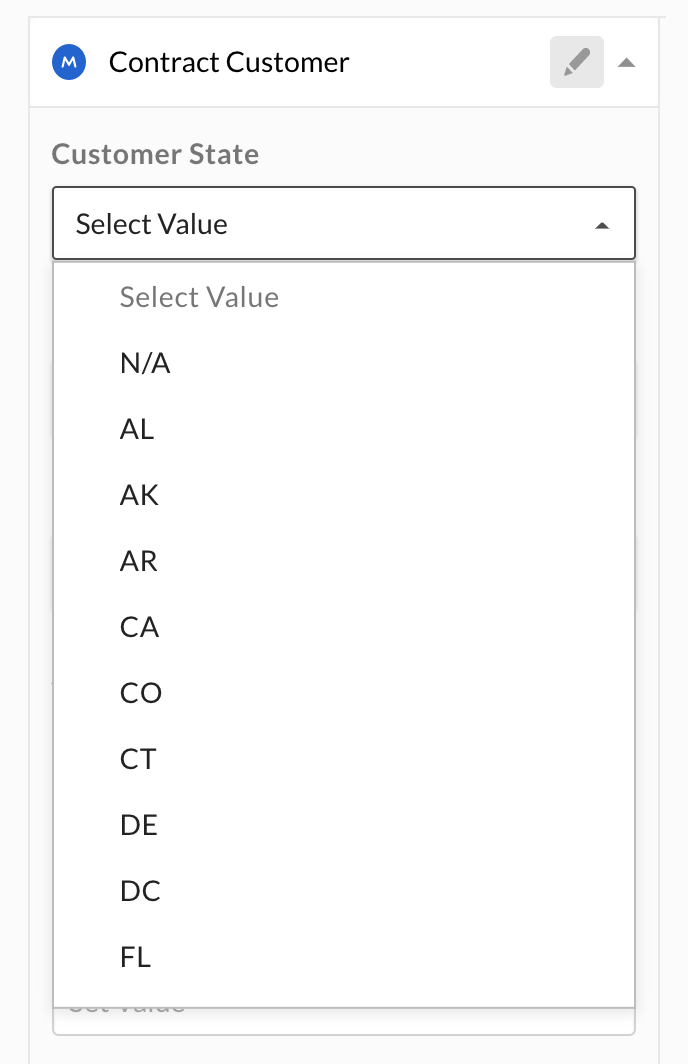
A metadata field of type `enum` is displayed to a user as a dropdown list. The
user can select one item from the list.
An `enum` allows a user to select zero or a single value. To allow a user to select
multiple values, use the `multiSelect` template field.
## Create an `enum` field
An `enum` field can be added to a metadata template either when creating a
metadata template, or when updating a
template with the `addField` operation.
The required attributes for an `enum` field are a `type`, a `displayName`, a
`key`, and a list of options.
```json theme={null}
{
"scope": "enterprise",
"displayName": "Contract",
"fields": [
{
"type": "enum",
"key": "customer_state",
"displayName": "Customer State",
"description": "The US state where the customer is located",
"hidden": false,
"options": [
{"key": "N/A"},
{"key": "AL"},
{"key": "AK"}
]
}
]
}
```
Optionally, a `description` can be provided that is shown to a user in the UI,
and the field can be set to `hidden` to hide it from users in the web and mobile
apps.
## Update an `enum` field
An `enum` template field can be updated by updating the
template it belongs to. Updates to templates happen through
**operations** to ensure that any template that is already assigned to a file or
folder is updated as well.
### Change basic field values
When updating an `enum` metadata field, one of the possible operations is the
`editField` operation, which can be used to change the field's `key`,
`displayName`, `description`, and `hidden` values.
```json theme={null}
[
{
"op": "editField",
"fieldKey": "customer_state",
"data": {
"displayName": "Customer State (USA)",
"key": "customer_state_usa"
}
}
]
```
The `fieldKey` here represents the original key of the field to change. The
`data.key` field is the new key of the field.
This will affect existing instances of this template.
### Add an option
Adding an option to an `enum` field can be achieved through the
`addEnumOption` operation. The operation expects the `fieldKey` to be set to the
key of the `enum` field to change, and a `data` object with the `key` of the new
option to add.
```json theme={null}
[
{
"op": "addEnumOption",
"fieldKey": "customer_state",
"data": {
"key": "AR"
}
}
]
```
The list of options should now be as follows.
```json theme={null}
...
"options": [
{"key": "N/A"},
{"key": "AL"},
{"key": "AK"},
{"key": "AR"}
]
...
```
This will affect existing instances of this template.
### Reorder options
Reordering the options in an `enum` field can be achieved through the
`reorderEnumOptions` operation. The operation expects the `fieldKey` to be set
to the key of the `enum` field to change, and an `enumOptionKeys` array with the
keys of the options in order.
```json theme={null}
[
{
"op": "reorderEnumOptions",
"fieldKey": "customer_state",
"enumOptionKeys": [
"AL",
"AK",
"AR",
"N/A"
]
}
]
```
The list of options should now be as follows.
```json theme={null}
...
"options": [
{"key": "AL"},
{"key": "AK"},
{"key": "AR"},
{"key": "N/A"}
]
...
```
New options can not be added with this operation. This will affect existing
instances of this template.
### Edit an option
Editing an option of an `enum` field can be achieved through the
`editEnumOption` operation. The operation expects the `fieldKey` to be set
to the key of the `enum` field to change, and an `enumOptionKey` to be set to
the key of the field option. Finally, it expects a `data` object with the new
`key` of the field option.
```json theme={null}
[
{
"op": "editEnumOption",
"fieldKey": "customer_state",
"enumOptionKey": "N/A",
"data": {
"key": "Outside USA"
}
}
]
```
The list of options should now be as follows.
```json theme={null}
...
"options": [
{"key": "AL"},
{"key": "AK"},
{"key": "AR"},
{"key": "Outside USA"}
]
...
```
This will affect existing instances of this template.
### Remove an option
Removing an option from an `enum` field can be achieved through the
`removeEnumOption` operation. The operation expects the `fieldKey` to be set to the
key of the `enum` field to change, and an `enumOptionKey` to be set to the key
of the field option to remove.
```json theme={null}
[
{
"op": "removeEnumOption",
"fieldKey": "customer_state",
"enumOptionKey": "AL"
}
]
```
The list of options should now be as follows.
```json theme={null}
...
"options": [
{"key": "AK"},
{"key": "AR"},
{"key": "Outside USA"}
]
...
```
This will affect existing instances of this template. Any fields that were set
to this value will have the value reset to `null`.