> ## Documentation Index
> Fetch the complete documentation index at: https://developer.box.com/llms.txt
> Use this file to discover all available pages before exploring further.
# Metadata Query Filters
export const Link = ({href, children, className, ...props}) => {
const localizedHref = localizeLink(href);
return
{children}
;
};
The `GET /search` API allows for filtering search results by their
associated metadata. A `mdfilters` query parameter allows a developer to specify
a metadata template and the desired values to query.
```sh cURL theme={null}
curl -i -X GET "https://api.box.com/2.0/search?query=sales&mdfilters=%5B%7B%22scope%22%3A%22enterprise%22%2C%22templateKey%22%3A%22contract%22%2C%22filters%22%3A%7B%22category%22%3A%22online%22%7D%7D%5D" \
-H "Authorization: Bearer "
```
```java Java theme={null}
long offsetValue = 0;
long limitValue = 10;
BoxSearch boxSearch = new BoxSearch(api);
BoxSearchParameters searchParams = new BoxSearchParameters();
searchParams.setQuery("sales");
BoxMetadataFilter bmf = new BoxMetadataFilter();
bmf.setScope("enterprise");
bmf.setTemplateKey("contract");
bmf.setFilter("category", "online")
searchParams.setMetadataFilter(bmf)
PartialCollection searchResults = boxSearch.searchRange(offsetValue, limitValue, searchParams);
```
```csharp .NET theme={null}
var filter = new
{
category = "online"
};
var filters = new List()
{
new BoxMetadataFilterRequest()
{
Scope = "enterprise",
TemplateKey = "contract",
Filters: filter
}
};
BoxCollection results = await client.SearchManager
.QueryAsync("sales", mdFilters: filters);
```
```python Python theme={null}
from boxsdk.object.search import MetadataSearchFilter, MetadataSearchFilters
metadata_search_filter = MetadataSearchFilter(scope='enterprise', template_key='contract')
metadata_search_filter.add_value_based_filter(field_key='category', value='online')
metadata_search_filters = MetadataSearchFilters()
metadata_search_filters.add_filter(metadata_search_filter)
client.search().query("sales", metadata_filters=metadata_search_filters)
```
```js Node theme={null}
client.search.query(
'sales',
{
mdfilters: [
{
scope: 'enterprise',
templateKey: 'contract',
filters: {
category: 'online'
}
}
]
})
.then(results => {
// ...
});
```
This example filters a search for any content that matches the query `sales`
by any item that has `enterprise.contract` metadata attached to it and where
the `category` field is set to `online`.
## Introduction to Metadata
Metadata allows users and applications to define and store custom data
associated with files and folders.
Metadata consists of key/value pairs that are assigned to a file or a folder.
For example, an important contract may have the key/value pairs of
`clientNumber: 820183` and `category: online`.
The `mdfilters` query parameter allows developers to find files and folders that
have a specific piece of metadata attached to them.
## Metadata Filter Syntax
The `mdfilters` parameter can currently only contain one filter, although this
may be expanded in the future.
Each filter defines the `scope` and `templateKey` of the metadata template to
filter on.
```json theme={null}
[
{
"scope": "enterprise",
"templateKey": "contract",
"filters": {}
}
]
```
To get the `scope` and `templateKey` for a template, either
list all metadata templates for an enterprise, or
list all metadata instances on an item.
With the template defined, the `filters` field accepts a few different filter
formats. The format of the filter very much depends on the type of field being
filtered by.
### Filter by `string` field
To filter by a field of type `string` a filter will need to define the `key` of
the field and the desired value to find items for.
```json theme={null}
[
{
"scope": "enterprise",
"templateKey": "contract",
"filters": {
"category": "online"
}
}
]
```
This example will find all files and folders that have an instance of the
`enterprise.contract` template applied to it, and for which the field with the
key `category` is set to the value `online`.
### Filter by `float` field
To filter by a field of type `float`, you will need to define define a range by
specifying a `gt` (greater-than) and/or `lt` (lower-than) value. To find an
exact value, you can input the same value for both `gt` and `lt`.
```json theme={null}
[
{
"scope": "enterprise",
"templateKey": "contract",
"filters": {
"amount": {
"gt": 10000,
"lt": 20000
}
}
}
]
```
This example will find all files and folders that have an instance of the
`enterprise.contract` template applied to it, and for which the field with the
key `amount` is set to a value equal or higher than `10000` and equal or lower
than `2000`. Note that `gt` and `lt` are inclusive and do not need to
both be set.
If you create a query based on numbers, do not
exceed the range of -16777215 and +16777215.
For metadata search using number attributes
the index value is stored as FLOAT32. As a result,
integers between -16777215 and +16777215 can be precisely represented.
Any operation with numbers beyond the range can lose its precision.
### Filter by `date` field
To filter by a field of type `date` a filter will need to define the `key` of
the field and the desired range to find items by specifying a `gt`
(greater-than) and `lt` (lower-than) value. Please note that `gt` and `lt` are
inclusive.
```json theme={null}
[
{
"scope": "enterprise",
"templateKey": "contract",
"filters": {
"expirationDate": {
"gt": "2016-08-01T00:00:00Z",
"lt": "2017-08-01T00:00:00Z"
}
}
}
]
```
This example will find all files and folders that have an instance of the
`enterprise.contract` template applied and have an `expirationDate` set to
a date after or exactly `2016-08-01T00:00:00Z`
and before or exactly `2017-08-01T00:00:00Z`.
### Filter by `enum` field
To filter by a field of type `enum` a filter will need to define the `key` of
the field and the desired value to find items for.
```json theme={null}
[
{
"scope": "enterprise",
"templateKey": "contract",
"filters": {
"category": "online"
}
}
]
```
This example will find all files and folders that have an instance of the
`enterprise.contract` template applied to it, and for which the field with the
key `category` is set to the value `online`.
### Filter by `multiSelect` field
To filter by a field of type `multiSelect` a filter will need to define the
`key` of the field and any of the potential desired values to find items for.
When performing a search, the query will essentially perform an `OR` operation
to match any template where any of the provided values match this field.
```json theme={null}
[
{
"scope": "enterprise",
"templateKey": "contract",
"filters": {
"category": [
"online",
"enterprise"
]
}
}
]
```
This example will find all files and folders that have an instance of the
`enterprise.contract` template applied to it, and for which the field with the
key `category` is set to the value `online` or `enterprise`.
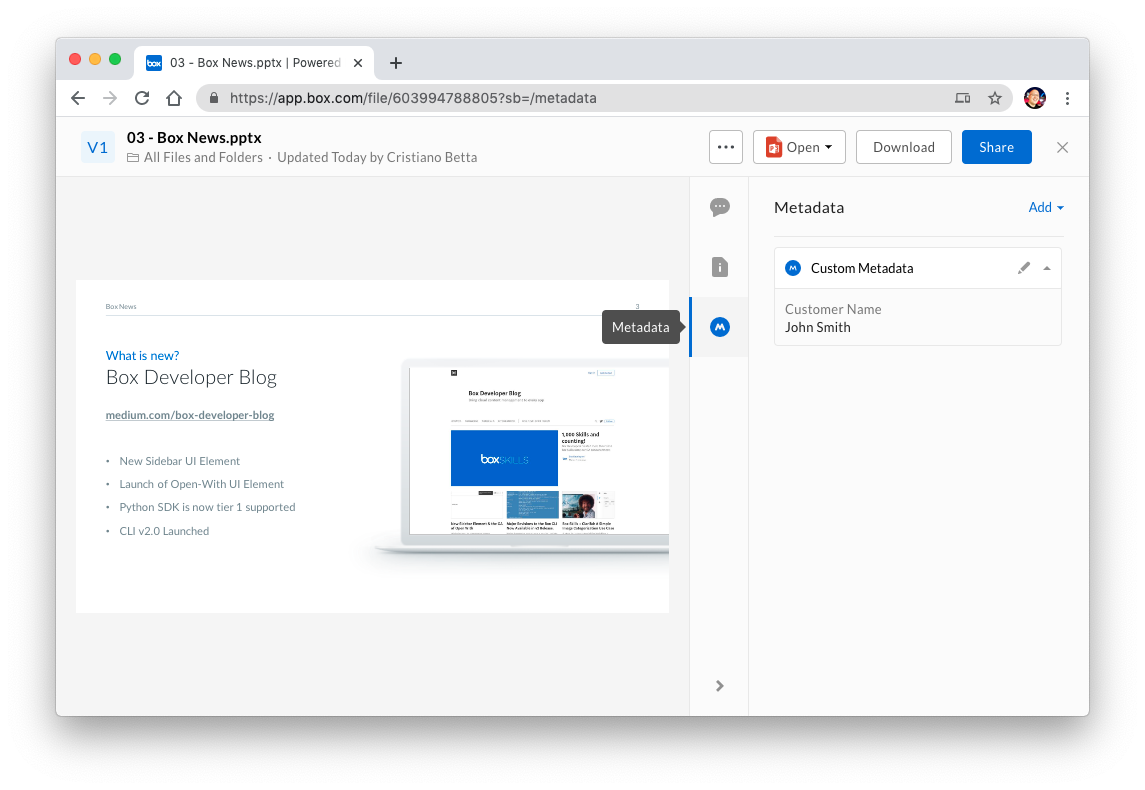 Metadata consists of key/value pairs that are assigned to a file or a folder.
For example, an important contract may have the key/value pairs of
`clientNumber: 820183` and `category: online`.
The `mdfilters` query parameter allows developers to find files and folders that
have a specific piece of metadata attached to them.
Metadata consists of key/value pairs that are assigned to a file or a folder.
For example, an important contract may have the key/value pairs of
`clientNumber: 820183` and `category: online`.
The `mdfilters` query parameter allows developers to find files and folders that
have a specific piece of metadata attached to them.