> ## Documentation Index
> Fetch the complete documentation index at: https://developer.box.com/llms.txt
> Use this file to discover all available pages before exploring further.
# Cross-Origin Resource Sharing (CORS)
[Cross-Origin Resource Sharing (CORS)][mdn_cors] is a security mechanism used
by web browsers to prevent malicious websites from accessing data on other
sites (like the Box API) without explicit permission.
CORS only applies to Box API requests made by a web page using a
web browser, and it relies on the `HTTP Origin` header being passed along
by the browser. It does not come in to play in a server-side environment.
## How CORS works
When a browser on one domain (for example `company.com`) tries to fetch
images, files, or even API resources from another domain (`box.com`),
the web browser will prevent access to any of those assets unless the right
CORS headers are present.
When the browser makes a cross-origin request, an `Origin` request header is
passed along with it that contains the domain of the site making that
request. This header can not be changed and is part of your web browser's
essential security.
By default, a browser will not accept any asset loaded from another domain
if there is no `Access-Control-Allow-Origin` response header present.
Servers like Box can explicitly list the domains allowed to access resources
on this server, or they can return a `*` value to allow any domain to access
the API.
## How Box uses CORS
Box uses the `Origin` request header and `Access-Control-Allow-Origin`
response header to enforce CORS rules defined by the developer.
### `Origin`-header validation
The Box API validates the `Origin` request header against the list of allowed
domains set by the application developer. Multiple allowed origins can be set
and any origin not on the list will return in a `HTTP 403` error.
```json theme={null}
{
"type": "error",
"status": 403,
"code": "cors_origin_not_whitelisted",
"context_info": {
"origin": "https://company.com"
},
"help_url": "/guides/api-calls/permissions-and-errors/common-errors/",
"message": "Access denied - Did you forget to safelist your origin in the CORS config of your app?",
"request_id": "4dsdfsa832213"
}
```
If no origin is set, all requests to the Box API for this application return
an error.
### `Access-Control-Allow-Origin` response header
After the Box API has validated the `Origin` header, it will return the data
requested as well as a `Access-Control-Allow-Origin` response header with
the value `*`.
```yaml theme={null}
HTTP/1.1 200 OK
Date: Wed, 23 Sep 2020 14:07:29 GMT
Content-Type: application/json
Transfer-Encoding: chunked
Connection: keep-alive
Strict-Transport-Security: max-age=31536000
Cache-Control: no-cache, no-store
Access-Control-Allow-Origin: *
Vary: Origin
BOX-REQUEST-ID: 032cfb446dae4fd0b4c2bff80a1a97ba7
```
By returning this header, the Box API informs the web browser that the
response can be used in the site that requested the data.
## Enabling CORS for your domain
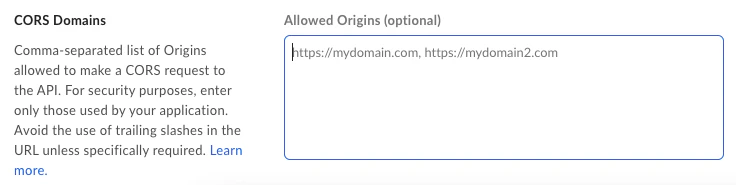
To enable CORS for the domain your application runs on, head over to the
developer console, select your application, and scroll down to the bottom of the
**Configuration** panel to find the **CORS Domains** setting.
Add a comma separated list of all the origins that you expect your application
to be making Box API requests from. Domains require the schema (`http` or
`https`) and can include wildcards for subdomains, for example `*.example.com`.
If your site runs on a non-standard port, it will also need to include that.
This is especially relevant for a site running on `localhost` or `127.0.0.1`.
An example list of origins would be as follows.
```sh theme={null}
https://company.com,https://*.internal.company.com,http://localhost:3000
```
## Debugging CORS
There are a few different kind of CORS errors that might occur when making
API calls to the Box API.
### `HTTP 403` - No allowed origins defined
You might get this error even after you provided a list of origins. Often,
this is because of a typo in the provided origins.
1. **Check your origins** - Head back to the developer console and make sure your origins map the site your are making the API call from. Keep in mind that an origin includes the scheme (`http(s)`) but no path or trailing `/`. We recommend inspecting the page using your browser's debug console and checking the `Origin` request header value. This value should match one of the provided values in the developer console.
2. **Check your credentials** - Another reason for this error might be that you are authenticating as a different application than the one you have set the origin up for. Check that the credentials match the ones of the application you are intending to use. We recommend trying to make a call from a server-side script to validate that the API call works.
### `Cross-Origin Request Blocked`
In some cases, you might get a Javascript error that mentions CORS.
```sh theme={null}
Cross-Origin Request Blocked: The Same Origin Policy disallows reading
the remote resource at https://api.box.com/2.0/users/me. (Reason: CORS
request did not succeed).
```
In many cases this has little to do with CORS. Instead we recommend checking the
following.
1. **Check your authentication headers** - If the authorization header is not provided or malformed, then the API will return a generic error without the necessary `Access-Control-Allow-Origin` header. This in turn will cause the previously mentioned error to be raised by your browser. Make sure to pass in an access token using the `Authorization: Bearer ...` header.
2. **Check for requests blocked by VPN, Proxies, etc** - In some cases, the Box API might be blocked by your VPN, corporate proxy, a browser extension, your DNS provider, or any other service that can intercept network traffic. Any of these can intercept the request and return a whole new request that does not include the necessary `Access-Control-Allow-Origin` header. To test for this case, try to make the same API call from a non-browser environment, from an incognito window, or from a whole other (not company owned) device.
[mdn_cors]: https://developer.mozilla.org/en-US/docs/Web/HTTP/CORS
### `Access-Control-Allow-Origin` header issues
If you encounter issues with the `Access-Control-Allow-Origin` header, do the following:
1. **Check if your domain is on the list of allowed origins** - Go to the developer console and open your application. Click on the **Configuration** tab and scroll down. You can add your domain to the list in section **CORS domains**.
 2. **Check if your server is set up correctly** - Configure your server to handle cross-domain requests or use non-cross-domain requests if you receive a warning **No 'access-control-allow-origin' header is present on the requested resource**.