> ## Documentation Index
> Fetch the complete documentation index at: https://developer.box.com/llms.txt
> Use this file to discover all available pages before exploring further.

# Wiring the Box file picker to a custom invocable

export const RelatedLinks = ({title, items = []}) => {
  const getBadgeClass = badge => {
    if (!badge) return "badge-default";
    const badgeType = badge.toLowerCase().replace(/\s+/g, "-");
    return `badge-${badge === "ガイド" ? "guide" : badgeType}`;
  };
  if (!items || items.length === 0) {
    return null;
  }
  return <div className="my-8">
      {}
      <h3 className="text-sm font-bold uppercase tracking-wider mb-4">{title}</h3>

      {}
      <div className="flex flex-col gap-3">
        {items.map((item, index) => <a key={index} href={item.href} className="py-2 px-3 rounded related_link hover:bg-[#f2f2f2] dark:hover:bg-[#111827] flex items-center gap-3 group no-underline hover:no-underline border-b-0">
            {}
            <span className={`px-2 py-1 rounded-full text-xs font-semibold uppercase tracking-wide flex-shrink-0 ${getBadgeClass(item.badge)}`}>
              {item.badge}
            </span>

            {}
            <span className="text-base">{item.label}</span>
          </a>)}
      </div>
    </div>;
};

Add the Box File Picker to your own Agentforce action so users pick a Box file in the action input instead of pasting file IDs. Two packaged pieces make it work:

* **`FileSelection`** — global Apex type with `selectedFileId` / `selectedFileName`. The value the picker returns.
* **`boxFileSelection`** — Lightning Type that renders the `boxFilePicker` UI (Recent Items / Browse Box Files / Current Record Folder).

Both ship in the package — you don't build them.

## Namespace (subscriber orgs)

Everything is under the `boxagents` namespace. In a subscriber org, reference packaged components with the prefix — the bare names won't compile:

| **Component**  | **In a subscriber org**       |
| -------------- | ----------------------------- |
| Apex type      | `boxagents.FileSelection`     |
| Lightning Type | `boxagents__boxFileSelection` |

Using bare `FileSelection` causes *Invalid type: FileSelection* / *InvocableVariable fields do not support type ...* / *Variable does not exist: req.file*.

## Steps

1. Add a `boxagents.FileSelection` `@InvocableVariable` to your `Request`.
2. Read `req.file.selectedFileId` (and `selectedFileName`).
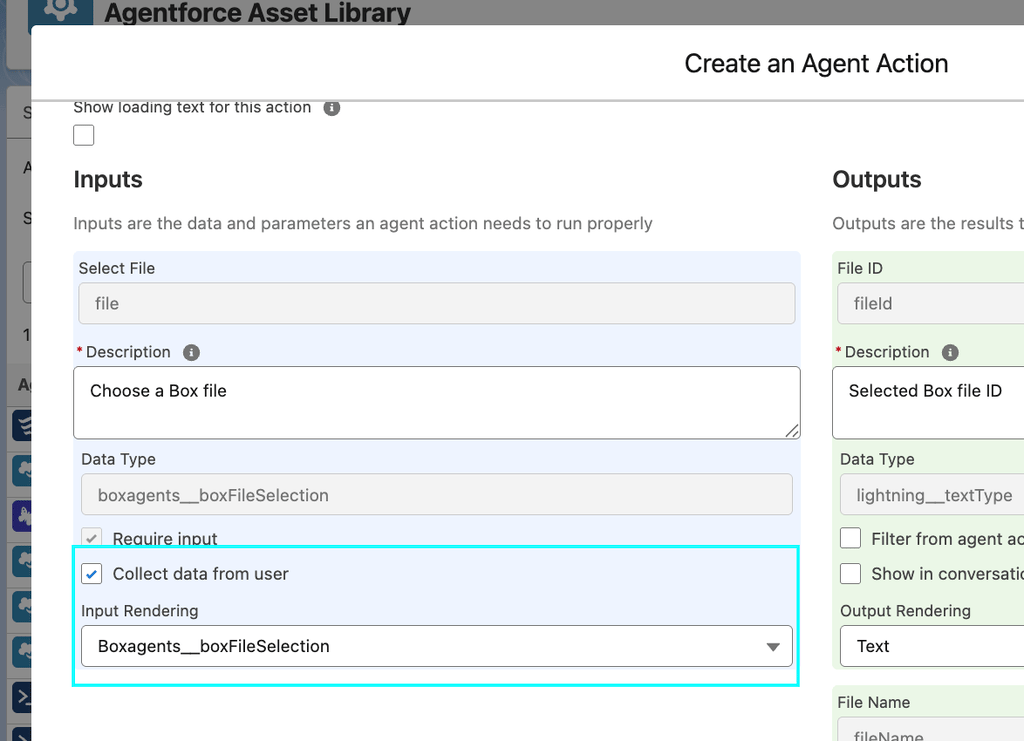
3. In Agent Builder, map that input to the `boxagents__boxFileSelection` Lightning Type so the picker UI renders.

Example

```
global with sharing class BoxFilePickerExample {
    @InvocableMethod(label='Get Selected Box File (Example)' description='Accept a file-picker selection and return the file ID' category='Box')
    global static List<Response> getSelectedFile(List<Request> requests) {
        List<Response> responses = new List<Response>();
        for(Request req : requests) {
            if(req.file == null || String.isBlank(req.file.selectedFileId)) {
                throw new IllegalArgumentException('File selection is required');
            }
            Response resp = new Response();
            resp.fileId = req.file.selectedFileId;
            resp.fileName = req.file.selectedFileName;
            responses.add(resp);
        }
        return responses;
    }
    global class Request {
        @InvocableVariable(label='Select File' description='Choose a Box file' required=true)
         global boxagents.FileSelection file;
    }    
    global class Response {
        @InvocableVariable(label='File ID') global String fileId;
        @InvocableVariable(label='File Name') global String fileName;
    }
}
```

## Mapping the input in Agent assets

<img src="https://mintcdn.com/box/cWlL7gzZ3cIKeA5H/images/guides/tooling/salesforce-toolkit/mapping-input-agent-assets.png?fit=max&auto=format&n=cWlL7gzZ3cIKeA5H&q=85&s=e6515991b4e890b911ae4e5e4e7199df" alt="Mapping input agent assets" width="1024" height="741" data-path="images/guides/tooling/salesforce-toolkit/mapping-input-agent-assets.png" />

The Apex input lets the action *accept* a selection; mapping it to the Lightning Type makes the *picker UI render*:

1. Open your custom action (Agentforce Studio → Agent Actions, or Flow Builder).
2. Select the **Select File** input.
3. Set its reference / Lightning Type to **`boxagents__boxFileSelection`** (*Box File Picker*).
4. Save and activate.

## Notes

* Namespace prefix in subscriber orgs is the #1 source of errors.
* Null-check `req.file` / `req.file.selectedFileId`.
* The ID is what Box APIs need; the name is for display/logging.
* Full references: the shipped `BoxAIAskWithFilePicker`, `BoxAIGenTextWithFilePicker`, `BoxAIExtractFieldsWithFilePicker`, `BoxAIExtractMetadataWithFilePicker`.

<RelatedLinks
  title="RELATED GUIDES"
  items={[
{ label: translate("Install Salesforce SDK"), href: "/guides/tooling/sdks/salesforce", badge: "GUIDE" }
]}
/>
