> ## Documentation Index
> Fetch the complete documentation index at: https://developer.box.com/llms.txt
> Use this file to discover all available pages before exploring further.

> Box AI Studio APIを使用して、カスタムAIエージェントの作成、管理、展開を行います。

# Box AI Studio

export const MultiRelatedLinks = ({sections = []}) => {
  if (!sections || sections.length === 0) {
    return null;
  }
  return <div className="space-y-8">
      {sections.map((section, index) => <RelatedLinks key={index} title={section.title} items={section.items} />)}
    </div>;
};

export const RelatedLinks = ({title, items = []}) => {
  const getBadgeClass = badge => {
    if (!badge) return "badge-default";
    const badgeType = badge.toLowerCase().replace(/\s+/g, "-");
    return `badge-${badge === "ガイド" ? "guide" : badgeType}`;
  };
  if (!items || items.length === 0) {
    return null;
  }
  return <div className="my-8">
      {}
      <h3 className="text-sm font-bold uppercase tracking-wider mb-4">{title}</h3>

      {}
      <div className="flex flex-col gap-3">
        {items.map((item, index) => <a key={index} href={item.href} className="py-2 px-3 rounded related_link hover:bg-[#f2f2f2] dark:hover:bg-[#111827] flex items-center gap-3 group no-underline hover:no-underline border-b-0">
            {}
            <span className={`px-2 py-1 rounded-full text-xs font-semibold uppercase tracking-wide flex-shrink-0 ${getBadgeClass(item.badge)}`}>
              {item.badge}
            </span>

            {}
            <span className="text-base">{item.label}</span>
          </a>)}
      </div>
    </div>;
};

export const Link = ({href, children, className, ...props}) => {
  const localizedHref = localizeLink(href);
  return <a href={localizedHref} className={className} {...props}>
      {children}
    </a>;
};

<Warning>
  Box AI Studioは、Enterprise Advancedアカウントでのみ使用できます。
</Warning>

Box AI Studioでは、APIを使用してカスタムAIエージェントを作成できます。Boxのデフォルトのエージェント構成を使用する標準の<Link href="/ai/box-ai-api">Box AI API</Link>エンドポイントとは異なり、AI Studioエージェントでは、カスタム指示、モデル選択、アクセス制御を指定して、目的特化型のエージェントを定義できます。

例えば、コンプライアンスコンサルタントとして機能するAIエージェントを作成する場合、特定のユーザーやグループのみにアクセスを限定して、FedRAMP Moderateに準拠しながらドキュメントに関する質問に回答させることができます。

## Box AI Studioの有効化

管理コンソールでBox AI Studioを有効にして、エージェントの作成を開始します。管理者が行う手順については、<Link href="https://support.box.com/hc/en-us/articles/37228079461267-Enabling-Box-AI-Studio-and-Managing-Agents">Box AI Studioの有効化とエージェントの管理</Link>を参照してください。

ステップバイステップ形式の手順については、<Link href="/guides/ai-studio/getting-started-ai-studio">AI Studioの使い方</Link>ガイドを参照してください。

## Box AI StudioとBox AIの関係

| 機能             | Box AI API                                                                              | Box AI Studio                                                                                               |
| -------------- | --------------------------------------------------------------------------------------- | ----------------------------------------------------------------------------------------------------------- |
| **ユースケース**     | Box内のファイルを対象としたQ\&A、テキスト生成、メタデータ抽出のためのエンドポイントを提供する                                      | カスタマイズされた動作を実行するカスタムAIエージェントを作成し、管理する                                                                       |
| **カスタマイズ**     | `ai_agent`パラメータを使用して、リクエストごとにモデルとプロンプトを上書きする                                            | カスタム指示、モデル、アクセス制御を備えた永続的エージェント構成を定義する                                                                       |
| **アクセス**       | Businessプラン以上                                                                           | Enterprise Advancedのみ                                                                                       |
| **APIエンドポイント** | `POST /ai/ask`, `POST /ai/text_gen`,  `POST /ai/extract`, `POST /ai/extract_structured` | `POST /ai_agents`, `GET /ai_agents`, `GET /ai_agents/{id}`, `PUT /ai_agents/{id}`, `DELETE /ai_agents/{id}` |

## 機能

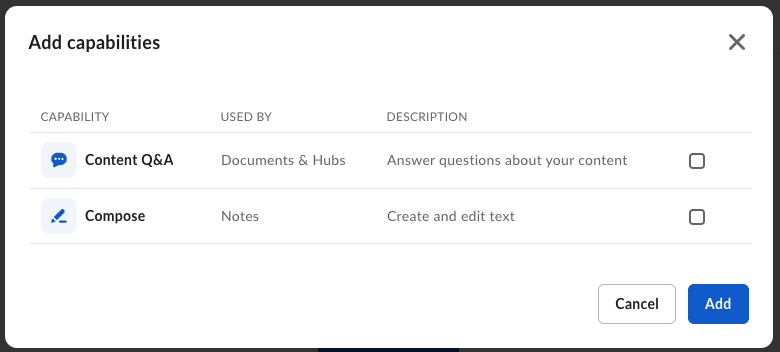
AI Studioエージェントは、以下のモードについて構成できます。

| モード         | パラメータ      | 説明                            |
| ----------- | ---------- | ----------------------------- |
| **質問**      | `ask`      | ドキュメントに関するユーザーからの質問に回答する      |
| **テキストの生成** | `text_gen` | ファイルコンテンツとプロンプトに基づいてテキストを生成する |
| **抽出**      | `extract`  | ドキュメントからメタデータを抽出する            |

<Frame>
  <img src="https://mintcdn.com/box/Z1XcLZTI-opBQvuM/images/guides/ai-studio/ai-agent-capabilities.png?fit=max&auto=format&n=Z1XcLZTI-opBQvuM&q=85&s=fa938ce153e4a236ac7d8944856a598f" alt="AIエージェントの機能" width="780" height="352" data-path="images/guides/ai-studio/ai-agent-capabilities.png" />
</Frame>

## 入門ガイド

<CardGroup cols={2}>
  <Card title="AI Studioの設定" icon="gear" href={localizeLink("/guides/ai-studio/getting-started-ai-studio")}>
    AI Studio APIコールを開始するには、Platformアプリを作成し、AIスコープを有効にして資格情報を生成します。
  </Card>

  <Card title="エージェントの作成" icon="robot" href={localizeLink("/guides/ai-studio/ai-studio-agents/create-agents")}>
    `POST /ai_agents`を使用して、特定の機能とアクセス制御を備えたカスタムAIエージェントを作成します。
  </Card>

  <Card title="エージェントのリストの取得" icon="list" href={localizeLink("/guides/ai-studio/ai-studio-agents/get-agents")}>
    組織内のすべてのAIエージェントのリストを取得し、モードや状態で絞り込みます。
  </Card>

  <Card title="エージェントの管理" icon="wrench" href={localizeLink("/guides/ai-studio/ai-studio-agents/index")}>
    IDに基づいてエージェントを取得、更新、削除します。
  </Card>
</CardGroup>

管理者の設定手順については、[Box AI Studioの有効化とエージェントの管理][ai-studio]を参照してください。

[ai-studio]: https://support.box.com/hc/en-us/articles/37228079461267-Enabling-Box-AI-Studio-and-Managing-Agents