> ## Documentation Index
> Fetch the complete documentation index at: https://developer.box.com/llms.txt
> Use this file to discover all available pages before exploring further.

# クライアント資格情報許可を使用した設定

export const MultiRelatedLinks = ({sections = []}) => {
  if (!sections || sections.length === 0) {
    return null;
  }
  return <div className="space-y-8">
      {sections.map((section, index) => <RelatedLinks key={index} title={section.title} items={section.items} />)}
    </div>;
};

export const RelatedLinks = ({title, items = []}) => {
  const getBadgeClass = badge => {
    if (!badge) return "badge-default";
    const badgeType = badge.toLowerCase().replace(/\s+/g, "-");
    return `badge-${badge === "ガイド" ? "guide" : badgeType}`;
  };
  if (!items || items.length === 0) {
    return null;
  }
  return <div className="my-8">
      {}
      <h3 className="text-sm font-bold uppercase tracking-wider mb-4">{title}</h3>

      {}
      <div className="flex flex-col gap-3">
        {items.map((item, index) => <a key={index} href={item.href} className="py-2 px-3 rounded related_link hover:bg-[#f2f2f2] dark:hover:bg-[#111827] flex items-center gap-3 group no-underline hover:no-underline border-b-0">
            {}
            <span className={`px-2 py-1 rounded-full text-xs font-semibold uppercase tracking-wide flex-shrink-0 ${getBadgeClass(item.badge)}`}>
              {item.badge}
            </span>

            {}
            <span className="text-base">{item.label}</span>
          </a>)}
      </div>
    </div>;
};

export const Link = ({href, children, className, ...props}) => {
  const localizedHref = localizeLink(href);
  return <a href={localizedHref} className={className} {...props}>
      {children}
    </a>;
};

<RelatedLinks
  title="必須のガイド"
  items={[
{ label: translate("Select Auth Method"), href: "/guides/authentication/select", badge: "GUIDE" },
{ label: translate("Setup with OAuth 2.0"), href: "/guides/authentication/oauth2/oauth2-setup", badge: "GUIDE" }
]}
/>

## 前提条件

サーバー側認証を使用してPlatformアプリを設定するには、Box Enterpriseアカウントから[開発者コンソール][devconsole]にアクセスできることを確認する必要があります。または、[Developerアカウント][devaccount]にサインアップすることもできます。

## アプリの作成手順

### 開発者コンソールへの移動

Boxにログインし、[開発者コンソール][devconsole]に移動します。\[**Platformアプリ**] を選択し、\[**新規アプリ**] をクリックします。

### アプリの新規作成

\[**アプリの新規作成**] 画面で、アプリ名を入力し、\[**アプリの種類**] ドロップダウンから \[**クライアント資格情報許可**] を選択します。

<Frame border>
  <img src="https://mintcdn.com/box/J0IlfoFf_v0hLHOU/images/guides/authentication/create-new-app.png?fit=max&auto=format&n=J0IlfoFf_v0hLHOU&q=85&s=e1118ea7200b15165c48f314ea4e9d0f" alt="[アプリの新規作成] 画面" width="1024" height="891" data-path="images/guides/authentication/create-new-app.png" />
</Frame>

<Warning>
  選択すると、新しいアプリケーションを作成しない限り、別の認証方法に変更できません。
</Warning>

## アプリ承認

このアプリケーションを使用するには、Box管理者または共同管理者の承認が必要です。

<Note>
  無料のDeveloperアカウントを使用している場合には、アプリが自動的に承認されます。この場合、以下に示した手作業による承認は必要ありません。
</Note>

[開発者コンソール][devconsole]の \[**構成**] タブで、以下を実行します。

* Box管理者または共同管理者の場合は、\[**承認**] をクリックして、直ちにアプリを承認します。
* 管理者または共同管理者でない場合は、\[**送信**] をクリックして、管理者または共同管理者に承認リクエストを送信します。リクエストが承認または拒否されると、メールが届きます。

このプロセスに関する詳細については、Boxの<Link href="/guides/authorization">承認ガイド</Link>を参照してください。

<Card href={localizeLink("/guides/authorization/platform-app-approval")} arrow title="Platformアプリケーションの承認方法を確認する" />

## 基本的な構成

### アプリケーションアクセス

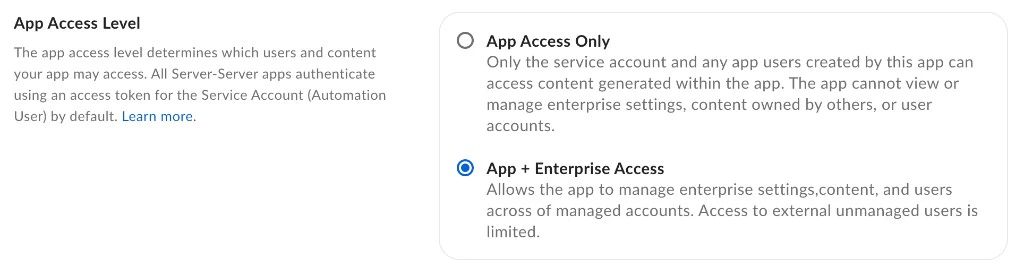
アプリケーションのアクセスレベルにより、アプリからアクセスできるユーザーおよびコンテンツが決まります。デフォルトでは、アプリケーションで問題なく操作できるのは、その<Link href="/platform/user-types/#service-account">サービスアカウント</Link>とすべての<Link href="/platform/user-types">App User</Link>のコンテンツのみです。企業の既存の管理対象ユーザーにもアクセスするには、[開発者コンソール][devconsole]の \[**構成**] タブにある \[**アプリアクセスレベル**] に移動し、\[**アプリ + Enterpriseアクセス**] に設定します。

<Frame border>
  <img src="https://mintcdn.com/box/J0IlfoFf_v0hLHOU/images/guides/authentication/app-access-level-new.png?fit=max&auto=format&n=J0IlfoFf_v0hLHOU&q=85&s=8e1e5f2e6b2d8b5fb45f50d0798c5064" alt="アプリのアクセスレベル" width="1024" height="275" data-path="images/guides/authentication/app-access-level-new.png" />
</Frame>

<Note>
  管理対象ユーザーまたは管理者として認証するには、\[**構成**] タブにある \[**追加の構成**] セクションで、\[**ユーザーアクセストークンを生成**] を有効にします。
</Note>

### アプリケーションスコープ

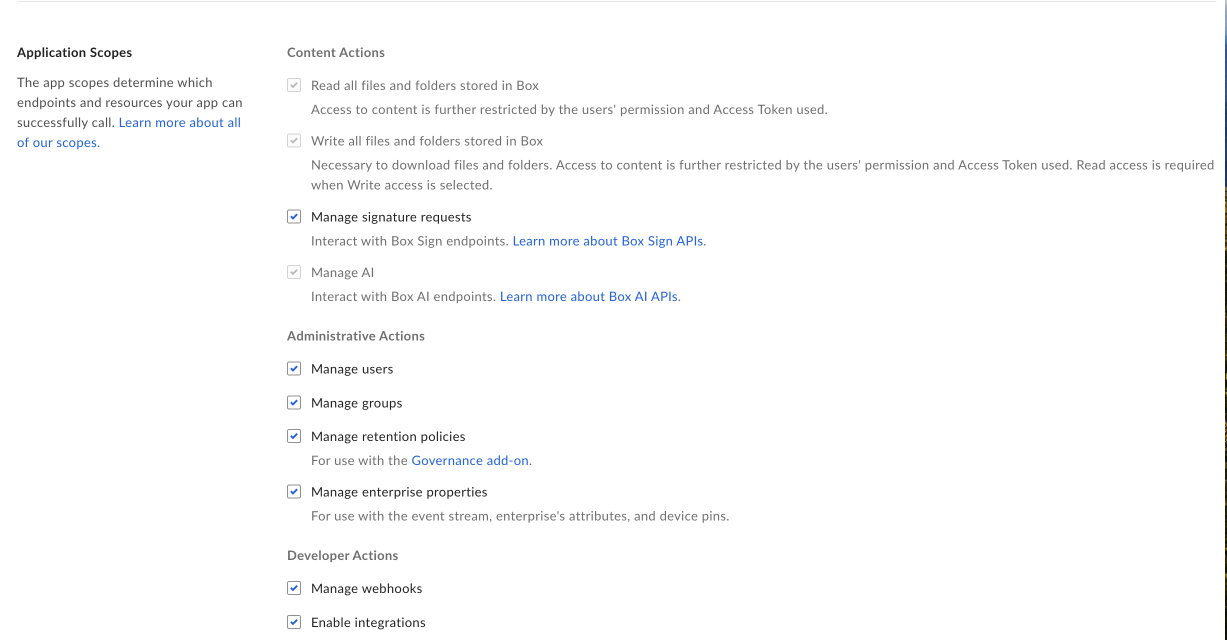
アプリケーションのスコープにより、アプリケーションが呼び出すことができるエンドポイントとリソースが決まります。各オプションの詳細については、<Link href="/guides/api-calls/permissions-and-errors/scopes">スコープのガイド</Link>を参照してください。

<Frame border width="600" center>
  <img src="https://mintcdn.com/box/KBEcg4yicgc_HMRY/images/guides/authentication/app-scopes.png?fit=max&auto=format&n=KBEcg4yicgc_HMRY&q=85&s=7d6a76fe395fc483d33179f6c4ad34e1" alt="アプリスコープ" width="1227" height="640" data-path="images/guides/authentication/app-scopes.png" />
</Frame>

### CORSドメイン

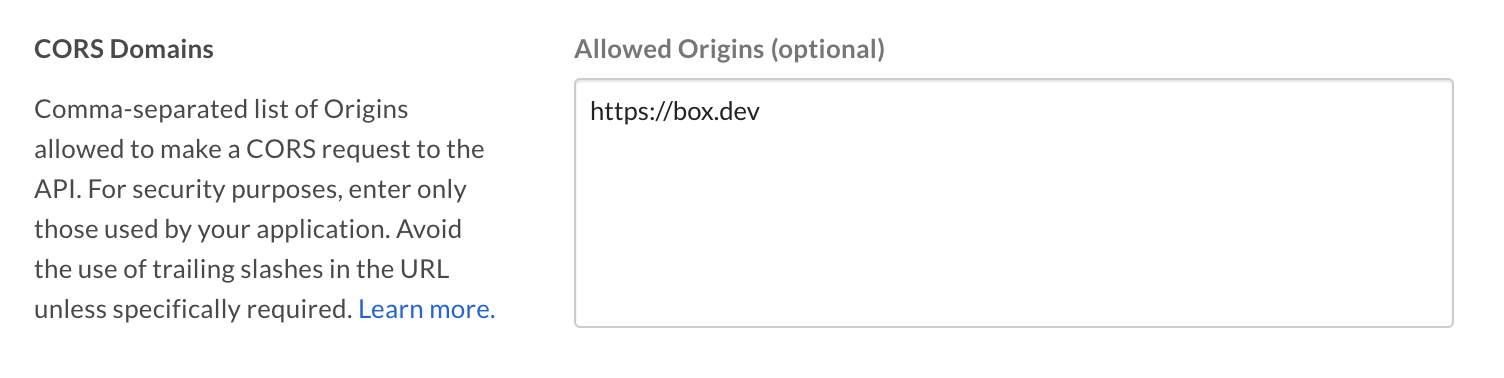
アプリケーションがJavaScriptでフロントエンドのブラウザコードからAPIコールを実行する場合は、[クロスオリジンリソース共有][cors] (CORS) のために、これらの呼び出しの実行元となるドメインを許可リストに追加する必要があります。すべてのリクエストがサーバー側のコードから発行される場合は、このセクションをスキップできます。

許可リストに完全なURIを追加するには、[開発者コンソール][devconsole]の \[**構成**] タブの下部にある \[**CORSドメイン**] セクションに移動します。
<Frame border>
  <img src="https://mintcdn.com/box/KBEcg4yicgc_HMRY/images/guides/authentication/app-cors.png?fit=max&auto=format&n=KBEcg4yicgc_HMRY&q=85&s=12de7f8cec95dc4317b02172ef10e9df" alt="アプリのCORS設定" width="1504" height="378" data-path="images/guides/authentication/app-cors.png" />
</Frame>

## SDKとクライアント資格情報許可の使用

各SDKのクライアント資格情報許可の詳細については、以下を参照してください。

* [.Net][.Net]

* [Java][Java]

* [Python][Python]

* [Node][Node]

* [IOS][IOS]

[.Net]: https://github.com/box/box-windows-sdk-v2/blob/legacy/docs/authentication.md#server-auth-with-ccg

[Java]: https://github.com/box/box-java-sdk/blob/legacy/doc/authentication.md#client-credentials-grant

[Python]: https://github.com/box/box-python-sdk/blob/legacy/docs/usage/authentication.md#client-credentials-grant

[Node]: https://github.com/box/box-node-sdk/blob/legacy/docs/authentication.md#client-credentials-grant-authentication

[IOS]: https://github.com/box/box-ios-sdk/blob/legacy/BoxSDK/docs/usage/authentication.md#client-credentials-grant

[devconsole]: https://app.box.com/developers/console

[devaccount]: https://account.box.com/signup/n/developer

[cors]: https://en.wikipedia.org/wiki/Cross-origin_resource_sharing

<RelatedLinks
  title="関連するAPI"
  items={[
{ label: translate("Authorize user"), href: "/reference/get-authorize", badge: "GET" }
]}
/>

<RelatedLinks
  title="関連するガイド"
  items={[
{ label: translate("Platform App"), href: "/guides/applications/platform-apps/index", badge: "GUIDE" },
{ label: translate("Select Auth Method"), href: "/guides/authentication/select", badge: "GUIDE" },
{ label: translate("Setup with OAuth 2.0"), href: "/guides/authentication/oauth2/oauth2-setup", badge: "GUIDE" }
]}
/>