> ## Documentation Index
> Fetch the complete documentation index at: https://developer.box.com/llms.txt
> Use this file to discover all available pages before exploring further.
# as-userヘッダー
export const Link = ({href, children, className, ...props}) => {
const localizedHref = localizeLink(href);
return
{children}
;
};
export const MultiRelatedLinks = ({sections = []}) => {
if (!sections || sections.length === 0) {
return null;
}
return
{sections.map((section, index) => )}
;
};
export const RelatedLinks = ({title, items = []}) => {
const getBadgeClass = badge => {
if (!badge) return "badge-default";
const badgeType = badge.toLowerCase().replace(/\s+/g, "-");
return `badge-${badge === "ガイド" ? "guide" : badgeType}`;
};
if (!items || items.length === 0) {
return null;
}
return ;
};
`as-user`ヘッダーを利用すると、JWTアプリケーションは別のユーザーの代理になることができます。
```sh theme={null}
curl https://api.box.com/2.0/folders/0 \
-H "as-user: [USER_ID]" \
-H "authorization: Bearer [ACCESS_TOKEN]"
```
この場合、ユーザーIDはユーザーのBox識別子です。どのユーザーでも、ユーザーIDは、管理者だけが利用可能な`GET /users`エンドポイントを介して確認できます。また、認証済みのユーザーセッションで`GET /users/me`エンドポイントを呼び出して確認することもできます。
## 前提条件
アプリケーションは、[開発者コンソール][devconsole]で、ユーザーとして操作を実行するように構成する必要があります。
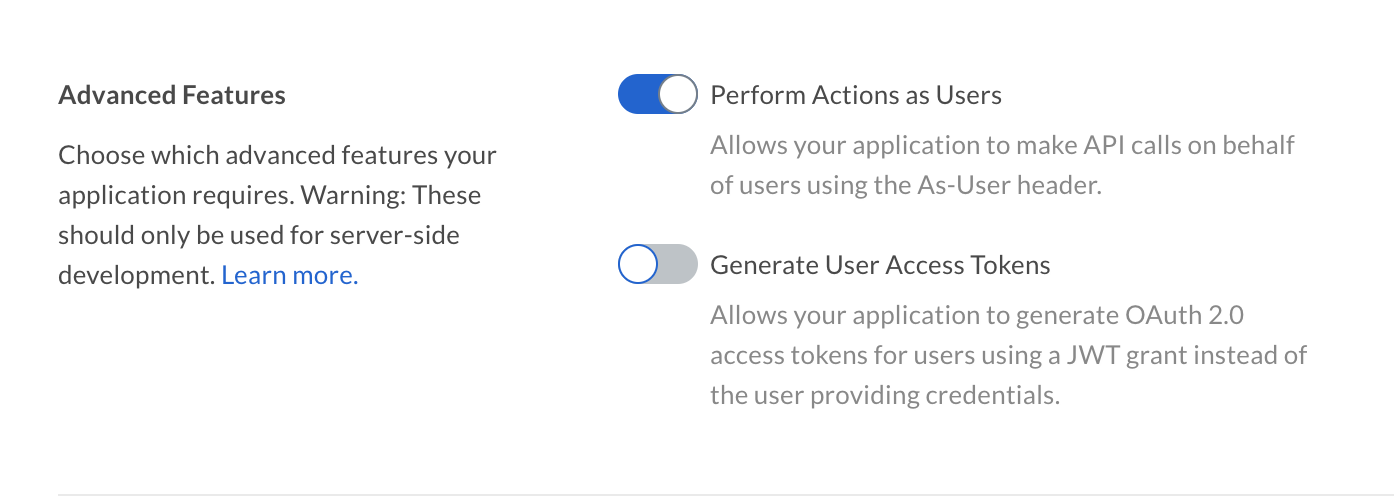 さらに、認証済みユーザーは、管理者権限を持つユーザー、つまり、管理者または共同管理者である必要があります。詳細については、ユーザータイプのガイドを参照してください。
## as-userを使用できるSDK
すべてのBox公式SDKでは、`as-user`ヘッダーを使用してユーザーの代わりに処理を実行することがサポートされています。
```csharp .NET theme={null}
var userClient = client.WithAsUserHeader("[USER_ID]");
```
```java Java theme={null}
BoxClient userClient = client.withAsUserHeader("[USER_ID]");
```
```python Python theme={null}
user_client = client.with_as_user_header('[USER_ID]')
```
```js Node theme={null}
const userClient = client.withAsUserHeader('[USER_ID]');
```
これらのメソッドは、as-userヘッダーが適用された新しいクライアントインスタンスを返し、元のクライアントには変更を加えません。
## 制限
* `as-user`ヘッダーではサービスアカウントの`user_id`を使用することはできません。
* 管理対象ユーザーを代理する場合、その企業が所有または管理するコンテンツにしかアクセスできません。`as-user`ヘッダーを使用して、外部ユーザーが所有するコンテンツにアクセスすることはできません。
* `as-user`ヘッダーには、認証済みユーザーと同じユーザーIDを指定することはできません。指定されたユーザーIDが現在のユーザーと一致した場合、リクエストは失敗し、`403 Forbidden`エラーが返されます。
[devconsole]: https://app.box.com/developers/console
さらに、認証済みユーザーは、管理者権限を持つユーザー、つまり、管理者または共同管理者である必要があります。詳細については、ユーザータイプのガイドを参照してください。
## as-userを使用できるSDK
すべてのBox公式SDKでは、`as-user`ヘッダーを使用してユーザーの代わりに処理を実行することがサポートされています。
```csharp .NET theme={null}
var userClient = client.WithAsUserHeader("[USER_ID]");
```
```java Java theme={null}
BoxClient userClient = client.withAsUserHeader("[USER_ID]");
```
```python Python theme={null}
user_client = client.with_as_user_header('[USER_ID]')
```
```js Node theme={null}
const userClient = client.withAsUserHeader('[USER_ID]');
```
これらのメソッドは、as-userヘッダーが適用された新しいクライアントインスタンスを返し、元のクライアントには変更を加えません。
## 制限
* `as-user`ヘッダーではサービスアカウントの`user_id`を使用することはできません。
* 管理対象ユーザーを代理する場合、その企業が所有または管理するコンテンツにしかアクセスできません。`as-user`ヘッダーを使用して、外部ユーザーが所有するコンテンツにアクセスすることはできません。
* `as-user`ヘッダーには、認証済みユーザーと同じユーザーIDを指定することはできません。指定されたユーザーIDが現在のユーザーと一致した場合、リクエストは失敗し、`403 Forbidden`エラーが返されます。
[devconsole]: https://app.box.com/developers/console