> ## Documentation Index
> Fetch the complete documentation index at: https://developer.box.com/llms.txt
> Use this file to discover all available pages before exploring further.
# 注釈トークン
export const Link = ({href, children, className, ...props}) => {
const localizedHref = localizeLink(href);
return
{children}
;
};
export const MultiRelatedLinks = ({sections = []}) => {
if (!sections || sections.length === 0) {
return null;
}
return
{sections.map((section, index) => )}
;
};
export const RelatedLinks = ({title, items = []}) => {
const getBadgeClass = badge => {
if (!badge) return "badge-default";
const badgeType = badge.toLowerCase().replace(/\s+/g, "-");
return `badge-${badge === "ガイド" ? "guide" : badgeType}`;
};
if (!items || items.length === 0) {
return null;
}
return ;
};
注釈は、新しいBox Viewでサポートされる主な機能の1つです。開発者はこの機能を使用して、アプリケーションに埋め込まれたプレビュー内から直接、コラボレーション機能を提供できます。
Box Viewでは、ハイライトのみ、ハイライトによる注釈、およびポイント注釈という3つの注釈の種類をサポートしています。注釈はドキュメントと画像のプレビューのみでサポートされます。
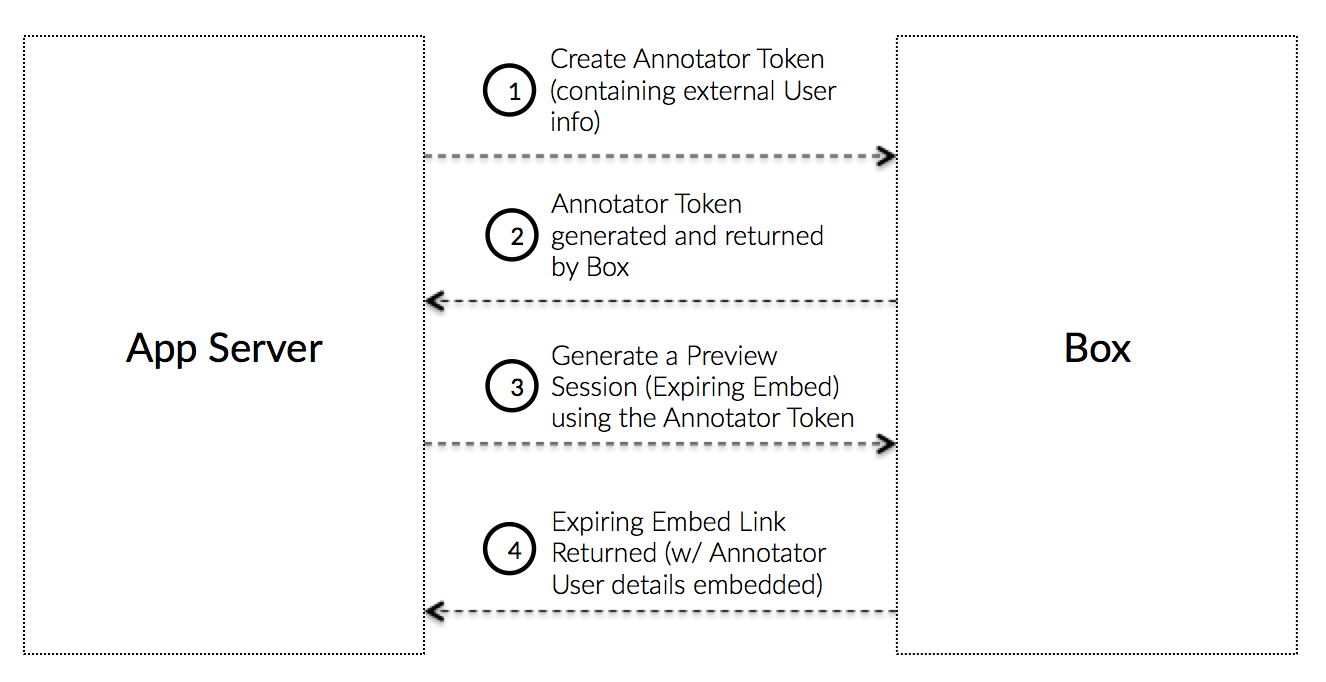 ## 注釈トークンとは
注釈トークンとは、ユーザーが注釈を付けることができるファイルに対してアプリケーションがプレビューの埋め込みリンクを作成できるようにするアクセストークンです。アプリケーションでは、アプリケーションのユーザーそれぞれに新しいApp Userが作成されない可能性があるため、注釈トークンを使用すると、注釈を付けたユーザーを追跡できます。
注釈トークンは、一意のユーザーIDと表示名にリンクされているプレビューセッション (有効期限付き埋め込みリンク) を生成するために、通常のアクセストークンまたはファイルトークンの代わりに使用されます。
注釈トークンを使用して生成されたプレビューセッションは特定の外部ユーザーに関連付けられるため、アプリケーションでは、アプリケーションのエンドユーザーごとに異なる注釈トークンを使用して、個別にプレビューセッションを生成することを強くお勧めします。
## 外部ユーザー情報
注釈に関連付けられた外部の表示名は、実際のところ、注釈に追加されるステートレスな「ラベル」です。つまり、注釈が追加されると、その表示名は完全に注釈と関連付けられるため、注釈を削除し、更新した表示名を使用して再度追加しなければ更新できません。
## SDKを使用せずに作成
注釈トークンを作成するには、[JWTを使用して手動で認証する](/guides/authentication/jwt/without-sdk)手順に従いますが、その際、JWTクレームを次のデータに置き換えます。
```csharp .Net theme={null}
var claims = new List{
new Claim("sub", '[EXTERNAL_USER_ID]'),
new Claim("name", '[EXTERNAL_USER_DISPLAY_NAME]'),
new Claim("box_sub_type", "external"),
new Claim("jti", jti),
};
```
```java Java theme={null}
JwtClaims claims = new JwtClaims();
claims.setIssuer(config.boxAppSettings.clientID);
claims.setAudience(authenticationUrl);
claims.setSubject("[EXTERNAL_USER_ID]");
claims.setName("[EXTERNAL_USER_DISPLAY_NAME]");
claims.setClaim("box_sub_type", "external");
claims.setGeneratedJwtId(64);
claims.setExpirationTimeMinutesInTheFuture(0.75f);
```
```python Python theme={null}
claims = {
'iss': config['boxAppSettings']['clientID'],
'sub': '[EXTERNAL_USER_ID]',
'name': '[EXTERNAL_USER_DISPLAY_NAME]',
'box_sub_type': 'external',
'aud': authentication_url,
'jti': secrets.token_hex(64),
'exp': round(time.time()) + 45
}
```
```js Node theme={null}
let claims = {
iss: config.boxAppSettings.clientID,
sub: "[EXTERNAL_USER_ID]",
name: "[EXTERNAL_USER_DISPLAY_NAME]",
box_sub_type: "external",
aud: authenticationUrl,
jti: crypto.randomBytes(64).toString("hex"),
exp: Math.floor(Date.now() / 1000) + 45
};
```
```ruby Ruby theme={null}
claims = {
iss: config['boxAppSettings']['clientID'],
sub: "[EXTERNAL_USER_ID]",
name: "[EXTERNAL_USER_DISPLAY_NAME]",
box_sub_type: 'external',
aud: authentication_url,
jti: SecureRandom.hex(64),
exp: Time.now.to_i + 45
}
```
```php PHP theme={null}
$claims = [
'iss' => $config->boxAppSettings->clientID,
'sub' => '[EXTERNAL_USER_ID]',
'name' => '[EXTERNAL_USER_DISPLAY_NAME]',
'box_sub_type' => 'external',
'aud' => $authenticationUrl,
'jti' => base64_encode(random_bytes(64)),
'exp' => time() + 45,
'kid' => $config->boxAppSettings->appAuth->publicKeyID
];
```
| パラメータ | 型 | 説明 |
| -------------- | ------ | ----------------------------------------------------- |
| `sub` | String | この注釈を関連付ける外部ユーザーID。このIDには、アプリケーションで追跡される任意のIDを使用できます。 |
| `box_sub_type` | String | 外部ユーザーIDを示す場合は`external` |
| `box_sub_type` | String | この注釈を関連付ける外部ユーザー名。これはBox UIに表示されます。 |
その後、ガイドに従ってこのクレームをアサーションに変換し、このアサーションを、既存の有効なアクセストークンまたはファイルトークンのほか、スコープのセット、トークンの作成対象となるリソースとともに`POST /oauth2/token`エンドポイントに渡します。
```csharp .Net theme={null}
var content = new FormUrlEncodedContent(new[]
{
new KeyValuePair(
"grant_type", "urn:ietf:params:oauth:grant-type:token-exchange"),
new KeyValuePair(
"resource", "https://api.box.com/2.0/files/123456"),
new KeyValuePair(
"subject_token", "[ACCESS_TOKEN]"),
new KeyValuePair(
"subject_token_type", "urn:ietf:params:oauth:token-type:access_token"),
new KeyValuePair(
"scope", "item_preview"),
new KeyValuePair(
"actor_token", "[JWT_ASSERTION_FOR_ANNOTATOR_TOKEN]"),
new KeyValuePair(
"actor_token_type", "urn:ietf:params:oauth:token-type:id_token"),
});
```
```java Java theme={null}
List params = new ArrayList();
params.add(new BasicNameValuePair(
"grant_type", "urn:ietf:params:oauth:grant-type:token-exchange"));
params.add(new BasicNameValuePair(
"resource", "https://api.box.com/2.0/files/123456"));
params.add(new BasicNameValuePair(
"subject_token", "[ACCESS_TOKEN]"));
params.add(new BasicNameValuePair(
"subject_token_type", "urn:ietf:params:oauth:token-type:access_token"));
params.add(new BasicNameValuePair(
"scope", "item_preview"));
params.add(new BasicNameValuePair(
"actor_token", "[JWT_ASSERTION_FOR_ANNOTATOR_TOKEN]"));
params.add(new BasicNameValuePair(
"actor_token_type", "urn:ietf:params:oauth:token-type:id_token"));
```
```python Python theme={null}
params = urlencode({
'grant_type': 'urn:ietf:params:oauth:grant-type:token-exchange',
'resource': 'https://api.box.com/2.0/files/123456',
'subject_token': '[ACCESS_TOKEN]',
'subject_token_type': 'urn:ietf:params:oauth:token-type:access_token',
'scope': 'item_preview',
'actor_token': '[JWT_ASSERTION_FOR_ANNOTATOR_TOKEN]',
'actor_token_type': 'urn:ietf:params:oauth:token-type:id_token'
}).encode()
```
```js Node theme={null}
let accessToken = await axios
.post(
authenticationUrl,
querystring.stringify({
grant_type: "urn:ietf:params:oauth:grant-type:token-exchange",
resource: "https://api.box.com/2.0/files/123456",
subject_token: "[ACCESS_TOKEN]",
subject_token_type: "urn:ietf:params:oauth:token-type:access_token",
scope: "item_preview",
actor_token: "[JWT_ASSERTION_FOR_ANNOTATOR_TOKEN]",
actor_token_type: "urn:ietf:params:oauth:token-type:id_token"
})
)
.then(response => response.data.access_token);
```
```ruby Ruby theme={null}
params = URI.encode_www_form({
grant_type: 'urn:ietf:params:oauth:grant-type:token-exchange',
resource: 'https://api.box.com/2.0/files/123456',
subject_token: '[ACCESS_TOKEN]',
subject_token_type: 'urn:ietf:params:oauth:token-type:access_token',
scope: 'item_preview',
actor_token: '[JWT_ASSERTION_FOR_ANNOTATOR_TOKEN]',
actor_token_type: 'urn:ietf:params:oauth:token-type:id_token'
})
```
```php PHP theme={null}
$params = [
'grant_type' => 'urn:ietf:params:oauth:grant-type:token-exchange',
'resource' => 'https://api.box.com/2.0/files/123456',
'subject_token' => '[ACCESS_TOKEN]',
'subject_token_type' => 'urn:ietf:params:oauth:token-type:access_token',
'scope' => 'item_preview',
'actor_token' => '[JWT_ASSERTION_FOR_ANNOTATOR_TOKEN]',
'actor_token_type' => 'urn:ietf:params:oauth:token-type:id_token'
];
```
| パラメータ | 説明 |
| ------------------ | ---------------------------------------------------- |
| `resource` | トークンが制限されるファイルへの完全なURLパス (省略可)。 |
| `actor_token` | 以前に作成されたJWTアサーション |
| `actor_token_type` | 常に`urn:ietf:params:oauth:token-type:id_token`に設定します。 |
## SDKを使用して作成
SDKを使用してJWT注釈トークンを作成するために、アプリケーションはアクティブなトークンを別のトークンと交換できます。
```js Node theme={null}
var options = {
actor: {
id: "[EXTERNAL_USER_ID]",
name: "[EXTERNAL_USER_DISPLAY_NAME"
}
};
client
.exchangeToken(
"item_preview",
"https://api.box.com/2.0/files/123456",
options
)
.then(tokenInfo => {
//=> tokenInfo.accessToken
});
```
## 注釈トークンとは
注釈トークンとは、ユーザーが注釈を付けることができるファイルに対してアプリケーションがプレビューの埋め込みリンクを作成できるようにするアクセストークンです。アプリケーションでは、アプリケーションのユーザーそれぞれに新しいApp Userが作成されない可能性があるため、注釈トークンを使用すると、注釈を付けたユーザーを追跡できます。
注釈トークンは、一意のユーザーIDと表示名にリンクされているプレビューセッション (有効期限付き埋め込みリンク) を生成するために、通常のアクセストークンまたはファイルトークンの代わりに使用されます。
注釈トークンを使用して生成されたプレビューセッションは特定の外部ユーザーに関連付けられるため、アプリケーションでは、アプリケーションのエンドユーザーごとに異なる注釈トークンを使用して、個別にプレビューセッションを生成することを強くお勧めします。
## 外部ユーザー情報
注釈に関連付けられた外部の表示名は、実際のところ、注釈に追加されるステートレスな「ラベル」です。つまり、注釈が追加されると、その表示名は完全に注釈と関連付けられるため、注釈を削除し、更新した表示名を使用して再度追加しなければ更新できません。
## SDKを使用せずに作成
注釈トークンを作成するには、[JWTを使用して手動で認証する](/guides/authentication/jwt/without-sdk)手順に従いますが、その際、JWTクレームを次のデータに置き換えます。
```csharp .Net theme={null}
var claims = new List{
new Claim("sub", '[EXTERNAL_USER_ID]'),
new Claim("name", '[EXTERNAL_USER_DISPLAY_NAME]'),
new Claim("box_sub_type", "external"),
new Claim("jti", jti),
};
```
```java Java theme={null}
JwtClaims claims = new JwtClaims();
claims.setIssuer(config.boxAppSettings.clientID);
claims.setAudience(authenticationUrl);
claims.setSubject("[EXTERNAL_USER_ID]");
claims.setName("[EXTERNAL_USER_DISPLAY_NAME]");
claims.setClaim("box_sub_type", "external");
claims.setGeneratedJwtId(64);
claims.setExpirationTimeMinutesInTheFuture(0.75f);
```
```python Python theme={null}
claims = {
'iss': config['boxAppSettings']['clientID'],
'sub': '[EXTERNAL_USER_ID]',
'name': '[EXTERNAL_USER_DISPLAY_NAME]',
'box_sub_type': 'external',
'aud': authentication_url,
'jti': secrets.token_hex(64),
'exp': round(time.time()) + 45
}
```
```js Node theme={null}
let claims = {
iss: config.boxAppSettings.clientID,
sub: "[EXTERNAL_USER_ID]",
name: "[EXTERNAL_USER_DISPLAY_NAME]",
box_sub_type: "external",
aud: authenticationUrl,
jti: crypto.randomBytes(64).toString("hex"),
exp: Math.floor(Date.now() / 1000) + 45
};
```
```ruby Ruby theme={null}
claims = {
iss: config['boxAppSettings']['clientID'],
sub: "[EXTERNAL_USER_ID]",
name: "[EXTERNAL_USER_DISPLAY_NAME]",
box_sub_type: 'external',
aud: authentication_url,
jti: SecureRandom.hex(64),
exp: Time.now.to_i + 45
}
```
```php PHP theme={null}
$claims = [
'iss' => $config->boxAppSettings->clientID,
'sub' => '[EXTERNAL_USER_ID]',
'name' => '[EXTERNAL_USER_DISPLAY_NAME]',
'box_sub_type' => 'external',
'aud' => $authenticationUrl,
'jti' => base64_encode(random_bytes(64)),
'exp' => time() + 45,
'kid' => $config->boxAppSettings->appAuth->publicKeyID
];
```
| パラメータ | 型 | 説明 |
| -------------- | ------ | ----------------------------------------------------- |
| `sub` | String | この注釈を関連付ける外部ユーザーID。このIDには、アプリケーションで追跡される任意のIDを使用できます。 |
| `box_sub_type` | String | 外部ユーザーIDを示す場合は`external` |
| `box_sub_type` | String | この注釈を関連付ける外部ユーザー名。これはBox UIに表示されます。 |
その後、ガイドに従ってこのクレームをアサーションに変換し、このアサーションを、既存の有効なアクセストークンまたはファイルトークンのほか、スコープのセット、トークンの作成対象となるリソースとともに`POST /oauth2/token`エンドポイントに渡します。
```csharp .Net theme={null}
var content = new FormUrlEncodedContent(new[]
{
new KeyValuePair(
"grant_type", "urn:ietf:params:oauth:grant-type:token-exchange"),
new KeyValuePair(
"resource", "https://api.box.com/2.0/files/123456"),
new KeyValuePair(
"subject_token", "[ACCESS_TOKEN]"),
new KeyValuePair(
"subject_token_type", "urn:ietf:params:oauth:token-type:access_token"),
new KeyValuePair(
"scope", "item_preview"),
new KeyValuePair(
"actor_token", "[JWT_ASSERTION_FOR_ANNOTATOR_TOKEN]"),
new KeyValuePair(
"actor_token_type", "urn:ietf:params:oauth:token-type:id_token"),
});
```
```java Java theme={null}
List params = new ArrayList();
params.add(new BasicNameValuePair(
"grant_type", "urn:ietf:params:oauth:grant-type:token-exchange"));
params.add(new BasicNameValuePair(
"resource", "https://api.box.com/2.0/files/123456"));
params.add(new BasicNameValuePair(
"subject_token", "[ACCESS_TOKEN]"));
params.add(new BasicNameValuePair(
"subject_token_type", "urn:ietf:params:oauth:token-type:access_token"));
params.add(new BasicNameValuePair(
"scope", "item_preview"));
params.add(new BasicNameValuePair(
"actor_token", "[JWT_ASSERTION_FOR_ANNOTATOR_TOKEN]"));
params.add(new BasicNameValuePair(
"actor_token_type", "urn:ietf:params:oauth:token-type:id_token"));
```
```python Python theme={null}
params = urlencode({
'grant_type': 'urn:ietf:params:oauth:grant-type:token-exchange',
'resource': 'https://api.box.com/2.0/files/123456',
'subject_token': '[ACCESS_TOKEN]',
'subject_token_type': 'urn:ietf:params:oauth:token-type:access_token',
'scope': 'item_preview',
'actor_token': '[JWT_ASSERTION_FOR_ANNOTATOR_TOKEN]',
'actor_token_type': 'urn:ietf:params:oauth:token-type:id_token'
}).encode()
```
```js Node theme={null}
let accessToken = await axios
.post(
authenticationUrl,
querystring.stringify({
grant_type: "urn:ietf:params:oauth:grant-type:token-exchange",
resource: "https://api.box.com/2.0/files/123456",
subject_token: "[ACCESS_TOKEN]",
subject_token_type: "urn:ietf:params:oauth:token-type:access_token",
scope: "item_preview",
actor_token: "[JWT_ASSERTION_FOR_ANNOTATOR_TOKEN]",
actor_token_type: "urn:ietf:params:oauth:token-type:id_token"
})
)
.then(response => response.data.access_token);
```
```ruby Ruby theme={null}
params = URI.encode_www_form({
grant_type: 'urn:ietf:params:oauth:grant-type:token-exchange',
resource: 'https://api.box.com/2.0/files/123456',
subject_token: '[ACCESS_TOKEN]',
subject_token_type: 'urn:ietf:params:oauth:token-type:access_token',
scope: 'item_preview',
actor_token: '[JWT_ASSERTION_FOR_ANNOTATOR_TOKEN]',
actor_token_type: 'urn:ietf:params:oauth:token-type:id_token'
})
```
```php PHP theme={null}
$params = [
'grant_type' => 'urn:ietf:params:oauth:grant-type:token-exchange',
'resource' => 'https://api.box.com/2.0/files/123456',
'subject_token' => '[ACCESS_TOKEN]',
'subject_token_type' => 'urn:ietf:params:oauth:token-type:access_token',
'scope' => 'item_preview',
'actor_token' => '[JWT_ASSERTION_FOR_ANNOTATOR_TOKEN]',
'actor_token_type' => 'urn:ietf:params:oauth:token-type:id_token'
];
```
| パラメータ | 説明 |
| ------------------ | ---------------------------------------------------- |
| `resource` | トークンが制限されるファイルへの完全なURLパス (省略可)。 |
| `actor_token` | 以前に作成されたJWTアサーション |
| `actor_token_type` | 常に`urn:ietf:params:oauth:token-type:id_token`に設定します。 |
## SDKを使用して作成
SDKを使用してJWT注釈トークンを作成するために、アプリケーションはアクティブなトークンを別のトークンと交換できます。
```js Node theme={null}
var options = {
actor: {
id: "[EXTERNAL_USER_ID]",
name: "[EXTERNAL_USER_DISPLAY_NAME"
}
};
client
.exchangeToken(
"item_preview",
"https://api.box.com/2.0/files/123456",
options
)
.then(tokenInfo => {
//=> tokenInfo.accessToken
});
```