> ## Documentation Index
> Fetch the complete documentation index at: https://developer.box.com/llms.txt
> Use this file to discover all available pages before exploring further.
> POST /ai/extract_structuredエンドポイントを使用し、テンプレート、フィールド定義、または抽出エージェント (強化) を利用してメタデータを抽出します。
# ファイルからメタデータを抽出する (構造化)
export const MultiRelatedLinks = ({sections = []}) => {
if (!sections || sections.length === 0) {
return null;
}
return
{sections.map((section, index) =>
;
};
export const RelatedLinks = ({title, items = []}) => {
const getBadgeClass = badge => {
if (!badge) return "badge-default";
const badgeType = badge.toLowerCase().replace(/\s+/g, "-");
return `badge-${badge === "ガイド" ? "guide" : badgeType}`;
};
if (!items || items.length === 0) {
return null;
}
return ;
};
export const Link = ({href, children, className, ...props}) => {
const localizedHref = localizeLink(href);
return
{children}
;
};
Box AI APIを使用すると、指定したファイルからメタデータを抽出し、結果をキー/値ペアの形式で取得することができます。入力には、`fields`パラメータを使用して構造を作成するか、すでに定義済みのメタデータテンプレートを使用できます。テンプレートの作成の詳細については、[メタデータテンプレートのカスタマイズ][templates-console]を参照するか、
* PDF
* DOC
* DOCX
* GDOC
* ODT
* Box Note
* テキスト
* RTF
* XDW
* AS
* TIFF
* TIF
* PNG
* JPEG
* JPG
* WEBP
* PPT
* PPTX
* GSLIDE
* GSLIDES
* ODP
* OTP
* XLS
* XLSX
* XLSM
* ODS
* CSV
* 言語: `.js`、`.py`、`.css`、`.php`、`.sql`
* JSON
* HTML
* XML
* MD
Box AIは、画像ファイル (TIFF、PNG、JPEG) やスキャンしたドキュメントを処理する際、自動的に光学式文字認識 (OCR) を適用します。これにより、抽出前に画像をPDFに変換する必要がなくなるため、時間の節約と統合の簡略化が実現します。
## サポートされている言語
Box AIは、以下の言語のドキュメントからメタデータを抽出できます。
* 英語
* 日本語
* 中国語
* 韓国語
- キリル文字ベースの言語 (ロシア語、ウクライナ語、ブルガリア語、セルビア語など)
異なる言語や画像形式を使用するために追加の構成は必要ありません。Box AIは、自動的に言語を検出し、必要に応じてOCRを適用します。
## 開始する前に
Platformアプリを作成して認証するには、
```sh cURL theme={null}
curl -i -L 'https://api.box.com/2.0/ai/extract_structured' \
-H 'content-type: application/json' \
-H 'authorization: Bearer ' \
-d '{
"items": [
{
"id": "12345678",
"type": "file",
"content": "This is file content."
}
],
"metadata_template": {
"template_key": "",
"type": "metadata_template",
"scope": ""
},
"fields": [
{
"key": "name",
"description": "The name of the person.",
"displayName": "Name",
"prompt": "The name is the first and last name from the email address.",
"type": "string",
"options": [
{
"key": "First Name"
},
{
"key": "Last Name"
]
}
],
"ai_agent": {
"type": "ai_agent_extract_structured",
"long_text": {
"model": "openai__gpt_5_mini"
},
"basic_text": {
"model": "openai__gpt_5_mini"
}
}
}'
```
```typescript Node/TypeScript v10 theme={null}
await client.ai.createAiExtractStructured({
fields: [
{
key: 'firstName',
displayName: 'First name',
description: 'Person first name',
prompt: 'What is the your first name?',
type: 'string',
} satisfies AiExtractStructuredFieldsField,
{
key: 'lastName',
displayName: 'Last name',
description: 'Person last name',
prompt: 'What is the your last name?',
type: 'string',
} satisfies AiExtractStructuredFieldsField,
{
key: 'dateOfBirth',
displayName: 'Birth date',
description: 'Person date of birth',
prompt: 'What is the date of your birth?',
type: 'date',
} satisfies AiExtractStructuredFieldsField,
{
key: 'age',
displayName: 'Age',
description: 'Person age',
prompt: 'How old are you?',
type: 'float',
} satisfies AiExtractStructuredFieldsField,
{
key: 'hobby',
displayName: 'Hobby',
description: 'Person hobby',
prompt: 'What is your hobby?',
type: 'multiSelect',
options: [
{ key: 'guitar' } satisfies AiExtractStructuredFieldsOptionsField,
{ key: 'books' } satisfies AiExtractStructuredFieldsOptionsField,
],
} satisfies AiExtractStructuredFieldsField,
],
items: [new AiItemBase({ id: file.id })],
aiAgent: agentIgnoringOverridingEmbeddingsModel,
} satisfies AiExtractStructured);
```
```python Python v10 theme={null}
client.ai.create_ai_extract_structured(
[AiItemBase(id=file.id)],
fields=[
CreateAiExtractStructuredFields(
key="firstName",
display_name="First name",
description="Person first name",
prompt="What is the your first name?",
type="string",
),
CreateAiExtractStructuredFields(
key="lastName",
display_name="Last name",
description="Person last name",
prompt="What is the your last name?",
type="string",
),
CreateAiExtractStructuredFields(
key="dateOfBirth",
display_name="Birth date",
description="Person date of birth",
prompt="What is the date of your birth?",
type="date",
),
CreateAiExtractStructuredFields(
key="age",
display_name="Age",
description="Person age",
prompt="How old are you?",
type="float",
),
CreateAiExtractStructuredFields(
key="hobby",
display_name="Hobby",
description="Person hobby",
prompt="What is your hobby?",
type="multiSelect",
options=[
CreateAiExtractStructuredFieldsOptionsField(key="guitar"),
CreateAiExtractStructuredFieldsOptionsField(key="books"),
],
),
],
ai_agent=agent_ignoring_overriding_embeddings_model,
)
```
```cs .NET v10 theme={null}
await client.Ai.CreateAiExtractStructuredAsync(requestBody: new AiExtractStructured(items: Array.AsReadOnly(new [] {new AiItemBase(id: file.Id)})) { Fields = Array.AsReadOnly(new [] {new AiExtractStructuredFieldsField(key: "firstName") { DisplayName = "First name", Description = "Person first name", Prompt = "What is the your first name?", Type = "string" },new AiExtractStructuredFieldsField(key: "lastName") { DisplayName = "Last name", Description = "Person last name", Prompt = "What is the your last name?", Type = "string" },new AiExtractStructuredFieldsField(key: "dateOfBirth") { DisplayName = "Birth date", Description = "Person date of birth", Prompt = "What is the date of your birth?", Type = "date" },new AiExtractStructuredFieldsField(key: "age") { DisplayName = "Age", Description = "Person age", Prompt = "How old are you?", Type = "float" },new AiExtractStructuredFieldsField(key: "hobby") { DisplayName = "Hobby", Description = "Person hobby", Prompt = "What is your hobby?", Type = "multiSelect", Options = Array.AsReadOnly(new [] {new AiExtractStructuredFieldsOptionsField(key: "guitar"),new AiExtractStructuredFieldsOptionsField(key: "books")}) }}) });
```
```swift Swift v10 theme={null}
try await client.ai.createAiExtractStructured(requestBody: AiExtractStructured(fields: [AiExtractStructuredFieldsField(key: "firstName", displayName: "First name", description: "Person first name", prompt: "What is the your first name?", type: "string"), AiExtractStructuredFieldsField(key: "lastName", displayName: "Last name", description: "Person last name", prompt: "What is the your last name?", type: "string"), AiExtractStructuredFieldsField(key: "dateOfBirth", displayName: "Birth date", description: "Person date of birth", prompt: "What is the date of your birth?", type: "date"), AiExtractStructuredFieldsField(key: "age", displayName: "Age", description: "Person age", prompt: "How old are you?", type: "float"), AiExtractStructuredFieldsField(key: "hobby", displayName: "Hobby", description: "Person hobby", prompt: "What is your hobby?", type: "multiSelect", options: [AiExtractStructuredFieldsOptionsField(key: "guitar"), AiExtractStructuredFieldsOptionsField(key: "books")])], items: [AiItemBase(id: file.id)]))
```
```java Java v10 theme={null}
client.getAi().createAiExtractStructured(new AiExtractStructured.Builder(Arrays.asList(new AiItemBase(file.getId()))).fields(Arrays.asList(new AiExtractStructuredFieldsField.Builder("firstName").description("Person first name").displayName("First name").prompt("What is the your first name?").type("string").build(), new AiExtractStructuredFieldsField.Builder("lastName").description("Person last name").displayName("Last name").prompt("What is the your last name?").type("string").build(), new AiExtractStructuredFieldsField.Builder("dateOfBirth").description("Person date of birth").displayName("Birth date").prompt("What is the date of your birth?").type("date").build(), new AiExtractStructuredFieldsField.Builder("age").description("Person age").displayName("Age").prompt("How old are you?").type("float").build(), new AiExtractStructuredFieldsField.Builder("hobby").description("Person hobby").displayName("Hobby").prompt("What is your hobby?").type("multiSelect").options(Arrays.asList(new AiExtractStructuredFieldsOptionsField("guitar"), new AiExtractStructuredFieldsOptionsField("books"))).build())).aiAgent(agentIgnoringOverridingEmbeddingsModel).build())
```
```java Java v5 theme={null}
BoxAIExtractMetadataTemplate template = new BoxAIExtractMetadataTemplate("templateKey", "enterprise");
BoxAIExtractStructuredResponse result = BoxAI.extractMetadataStructured(
api,
Collections.singletonList(new BoxAIItem("123456", BoxAIItem.Type.FILE)),
template
);
JsonObject sourceJson = result.getSourceJson();
```
### パラメータ
コールを実行するには、以下のパラメータを渡す必要があります。必須のパラメータは**太字**で示されています。
`items`配列には要素が1つだけ含まれている必要があります。プロンプトとファイルの制限については、
最良の結果を得るには、[抽出エージェント (強化)](/guides/box-ai/ai-tutorials/extract-metadata-structured#enhanced-extract-agent) を使用してください。
#### `struct`フィールドタイプ
`struct`タイプを使用すると、関連する複数のサブフィールドを1つの名前付きJSONオブジェクトにグループ化することができます。これは、関連するひとまとまりの値を抽出し、個別のフラットなフィールドではなく、1つの構造化されたオブジェクトとして取得する必要がある場合に便利です。例としては、住所や個人の連絡先情報などを挙げることができます。
`struct`フィールドには、そのサブフィールドを定義する`fields`配列が必要です。各サブフィールドは、以下のプロパティを持つオブジェクトです。
* `key`: サブフィールドの一意の識別子。
* `type`: サブフィールドのタイプ。サポートされるタイプは、`string`、`text`、`number`、`float`、`boolean`、`date`、`enum`、`multiSelect`、および`array[]`です (例: `array[string]`)。ネストされた`struct`または`table`タイプは、サブフィールドとしてサポートされていません。
* `displayName`: サブフィールドの表示名。
* `description`: サブフィールドの説明。
* `prompt`: サブフィールドに関する追加のコンテキスト。サブフィールドの確認方法やフォーマットの方法を含めることができます。
グループ化されたオブジェクト全体に指示を適用する場合、`struct`フィールドレベルでプロンプトを追加できます。
出力は、抽出されたサブフィールドの値を含む単一のJSONオブジェクトとなります。
**`struct`フィールドタイプに対するリクエストの例**
```json theme={null}
{
"fields": [
{
"key": "address",
"displayName": "Address",
"type": "struct",
"fields": [
{ "key": "street_name", "type": "string" },
{ "key": "home_number", "type": "string" },
{ "key": "postal_code", "type": "string" },
{ "key": "city", "type": "string" }
]
}
]
}
```
**レスポンス:**
```json theme={null}
{
"answer": {
"address": {
"street_name": "Main St",
"home_number": "123",
"postal_code": "94105",
"city": "San Francisco"
}
}
}
```
#### `table`フィールドタイプ
`table`タイプを使用すると、構造化データの繰り返し行をJSONオブジェクトの配列として抽出できます。この場合、各オブジェクトが1行を表します。
これは、ドキュメント内に同じデータ構造のインスタンスが複数含まれている場合に役立ちます。例としては、請求書の明細項目や税率表の項目などが挙げられます。
`table`フィールドには、各行の列 (サブフィールド) を定義する`fields`配列が必要です。サブフィールドのプロパティおよびサポートされるタイプは、`struct`のものと同じです。
表の抽出は、視覚的にフォーマットされた表に限定されません。`table`タイプは、グリッド、キー/値ペア、フォームレイアウト、単なる文のいずれとして表示されている場合でも、繰り返しデータを正確に抽出します。
出力はJSONオブジェクトの配列であり、各オブジェクトは抽出された1行を表します。
**`table`フィールドタイプに対するリクエストの例**
```json theme={null}
{
"fields": [
{
"key": "line_items",
"displayName": "Line Items",
"type": "table",
"fields": [
{ "key": "description", "type": "string" },
{ "key": "quantity", "type": "float" },
{ "key": "amount", "type": "float" }
]
}
]
}
```
**レスポンス:**
```json theme={null}
{
"answer": {
"line_items": [
{ "description": "Desk", "quantity": 2.0, "amount": 399.99 },
{ "description": "Chair", "quantity": 4.0, "amount": 149.99 }
]
}
}
```
#### サポートされるサブフィールドのタイプ
構造および表のフィールド内で、以下のタイプがサポートされています。
| 型 | メモ |
| ------------- | -------------------- |
| `string` | スカラーまたは配列 \[string] |
| `text` | スカラーまたは配列 \[text] |
| `number` | スカラーまたは配列 \[number] |
| `float` | スカラーまたは配列 \[float] |
| `boolean` | スカラーまたは配列 \[boolean] |
| `date` | スカラーまたは配列 \[date] |
| `enum` | 出現は1回のみ |
| `multiSelect` | 出現は1回のみ |
ネストされた`struct`および`table`タイプは、サブフィールドとしてはサポートされていません。
`struct`と`table`の2つのフィールドタイプの実際の使用例を見ていきます。サプライヤ契約書から、グループ化されたベンダー詳細データと繰り返しの納品スケジュールを抽出したうえで、結果を下流の調達レコードにマッピングする方法を確認できます。
## ユースケース
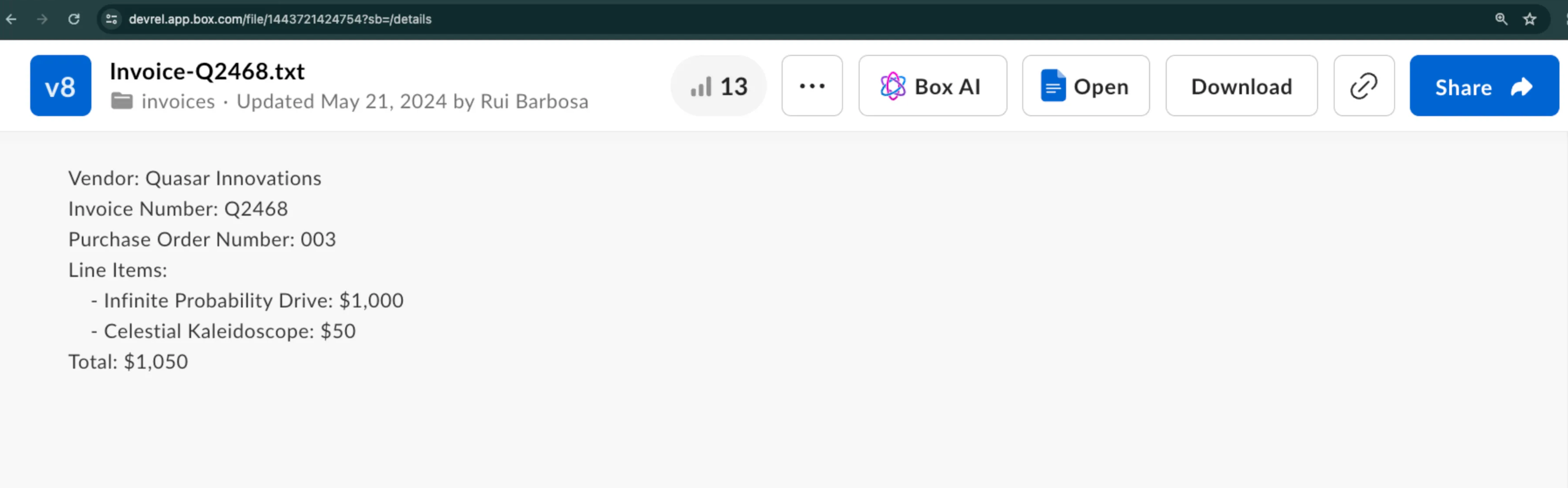
この例では、サンプル請求書から構造化された形でメタデータを抽出する方法を示します。ベンダー名、請求書番号などの詳細情報を抽出する必要があるとします。
`fields`と`metadata_template`のどちらかを使用して、構造を指定できます。両方を使用することはできません。
### `fields`パラメータの使用
`fields`パラメータを使用すると、抽出するデータを指定できます。各`fields`オブジェクトにはパラメータのサブセットがあり、それを使用して、検索対象のデータに関する情報を追加できます。たとえば、フィールドのタイプや説明、さらには追加のコンテキストを含めたプロンプトを追加することができます。
```bash theme={null}
curl --location 'https://api.box.com/2.0/ai/extract_structured' \
--header 'Content-Type: application/json' \
--header 'Authorization: Bearer '' \
--data '{
"items": [
{
"id": "1517628697289",
"type": "file"
}
],
"fields": [
{
"key": "document_type",
"type": "enum",
"prompt": "what type of document is this?",
"options": [
{
"key": "Invoice"
},
{
"key": "Purchase Order"
},
{
"key": "Unknown"
}
]
},
{
"key": "document_date",
"type": "date"
},
{
"key": "vendor",
"description": "The name of the entity.",
"prompt": "Which vendor is sending this document.",
"type": "string"
},
{
"key": "document_total",
"type": "float"
}
]
}'
```
応答には、以下のように、指定したフィールドとその値が示されます。
```bash theme={null}
{
"document_date": "2024-02-13",
"vendor": "Quasar Innovations",
"document_total": $1050,
"document_type": "Purchase Order"
}
```
### メタデータテンプレートの使用
メタデータテンプレートを使用する場合は、その`template_key`、`type`、`scope`を指定します。
```bash theme={null}
curl --location 'https://api.box.com/2.0/ai/extract_structured' \
--header 'Content-Type: application/json' \
--header 'Authorization: Bearer ' \
--data '{
"items": [
{
"id": "1517628697289",
"type": "file"
}
],
"metadata_template": {
"template_key": "rbInvoicePO",
"type": "metadata_template",
"scope": "enterprise_1134207681"
}
}'
```
応答には、以下のように、メタデータテンプレートに含まれているフィールドとその値が示されます。
```bash theme={null}
{
"documentDate": "February 13, 2024",
"total": "$1050",
"documentType": "Purchase Order",
"vendor": "Quasar Innovations",
"purchaseOrderNumber": "003"
}
```
### 抽出エージェント (強化)
抽出エージェント (強化) を使用するには、次のように`ai_agent`オブジェクトを指定します。
```bash theme={null}
{
"ai_agent": {
"type": "ai_agent_id",
"id": "enhanced_extract_agent"
}
}
```
抽出エージェント (強化) を使用してデータを抽出するには、以下のいずれかが必要です。
* [インラインでのフィールド定義][inline-field] (フィールドが頻繁に変わる場合に最適)
* [メタデータテンプレート][metadata-template] (フィールドが一定である場合に最適)
Box Python SDKを使用したサンプルのコードスニペットを確認してください。
```Python theme={null}
from box_sdk_gen import (
AiAgentReference,
AiAgentReferenceTypeField,
AiItemBase,
AiItemBaseTypeField,
BoxClient,
BoxCCGAuth,
CCGConfig,
CreateAiExtractStructuredMetadataTemplate
)
# Create your client credentials grant config from the developer console
ccg_config = CCGConfig(
client_id="my_box_client_id", # replace with your client id
client_secret="my_box_client_secret", # replace with your client secret
user_id="my_box_user_id", # replace with the box user id that has access
# to the file you are referencing
)
auth = BoxCCGAuth(config=ccg_config)
client = BoxClient(auth=auth)
# Create the agent config referencing the enhanced extract agent
enhanced_extract_agent_config = AiAgentReference(
id="enhanced_extract_agent",
type=AiAgentReferenceTypeField.AI_AGENT_ID
)
# Use the Box SDK to call the extract_structured endpoint
box_ai_response = client.ai.create_ai_extract_structured(
# Create the items array containing the file information to extract from
items=[
AiItemBase(
id="my_box_file_id", # replace with the file id
type=AiItemBaseTypeField.FILE
)
],
# Reference the Box Metadata template
metadata_template=CreateAiExtractStructuredMetadataTemplate(
template_key="InvoicePO",
scope="enterprise"
),
# Attach the agent config you created earlier
ai_agent=enhanced_extract_agent_config,
)
print(f"box_ai_response: {box_ai_response.answer}")
```
[templates-console]: https://support.box.com/hc/en-us/articles/360044194033-Customizing-Metadata-Templates
[changelog]: /changelog
[blog]: https://medium.com/box-developer-blog
[inline-field]: #use-fields-parameter
[metadata-template]: #use-metadata-template
[autofill-metadata]: https://support.box.com/hc/en-us/articles/360044196173-Using-Metadata#h_01JJSRYKDKXHGJT9ZHCW1E9RX5
抽出 (構造化) の実際の動作をご確認ください。フォルダの監視、請求書のフィールド抽出、各ファイルへのメタデータ書き戻しを実行する、エンドツーエンドの自動化を構築します。
 ### リクエストの作成
Box AIから応答を取得するには、以下のパラメータを使用して、`POST /2.0/ai/extract_structured`エンドポイントを呼び出します。
* `items.type`および`items.id`: データの抽出元となるファイルを指定します。
* `fields`: 指定したファイルから抽出するデータを指定します。
* `metadata_template`: 既存のメタデータテンプレートを指定します。
### リクエストの作成
Box AIから応答を取得するには、以下のパラメータを使用して、`POST /2.0/ai/extract_structured`エンドポイントを呼び出します。
* `items.type`および`items.id`: データの抽出元となるファイルを指定します。
* `fields`: 指定したファイルから抽出するデータを指定します。
* `metadata_template`: 既存のメタデータテンプレートを指定します。