> ## Documentation Index
> Fetch the complete documentation index at: https://developer.box.com/llms.txt
> Use this file to discover all available pages before exploring further.
# Box Signリクエストの作成
export const MultiRelatedLinks = ({sections = []}) => {
if (!sections || sections.length === 0) {
return null;
}
return
{sections.map((section, index) =>
;
};
export const RelatedLinks = ({title, items = []}) => {
const getBadgeClass = badge => {
if (!badge) return "badge-default";
const badgeType = badge.toLowerCase().replace(/\s+/g, "-");
return `badge-${badge === "ガイド" ? "guide" : badgeType}`;
};
if (!items || items.length === 0) {
return null;
}
return ;
};
export const Link = ({href, children, className, ...props}) => {
const localizedHref = localizeLink(href);
return
{children}
;
};
```sh cURL theme={null}
curl -i -X POST "https://api.box.com/2.0/sign_requests" \
-H "authorization: Bearer " \
-d '{
"signers": [
{
"role": "signer",
"email": "example_email@box.com"
}
],
"source_files": [
{
"type": "file",
"id": "123456789"
}
],
"parent_folder":
{
"type": "folder",
"id": "0987654321"
}
}'
```
```typescript Node/TypeScript v10 theme={null}
await client.signRequests.createSignRequest({
signers: [
{
email: signerEmail,
suppressNotifications: true,
declinedRedirectUrl: 'https://www.box.com',
embedUrlExternalUserId: '123',
isInPerson: false,
loginRequired: false,
password: 'password',
role: 'signer' as SignRequestCreateSignerRoleField,
} satisfies SignRequestCreateSigner,
],
areRemindersEnabled: true,
areTextSignaturesEnabled: true,
daysValid: 30,
declinedRedirectUrl: 'https://www.box.com',
emailMessage: 'Please sign this document',
emailSubject: 'Sign this document',
externalId: '123',
externalSystemName: 'BoxSignIntegration',
isDocumentPreparationNeeded: false,
name: 'Sign Request',
parentFolder: new FolderMini({ id: destinationFolder.id }),
redirectUrl: 'https://www.box.com',
prefillTags: [
{
dateValue: dateFromString('2035-01-01'),
documentTagId: '0',
} satisfies SignRequestPrefillTag,
],
sourceFiles: [new FileBase({ id: fileToSign.id })],
} satisfies SignRequestCreateRequest);
```
```python Python v10 theme={null}
client.sign_requests.create_sign_request(
[
SignRequestCreateSigner(
email=signer_email,
suppress_notifications=True,
declined_redirect_url="https://www.box.com",
embed_url_external_user_id="123",
is_in_person=False,
login_required=False,
password="password",
role=SignRequestCreateSignerRoleField.SIGNER,
)
],
source_files=[FileBase(id=file_to_sign.id)],
parent_folder=FolderMini(id=destination_folder.id),
is_document_preparation_needed=False,
redirect_url="https://www.box.com",
declined_redirect_url="https://www.box.com",
are_text_signatures_enabled=True,
email_subject="Sign this document",
email_message="Please sign this document",
are_reminders_enabled=True,
name="Sign Request",
prefill_tags=[
SignRequestPrefillTag(
date_value=date_from_string("2035-01-01"), document_tag_id="0"
)
],
days_valid=30,
external_id="123",
external_system_name="BoxSignIntegration",
)
```
```cs .NET v10 theme={null}
await client.SignRequests.CreateSignRequestAsync(requestBody: new SignRequestCreateRequest(signers: Array.AsReadOnly(new [] {new SignRequestCreateSigner() { Email = signerEmail, SuppressNotifications = true, DeclinedRedirectUrl = "https://www.box.com", EmbedUrlExternalUserId = "123", IsInPerson = false, LoginRequired = false, Password = "password", Role = SignRequestCreateSignerRoleField.Signer }}), areRemindersEnabled: true, areTextSignaturesEnabled: true, daysValid: 30, declinedRedirectUrl: "https://www.box.com", emailMessage: "Please sign this document", emailSubject: "Sign this document", externalId: "123", externalSystemName: "BoxSignIntegration", isDocumentPreparationNeeded: false, name: "Sign Request", parentFolder: new FolderMini(id: destinationFolder.Id), redirectUrl: "https://www.box.com", prefillTags: Array.AsReadOnly(new [] {new SignRequestPrefillTag() { DateValue = Utils.DateFromString(date: "2035-01-01"), DocumentTagId = "0" }}), sourceFiles: Array.AsReadOnly(new [] {new FileBase(id: fileToSign.Id)})));
```
```swift Swift v10 theme={null}
try await client.signRequests.createSignRequest(requestBody: SignRequestCreateRequest(signers: [SignRequestCreateSigner(email: signerEmail, suppressNotifications: true, declinedRedirectUrl: "https://www.box.com", embedUrlExternalUserId: "123", isInPerson: false, loginRequired: false, password: "password", role: SignRequestCreateSignerRoleField.signer)], areRemindersEnabled: true, areTextSignaturesEnabled: true, daysValid: Int64(30), declinedRedirectUrl: "https://www.box.com", emailMessage: "Please sign this document", emailSubject: "Sign this document", externalId: "123", externalSystemName: "BoxSignIntegration", isDocumentPreparationNeeded: false, name: "Sign Request", parentFolder: FolderMini(id: destinationFolder.id), redirectUrl: "https://www.box.com", prefillTags: [SignRequestPrefillTag(dateValue: try Utils.Dates.dateFromString(date: "2035-01-01"), documentTagId: "0")], sourceFiles: [FileBase(id: fileToSign.id)]))
```
```java Java v10 theme={null}
client.getSignRequests().createSignRequest(new SignRequestCreateRequest.Builder(Arrays.asList(new SignRequestCreateSigner.Builder().email(signerEmail).role(SignRequestCreateSignerRoleField.SIGNER).isInPerson(false).embedUrlExternalUserId("123").declinedRedirectUrl("https://www.box.com").loginRequired(false).password("password").suppressNotifications(true).build())).sourceFiles(Arrays.asList(new FileBase(fileToSign.getId()))).parentFolder(new FolderMini(destinationFolder.getId())).isDocumentPreparationNeeded(false).redirectUrl("https://www.box.com").declinedRedirectUrl("https://www.box.com").areTextSignaturesEnabled(true).emailSubject("Sign this document").emailMessage("Please sign this document").areRemindersEnabled(true).name("Sign Request").prefillTags(Arrays.asList(new SignRequestPrefillTag.Builder().documentTagId("0").dateValue(dateFromString("2035-01-01")).build())).daysValid(30L).externalId("123").externalSystemName("BoxSignIntegration").build())
```
```java Java v5 theme={null}
List files = new ArrayList();
BoxSignRequestFile file = new BoxSignRequestFile("12345");
files.add(file);
// you can also use specific version of the file
BoxFile file = new BoxFile(api, "12345");
List versions = file.getVersions();
BoxFileVersion firstVersion = versions.get(0);
BoxSignRequestFile file = new BoxSignRequestFile(firstVersion.getFileID(), firstVersion.getVersionID());
List signers = new ArrayList();
BoxSignRequestSigner newSigner = new BoxSignRequestSigner("signer@mail.com");
signers.add(newSigner);
String destinationParentFolderId = "55555";
BoxSignRequest.Info signRequestInfo = BoxSignRequest.createSignRequest(api, files,
signers, destinationParentFolderId);
```
```python Python v4 theme={null}
source_file = {
'id': '12345',
'type': 'file'
}
files = [source_file]
signer = {
'name': 'John Doe',
'email': 'signer@mail.com'
}
signers = [signer]
parent_folder_id = '123456789'
new_sign_request = client.create_sign_request_v2(signers, files=files, parent_folder_id=parent_folder_id)
print(f'(Sign Request ID: {new_sign_request.id})')
```
```cs .NET v6 theme={null}
var sourceFiles = new List
{
new BoxSignRequestCreateSourceFile()
{
Id = "12345"
}
};
var signers = new List
{
new BoxSignRequestSignerCreate()
{
Email = "example@gmail.com"
}
};
var parentFolder = new BoxRequestEntity()
{
Id = "12345",
Type = BoxType.folder
};
var request = new BoxSignRequestCreateRequest
{
SourceFiles = sourceFiles,
Signers = signers,
ParentFolder = parentFolder
};
BoxSignRequest signRequest = await client.SignRequestsManager.CreateSignRequestAsync(request);
```
```javascript Node v4 theme={null}
const signRequest = await client.signRequests.create({
signers: [
{
role: 'signer',
email: 'user@example.com',
},
],
source_files: [
{
type: 'file',
id: '12345',
},
],
parent_folder: {
type: 'folder',
id: '1234567',
},
});
console.log(`Created a new sign request id ${signRequest.id}`);
```
`request_flow`を`cfr11`に設定すると、APIを介して21 CFR Part 11 (GxP) 署名リクエストを開始できます。詳細については、[21 CFR Part 11リクエスト](/sign/request-options/cfr-part-11)および[21 CFR Part 11コンプライアンスのサポート](https://docs.box.com/en/box-sign/sending-a-document-for-signature/21-cfr-part-11-compliance-support)を参照してください。
## ドキュメントの準備
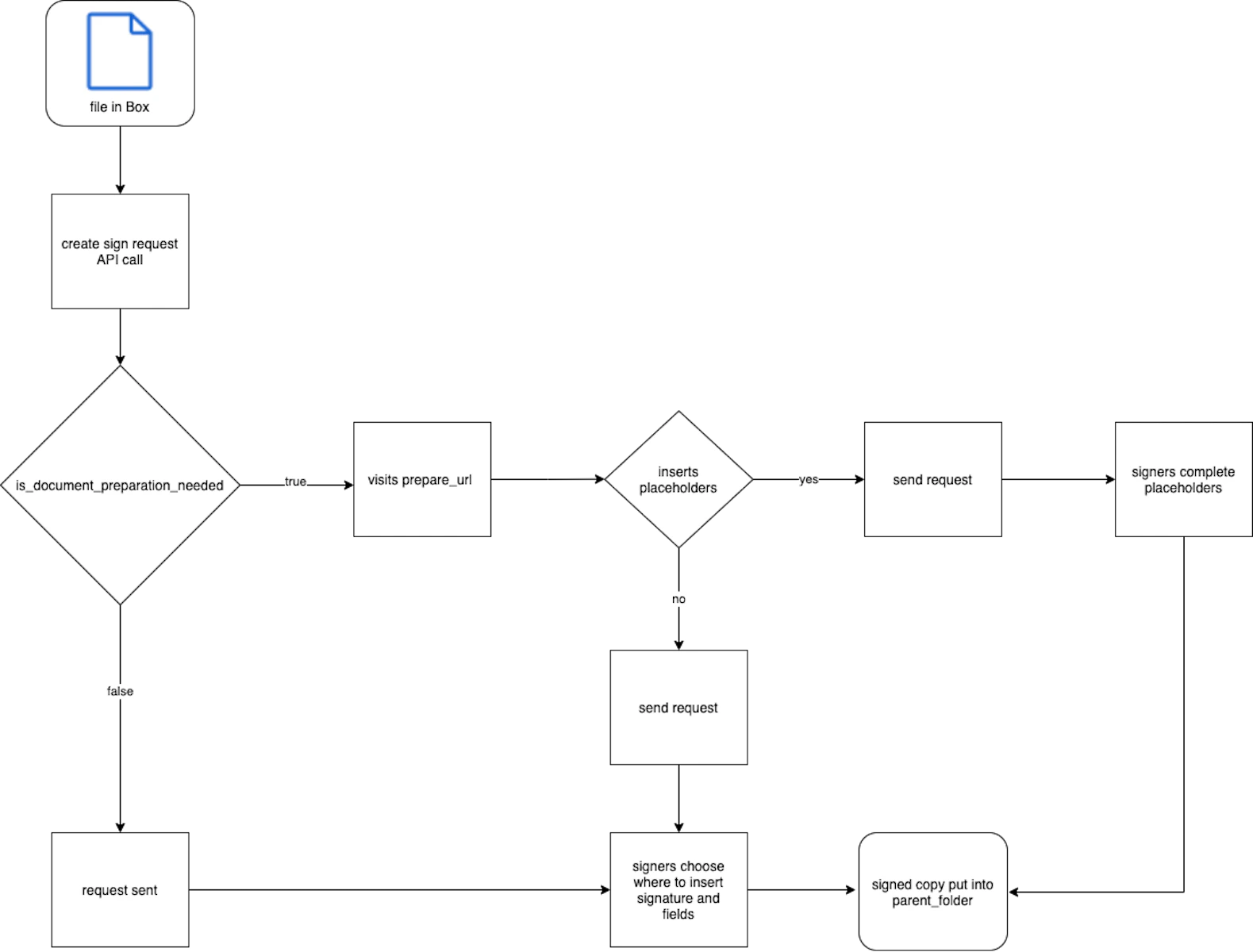
Box Signリクエストを送信する前にドキュメントを準備することで、開発者は署名者のために日付、テキスト、チェックボックス、署名のプレースホルダを追加できます。これを行うには、UIを使用するか、ドキュメント内で直接[タグ][tags]を使用します。準備を行わなかった場合、署名者には準備が完了していないドキュメントが送信されるため、署名者の判断で署名やフィールドを配置できます。ただし、開発者は、準備が完了していないドキュメントの機能をオンまたはオフにするためのコントロールをリクエスト内で利用できます。
`is_document_preparation_needed`を`true`に設定すると、レスポンスで`prepare_url`が返されます。ブラウザでこのリンクにアクセスすると、ドキュメントの準備を完了し、UI上でリクエストを送信できます。
ドキュメントのタグの詳細については、[サポート記事][tags]を参照してください。
Boxウェブアプリを使用してテンプレートに作成された事前入力タグには、APIからアクセスできません。
リクエスト送信者は、Box内のファイルに対してダウンロード権限を持っている必要があります。この要件を満たしているかどうかを確認するには、[コラボレーションレベル][collab]を確認します。
サポートされているファイルタイプは以下のとおりです。
* すべての
Box Signは、リクエストで指定された署名者のメールアドレスに署名用メールを送信しようとするだけです。Boxユーザーの場合、指定しない限り、メールエイリアスは含まれません。指定された署名者のメールアドレスすべてが有効であることを再確認してください。
### 入力
`inputs`パラメータは、ユーザーが操作できるプレースホルダを表します。`document_tag_id`パラメータには、署名リクエストの作成時に渡すデータを設定できます。
## テンプレート
署名リクエストは、テンプレートを使用して作成できます。そのためには、`template_id`パラメータを指定する必要があります。署名リクエスト作成時のテンプレートの使用の詳細については、
デフォルトのページには「すべての関係者がドキュメントでの作業を完了すると、期限が設定された最終版へのリンクがメールで届きます。また、Boxアカウントをお持ちの場合は、アカウントにコピーが保存されます。」と表示されます。署名者を別のページにリダイレクトする場合、この情報は署名者に表示されなくなります。
## 複数の署名者と署名の順序
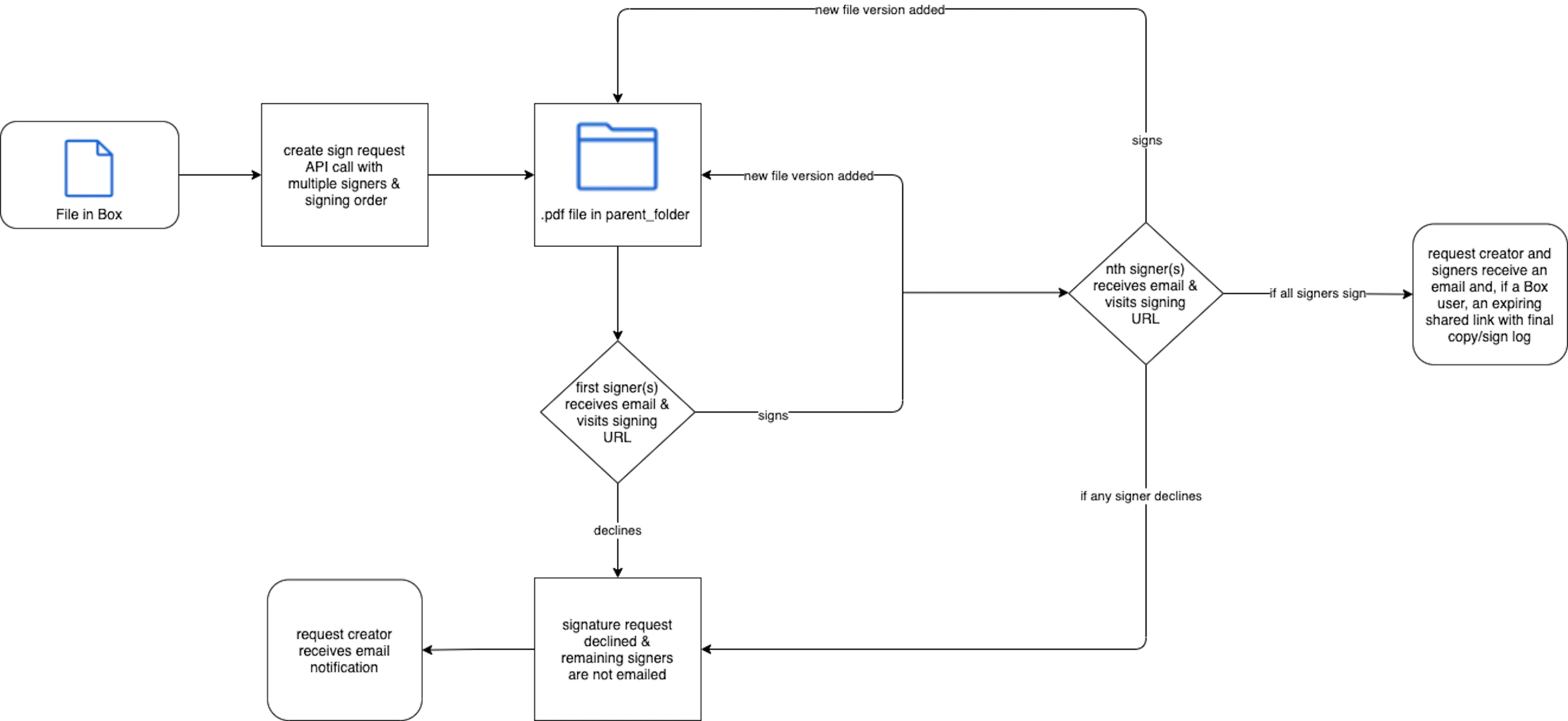
署名の順序は、指定された`order`の数値を小さいものから大きいものへ順序付けすることで決まります。2つの数値が同じ場合、署名者には同時にリクエストが届きます。
最初は、割り当てられた`order`の数値が最も小さい署名者だけに、Box Signリクエストメールが送信されます。その署名者が署名すると、次のユーザーにメールが送信される、というように進んでいきます。Box Signでは、ユーザーが署名するたびに、ドキュメントの新しいバージョンが`parent_folder`に自動的に追加されます。
いずれかの署名者が拒否した場合、残りの署名者にBox Signリクエストメールが送信されません。リクエスト全体が拒否されます。