> ## Documentation Index
> Fetch the complete documentation index at: https://developer.box.com/llms.txt
> Use this file to discover all available pages before exploring further.
# テンプレートを使用した署名リクエストの作成
> BoxウェブアプリでBox Signテンプレートを作成し、APIを使用してテンプレートのリストを取得して、template_idと事前入力タグを指定したリクエストを送信できます。
export const MultiRelatedLinks = ({sections = []}) => {
if (!sections || sections.length === 0) {
return null;
}
return
{sections.map((section, index) => )}
;
};
export const RelatedLinks = ({title, items = []}) => {
const getBadgeClass = badge => {
if (!badge) return "badge-default";
const badgeType = badge.toLowerCase().replace(/\s+/g, "-");
return `badge-${badge === "ガイド" ? "guide" : badgeType}`;
};
if (!items || items.length === 0) {
return null;
}
return ;
};
Box Signテンプレートは、署名フィールドやイニシャルフィールド、署名者の役割、および任意のメール設定があらかじめ設定されたドキュメントです。テンプレートはBoxウェブアプリで作成および管理します。APIではテンプレートのリストの取得やテンプレートからの署名リクエストの作成はできますが、テンプレートの作成、編集、削除はできません。
テンプレートの署名フィールドとイニシャルフィールドは、特定の署名者に割り当てられます。これらのフィールドは必須または任意に設定できます。テンプレートからリクエストを作成する際に、アプリでこれらのフィールドに事前入力できますが、フィールドが割り当てられた署名者は、署名をする際にその値を変更できます。
テンプレートの受信者に対して[署名者の本人確認](/guides/box-sign/signer-verification)を設定することもできます。
リクエスト作成時のオプションについては、[Box Signリクエストの作成](/guides/box-sign/create-sign-request)を参照してください。
## テンプレートの作成
Box Signで、\[**署名**] を開いて \[**テンプレート**] を選択します。\[**新しいテンプレート**] を選択し、ドキュメントを選択またはアップロードします。
![Box Signで [テンプレート] に移動する](https://mintcdn.com/box/s1L5HSixA7CalnZ6/images/guides/box-sign/sign-template-navigate.png?fit=max&auto=format&n=s1L5HSixA7CalnZ6&q=85&s=550175df3a718fb07b4c07210a1ffd13)
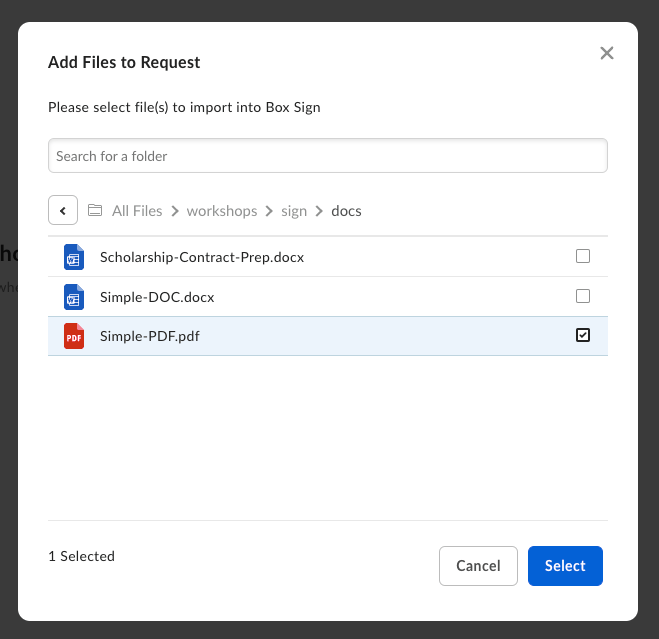 日付、名前、署名など、必要な署名フィールドやイニシャルフィールドを配置し、テンプレートを保存します。
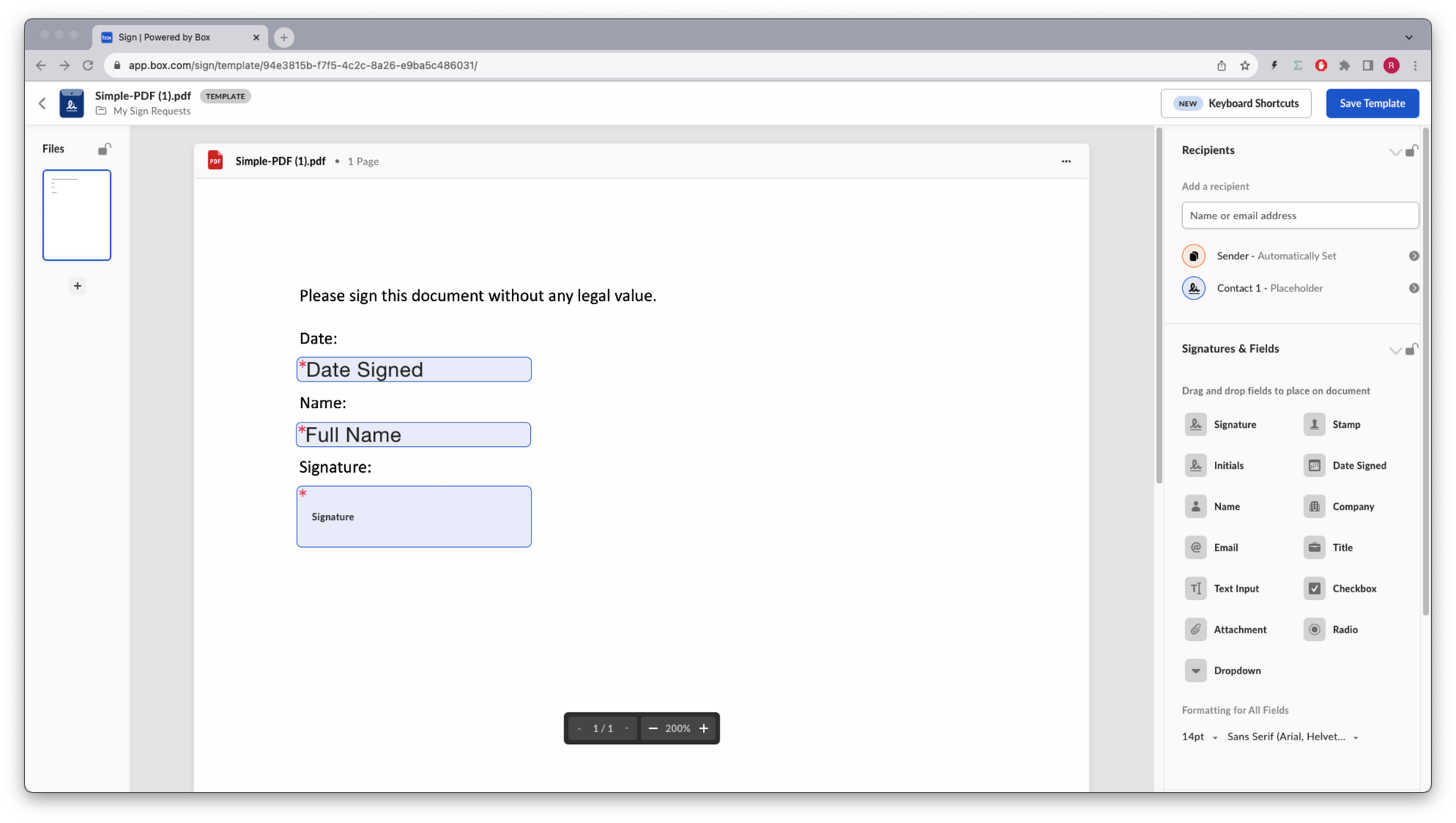 UIの詳細については、[Box Signでのテンプレートの作成](https://support.box.com/hc/en-us/articles/4404094944915-Creating-templates)に関するサポート記事を参照してください。
## テンプレートIDの取得
`template_id`を確認するには、[Box Signテンプレートのリストを取得](/reference/get-sign-templates)エンドポイントを使用します。
```sh theme={null}
curl -i -X GET "https://api.box.com/2.0/sign_templates" \
-H "authorization: Bearer "
```
レスポンスは、以下の簡略化した例のようになります。スキーマの詳細については、[Box Signテンプレートのリストを取得](/reference/get-sign-templates)エンドポイントのリファレンスを参照してください。
```json theme={null}
{
"entries": [
{
"id": "6ae28666-03c4-4ac1-80db-06a90d3b1361",
"name": "Contract.pdf",
"parent_folder": {
"id": "157064745449",
"type": "folder",
"name": "My Sign Requests"
},
"signers": [
{
"email": "",
"label": "reader",
"role": "final_copy_reader"
},
{
"email": "",
"label": "signer1",
"role": "signer"
},
{
"email": "",
"label": "signer2",
"role": "signer",
"inputs": [
{
"document_tag_id": "signer2_full_name",
"type": "text",
"content_type": "full_name"
},
{
"document_tag_id": null,
"type": "signature"
},
{
"document_tag_id": null,
"type": "date"
}
]
}
]
}
]
}
```
各入力フィールドや`document_tag_id`など特定のテンプレートを調べるには、[IDを指定してBox Signテンプレートを取得](/reference/get-sign-templates-id)エンドポイントを使用します。
```sh theme={null}
curl -i -X GET "https://api.box.com/2.0/sign_templates/6ae28666-03c4-4ac1-80db-06a90d3b1361" \
-H "authorization: Bearer "
```
## 署名リクエストの作成
リクエストの作成時に、`template_id`、`parent_folder`、および署名者のメールアドレスを渡します。テンプレートがすでにドキュメントを参照している場合、`source_files`は不要です。`POST`本文内の署名者の順序はテンプレート上の順序と同じにしてください。
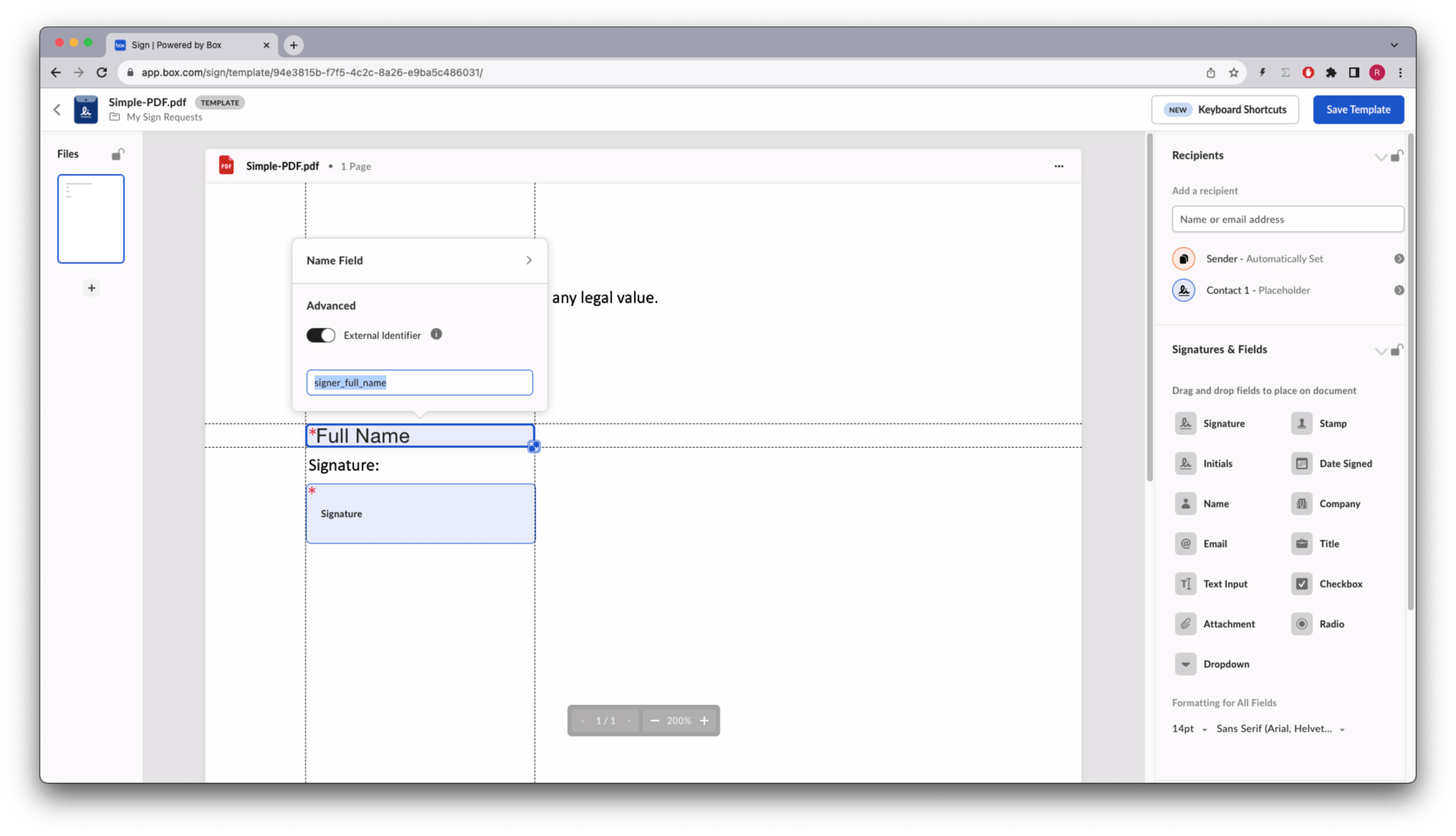
テンプレートエディタで、事前入力する署名フィールドまたはイニシャルフィールドにタグIDを割り当て、その`document_tag_id`を設定した`prefill_tags`を送信します。
UIの詳細については、[Box Signでのテンプレートの作成](https://support.box.com/hc/en-us/articles/4404094944915-Creating-templates)に関するサポート記事を参照してください。
## テンプレートIDの取得
`template_id`を確認するには、[Box Signテンプレートのリストを取得](/reference/get-sign-templates)エンドポイントを使用します。
```sh theme={null}
curl -i -X GET "https://api.box.com/2.0/sign_templates" \
-H "authorization: Bearer "
```
レスポンスは、以下の簡略化した例のようになります。スキーマの詳細については、[Box Signテンプレートのリストを取得](/reference/get-sign-templates)エンドポイントのリファレンスを参照してください。
```json theme={null}
{
"entries": [
{
"id": "6ae28666-03c4-4ac1-80db-06a90d3b1361",
"name": "Contract.pdf",
"parent_folder": {
"id": "157064745449",
"type": "folder",
"name": "My Sign Requests"
},
"signers": [
{
"email": "",
"label": "reader",
"role": "final_copy_reader"
},
{
"email": "",
"label": "signer1",
"role": "signer"
},
{
"email": "",
"label": "signer2",
"role": "signer",
"inputs": [
{
"document_tag_id": "signer2_full_name",
"type": "text",
"content_type": "full_name"
},
{
"document_tag_id": null,
"type": "signature"
},
{
"document_tag_id": null,
"type": "date"
}
]
}
]
}
]
}
```
各入力フィールドや`document_tag_id`など特定のテンプレートを調べるには、[IDを指定してBox Signテンプレートを取得](/reference/get-sign-templates-id)エンドポイントを使用します。
```sh theme={null}
curl -i -X GET "https://api.box.com/2.0/sign_templates/6ae28666-03c4-4ac1-80db-06a90d3b1361" \
-H "authorization: Bearer "
```
## 署名リクエストの作成
リクエストの作成時に、`template_id`、`parent_folder`、および署名者のメールアドレスを渡します。テンプレートがすでにドキュメントを参照している場合、`source_files`は不要です。`POST`本文内の署名者の順序はテンプレート上の順序と同じにしてください。
テンプレートエディタで、事前入力する署名フィールドまたはイニシャルフィールドにタグIDを割り当て、その`document_tag_id`を設定した`prefill_tags`を送信します。
 ```json theme={null}
{
"template_id": "6ae28666-03c4-4ac1-80db-06a90d3b1361",
"parent_folder": {
"id": "123456789000",
"type": "folder"
},
"signers": [
{
"email": "signer1@example.com",
"role": "signer"
},
{
"email": "signer2@example.com",
"role": "signer"
}
],
"prefill_tags": [
{
"document_tag_id": "signer1_full_name",
"text_value": "Ebenezer Scrooge"
},
{
"document_tag_id": "signer2_full_name",
"text_value": "Bob Cratchit"
}
]
}
```
```sh theme={null}
curl -i -X POST "https://api.box.com/2.0/sign_requests" \
-H "authorization: Bearer " \
-H "content-type: application/json" \
-d '{
"template_id": "6ae28666-03c4-4ac1-80db-06a90d3b1361",
"parent_folder": {
"type": "folder",
"id": "123456789000"
},
"signers": [
{
"email": "signer1@example.com",
"role": "signer"
},
{
"email": "signer2@example.com",
"role": "signer"
}
],
"prefill_tags": [
{
"document_tag_id": "signer1_full_name",
"text_value": "Ebenezer Scrooge"
},
{
"document_tag_id": "signer2_full_name",
"text_value": "Bob Cratchit"
}
]
}'
```
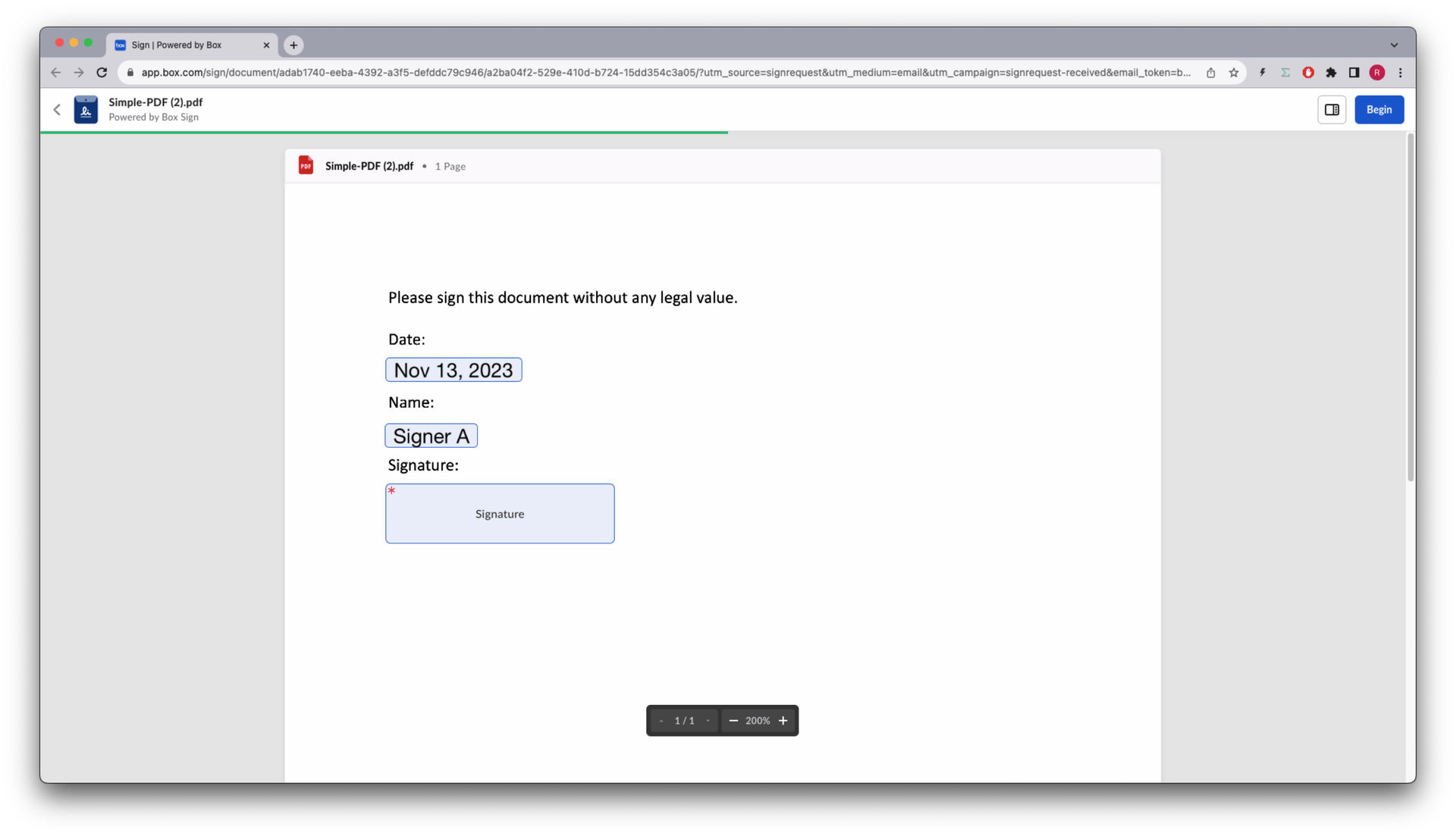
レスポンスには、新しいリクエストの`id`、`template_id`、および事前入力した値が含まれます。テンプレートに署名フィールドやイニシャルフィールドがすでに配置されている場合、ドキュメント準備は不要です。日付フィールドがある場合は、現在の日付が入力されます。署名者は自分に割り当てられたフィールドの値を変更できます。
```json theme={null}
{
"template_id": "6ae28666-03c4-4ac1-80db-06a90d3b1361",
"parent_folder": {
"id": "123456789000",
"type": "folder"
},
"signers": [
{
"email": "signer1@example.com",
"role": "signer"
},
{
"email": "signer2@example.com",
"role": "signer"
}
],
"prefill_tags": [
{
"document_tag_id": "signer1_full_name",
"text_value": "Ebenezer Scrooge"
},
{
"document_tag_id": "signer2_full_name",
"text_value": "Bob Cratchit"
}
]
}
```
```sh theme={null}
curl -i -X POST "https://api.box.com/2.0/sign_requests" \
-H "authorization: Bearer " \
-H "content-type: application/json" \
-d '{
"template_id": "6ae28666-03c4-4ac1-80db-06a90d3b1361",
"parent_folder": {
"type": "folder",
"id": "123456789000"
},
"signers": [
{
"email": "signer1@example.com",
"role": "signer"
},
{
"email": "signer2@example.com",
"role": "signer"
}
],
"prefill_tags": [
{
"document_tag_id": "signer1_full_name",
"text_value": "Ebenezer Scrooge"
},
{
"document_tag_id": "signer2_full_name",
"text_value": "Bob Cratchit"
}
]
}'
```
レスポンスには、新しいリクエストの`id`、`template_id`、および事前入力した値が含まれます。テンプレートに署名フィールドやイニシャルフィールドがすでに配置されている場合、ドキュメント準備は不要です。日付フィールドがある場合は、現在の日付が入力されます。署名者は自分に割り当てられたフィールドの値を変更できます。
 ドキュメントに署名タグやイニシャルタグがすでに含まれていて、ウェブアプリでテンプレートを管理しない場合は、[構造化されたドキュメントへの署名](/guides/box-sign/document-types/structured)を参照してください。