> ## Documentation Index
> Fetch the complete documentation index at: https://developer.box.com/llms.txt
> Use this file to discover all available pages before exploring further.
# Box Doc Genの使い方
export const MultiRelatedLinks = ({sections = []}) => {
if (!sections || sections.length === 0) {
return null;
}
return
{sections.map((section, index) =>
;
};
export const RelatedLinks = ({title, items = []}) => {
const getBadgeClass = badge => {
if (!badge) return "badge-default";
const badgeType = badge.toLowerCase().replace(/\s+/g, "-");
return `badge-${badge === "ガイド" ? "guide" : badgeType}`;
};
if (!items || items.length === 0) {
return null;
}
return ;
};
export const Link = ({href, children, className, ...props}) => {
const localizedHref = localizeLink(href);
return
{children}
;
};
Box Doc Gen APIを使用したドキュメントの生成を開始するには、Platformアプリケーションと、コールを認証するための開発者トークンが必要です。また、ドキュメントの入力ソースとして機能するDoc Genテンプレートも必要です。
## Box Doc Genの有効化
Box Doc Genを使用するには、管理者が管理コンソールで有効にしていることを確認してください。Box管理者の場合、[Enterprise設定: \[コンテンツと共有\] タブ][settings]のドキュメントで必要な情報を確認できます。
## Box Doc Genテンプレートの作成とアップロード
Box Doc Gen APIを使用してドキュメントを生成するには、Box Doc GenテンプレートがすでにBox内に存在する必要があります。テンプレートを作成するには、以下のオプションがあります。
* [Microsoft Word用Box Doc Gen Template Creatorアドイン][template-addin]をインストールする。
* [JSONファイルを使用][json-template]してBox Doc Genテンプレートを作成するか、手動で[テンプレートタグ][template-tags]を作成する。
## Platformアプリケーションの作成
まず、コールの実行に使用するPlatformアプリケーションを作成する必要があります。アプリケーションを作成するには、
開発者トークンの有効期限は1時間のみです。
詳細については、 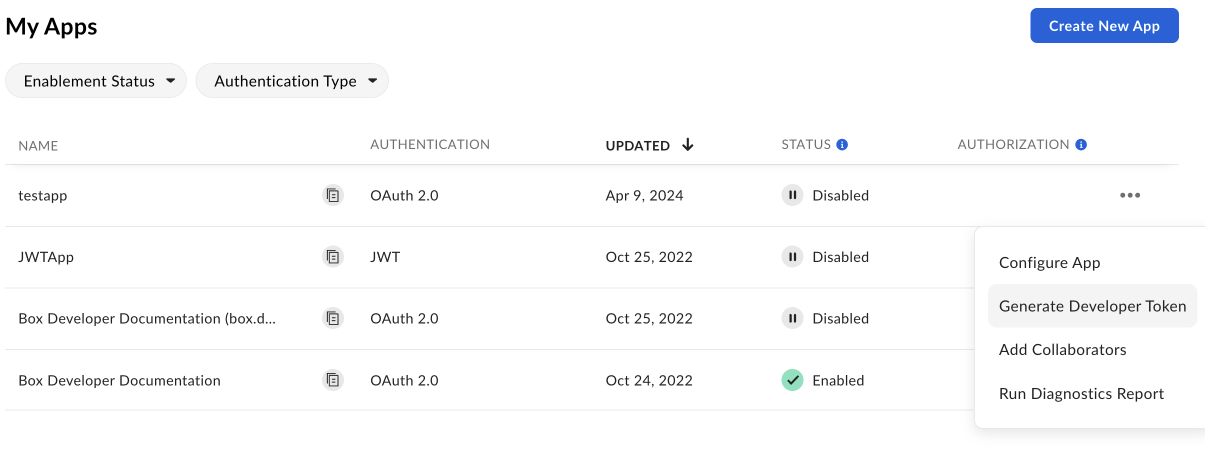 アプリを開いて、\[**構成**] > \[**開発者トークン**] に移動してトークンを生成することもできます。
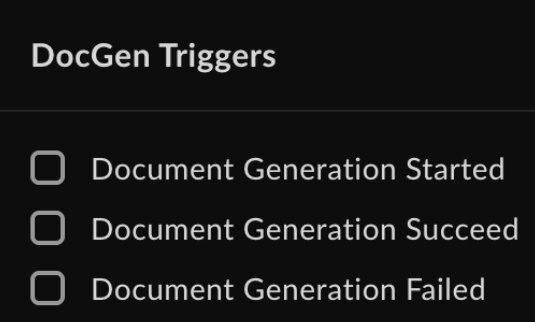 通知に掲載される情報は以下のとおりです。
* トリガー名
* Webhookトリガーのタイムスタンプ
* テンプレートファイルID
* テンプレートファイルバージョンID
* テンプレートファイル名
* 保存先フォルダ
* 生成されたファイルのID (ドキュメント生成プロセスが成功した場合)
* 出力タイプ (DOCXまたはPDF)
* 理由 (ドキュメント生成プロセスが失敗した場合)
[settings]: https://support.box.com/hc/en-us/articles/4404822772755-Enterprise-Settings-Content-Sharing-Tab#h_01FYQGK5RW42T07GV985MQ9E9A
[template-addin]: https://support.box.com/hc/en-us/articles/36587535449747-Installing-Box-Doc-Gen-Add-in
[template-tags]: https://support.box.com/hc/en-us/articles/36151895655059-Creating-A-Box-Doc-Gen-Template-Manually
[json-template]: https://support.box.com/hc/en-us/articles/36148012877843-Creating-a-Box-Doc-Gen-Template-using-JSON-data
通知に掲載される情報は以下のとおりです。
* トリガー名
* Webhookトリガーのタイムスタンプ
* テンプレートファイルID
* テンプレートファイルバージョンID
* テンプレートファイル名
* 保存先フォルダ
* 生成されたファイルのID (ドキュメント生成プロセスが成功した場合)
* 出力タイプ (DOCXまたはPDF)
* 理由 (ドキュメント生成プロセスが失敗した場合)
[settings]: https://support.box.com/hc/en-us/articles/4404822772755-Enterprise-Settings-Content-Sharing-Tab#h_01FYQGK5RW42T07GV985MQ9E9A
[template-addin]: https://support.box.com/hc/en-us/articles/36587535449747-Installing-Box-Doc-Gen-Add-in
[template-tags]: https://support.box.com/hc/en-us/articles/36151895655059-Creating-A-Box-Doc-Gen-Template-Manually
[json-template]: https://support.box.com/hc/en-us/articles/36148012877843-Creating-a-Box-Doc-Gen-Template-using-JSON-data