> ## Documentation Index
> Fetch the complete documentation index at: https://developer.box.com/llms.txt
> Use this file to discover all available pages before exploring further.
# 分類
export const Link = ({href, children, className, ...props}) => {
const localizedHref = localizeLink(href);
return
{children}
;
};
export const MultiRelatedLinks = ({sections = []}) => {
if (!sections || sections.length === 0) {
return null;
}
return
{sections.map((section, index) => )}
;
};
export const RelatedLinks = ({title, items = []}) => {
const getBadgeClass = badge => {
if (!badge) return "badge-default";
const badgeType = badge.toLowerCase().replace(/\s+/g, "-");
return `badge-${badge === "ガイド" ? "guide" : badgeType}`;
};
if (!items || items.length === 0) {
return null;
}
return ;
};
Boxを使用すると、ユーザーおよびアプリケーションは、セキュリティ分類ラベルをファイルを適用したり、分類ラベルをフォルダとそのコンテンツにカスケードしたりできます。分類は、BoxのGovernanceおよびShield製品から不注意でアクセスされないよう、共有した機密性の高いコンテンツを保護するのに役立ちます。
分類APIを使用すると、新しい分類ラベルを作成したり、分類をファイルやフォルダに割り当てたりすることができます。
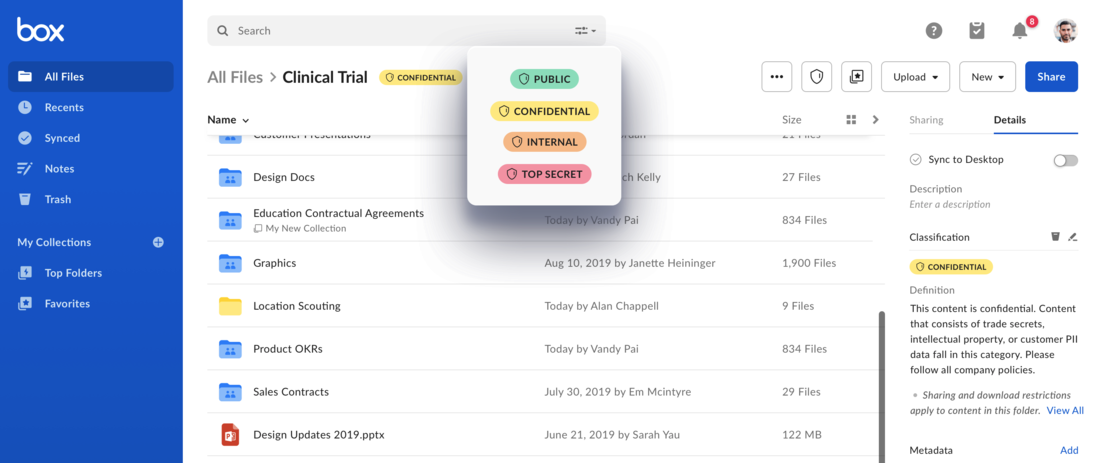 分類では、メタデータAPIを使用して、分類ラベルを作成したり、分類をファイルやフォルダに割り当てたりします。メタデータテンプレートとメタデータインスタンスの詳細については、メタデータに関するガイドを参照してください。
## 分類とメタデータ
分類を使用する場合、開発者はメタデータテンプレートとメタデータインスタンスを操作する必要があります。
* **分類テンプレート:** 分類を使用するために、会社では、1つ以上の分類を含む分類メタデータテンプレートを用意する必要があります。このテンプレートでは、`scope`/`templateKey`を`enterprise.securityClassification-6VMVochwUWo`にしておく必要があります。このテンプレートは、使用可能な分類レベル、そのラベル名、説明、`colorID`値を保持します。
* **テンプレートインスタンス**: ファイルやフォルダに分類を適用するために、開発者は、`enterprise.securityClassification-6VMVochwUWo`テンプレートのインスタンスを項目に適用します。テンプレートが適用されると、テンプレート上の分類のリストから分類のいずれかが選択されます。
分類では、メタデータAPIを使用して、分類ラベルを作成したり、分類をファイルやフォルダに割り当てたりします。メタデータテンプレートとメタデータインスタンスの詳細については、メタデータに関するガイドを参照してください。
## 分類とメタデータ
分類を使用する場合、開発者はメタデータテンプレートとメタデータインスタンスを操作する必要があります。
* **分類テンプレート:** 分類を使用するために、会社では、1つ以上の分類を含む分類メタデータテンプレートを用意する必要があります。このテンプレートでは、`scope`/`templateKey`を`enterprise.securityClassification-6VMVochwUWo`にしておく必要があります。このテンプレートは、使用可能な分類レベル、そのラベル名、説明、`colorID`値を保持します。
* **テンプレートインスタンス**: ファイルやフォルダに分類を適用するために、開発者は、`enterprise.securityClassification-6VMVochwUWo`テンプレートのインスタンスを項目に適用します。テンプレートが適用されると、テンプレート上の分類のリストから分類のいずれかが選択されます。