> ## Documentation Index
> Fetch the complete documentation index at: https://developer.box.com/llms.txt
> Use this file to discover all available pages before exploring further.
# セキュリティの強化 (2要素認証)
Box Signを使用すると、送信者は署名リクエストや再利用可能なテンプレートに対する[セキュリティレイヤー][2FA]を追加できます。署名者に対し、CAC/PIVスマートカード認証、SMSによる多要素認証、またはBoxアカウントへのログインによる身元認証を求めることができます。こうした認証方法に加え、パスワードを追加することで、保護をさらに強化できます。
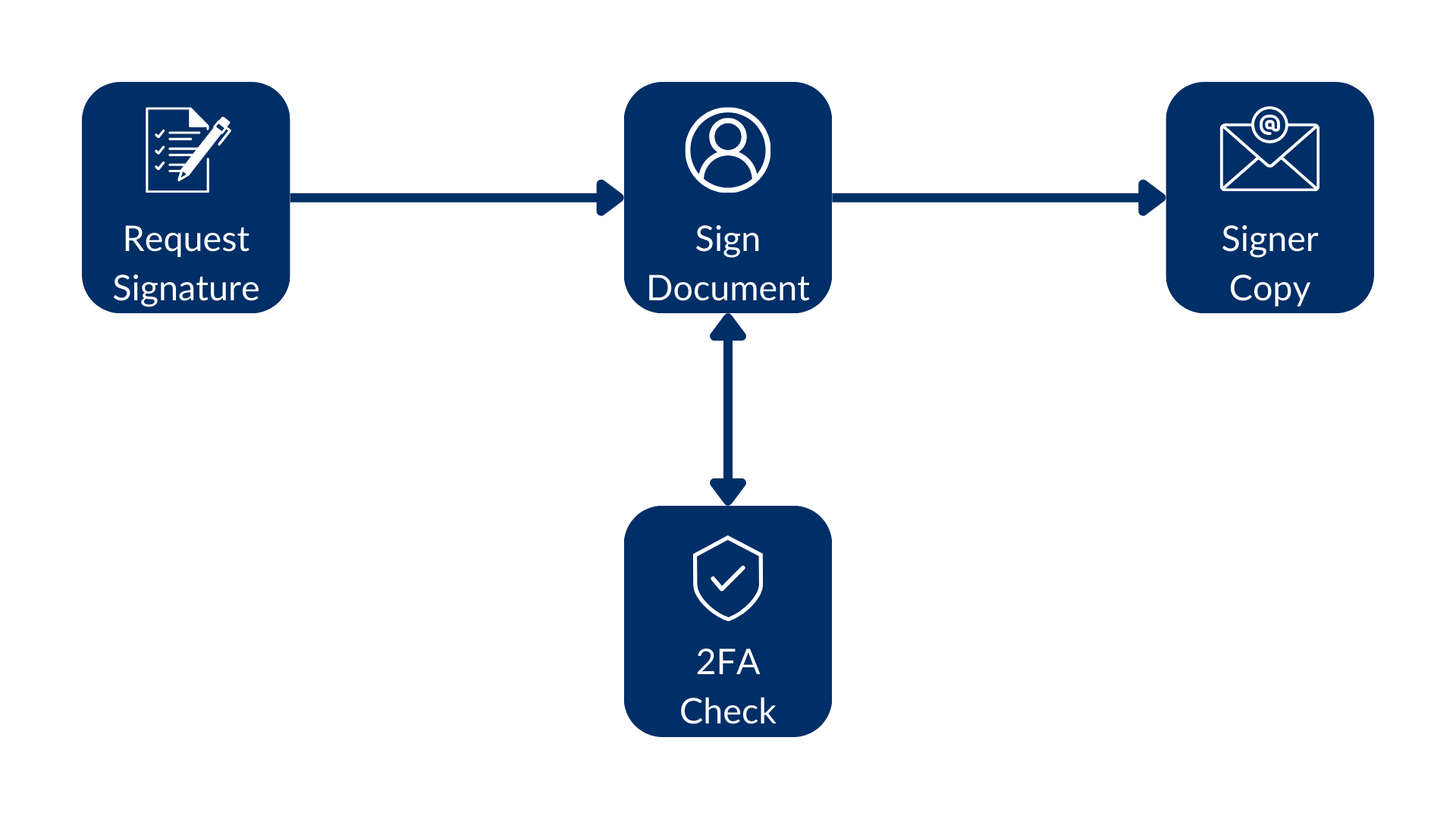 テンプレート内または署名リクエストの作成時にセキュリティレベルを高めることができます。
## 認証方法 (推奨)
`signer`オブジェクトの`verification_method`プロパティを使用すると、署名リクエストを作成する際に署名者の認証方法を統合的に構成できます。すべての認証タイプに対して1つの一貫した構造を使用するため、このアプローチは新規の統合で推奨されます。使用する方法を指定するには、`type`フィールドを設定します。
サポートされるタイプ
| 型 | 説明 |
| --------- | ------------------------------------------------- |
| `cac_piv` | 署名者に、CAC/PIVスマートカードを使用した認証を求めます。 |
| `phone` | 署名者に、SMS認証を実行するように求めます。`phone_number`フィールドを指定します。 |
| `login` | 署名者に、Boxアカウントにログインした後で署名するように求めます。 |
署名リクエストまたは署名テンプレートをクエリすると、各署名者の`verification_method`プロパティに、どの認証方法が設定されているかが表示されます。`null`値が表示されている場合、その署名者は認証を完了する必要がありません。
同じ署名者に`verification_method`と従来の認証プロパティ (`login_required`や`verification_phone_number`など) の両方を設定した場合、`verification_method`が優先されます。APIは従来のプロパティを無視します。
### CAC/PIVスマートカードによる認証
署名者に、CAC/PIVスマートカードによる身元認証を求めるには、署名者の`verification_method`を`{ "type": "cac_piv" }`に設定します。
スマートカード認証を利用するには、組織内でCAC/PIVの権限が有効になっている必要があります。必要な権限が組織にない場合、APIは`403 Forbidden`エラーを返します。CAC/PIVスマートカード認証の詳細については、担当のアカウントチームまでお問い合わせください。
署名リクエストに複数の署名者がいる場合、認証方法として`cac_piv`を使用する際は、署名順序を指定する必要があります。署名者が1人の場合は、署名順序は不要です。
```sh cURL theme={null}
curl --location 'https://api.box.com/2.0/sign_requests' \
--header 'Content-Type: application/json' \
--header 'Authorization: Bearer ej...3t' \
--data-raw '{
"parent_folder": {
"id": "234102987614",
"type": "folder"
},
"source_files": [
{
"id": "1358047520478",
"type": "file"
}
],
"signers": [
{
"email": "signer@example.com",
"role": "signer",
"verification_method": {
"type": "cac_piv"
}
}
]
}'
```
### SMS認証
SMSによる認証を求めるには、署名者の`verification_method`を`{ "type": "phone", "phone_number": "" }`に設定します。電話番号には国コードを含める必要があり、その前に`+`または`00` (例: `+15551232190`または`0015551232190`) を付ける必要があります。
```sh cURL theme={null}
curl --location 'https://api.box.com/2.0/sign_requests' \
--header 'Content-Type: application/json' \
--header 'Authorization: Bearer ej...3t' \
--data-raw '{
"parent_folder": {
"id": "234102987614",
"type": "folder"
},
"source_files": [
{
"id": "1358047520478",
"type": "file"
}
],
"signers": [
{
"email": "signer@example.com",
"role": "signer",
"verification_method": {
"type": "phone",
"phone_number": "+15551232190"
}
}
]
}'
```
### ログイン認証
署名者が署名する前にBoxアカウントにログインするよう求めるには、署名者の`verification_method`を`{ "type": "login" }`に設定します。これは、`login_required`パラメータに代わる推奨される方法です。
```sh cURL theme={null}
curl --location 'https://api.box.com/2.0/sign_requests' \
--header 'Content-Type: application/json' \
--header 'Authorization: Bearer ej...3t' \
--data-raw '{
"parent_folder": {
"id": "234102987614",
"type": "folder"
},
"source_files": [
{
"id": "1358047520478",
"type": "file"
}
],
"signers": [
{
"email": "signer@example.com",
"role": "signer",
"verification_method": {
"type": "login"
}
}
]
}'
```
## パスワード認証
`signer`オブジェクトに`password`パラメータを渡すことにより、署名リクエストを開くためにパスワードを使用するよう署名者に要求することができます。次に例を示します。
```sh cURL theme={null}
curl --location 'https://api.box.com/2.0/sign_requests' \
--header 'Content-Type: application/json' \
--header 'Authorization: Bearer ej...3t' \
--data-raw '{
"is_document_preparation_needed": true,
"parent_folder": {
"id": "234102987614",
"type": "folder"
},
"source_files": [
{
"id": "1358047520478",
"type": "file"
}
],
"signers": [
{
"email": "verify@example.com",
"role": "signer",
"password": "1234"
}
]
}'
```
```python Python Gen SDK theme={null}
def sign_doc_verify_password(
client: Client,
document_id: str,
destination_folder_id: str,
signer_email: str,
signer_password: str,
) -> SignRequest:
# Sign request params
source_file = FileBase(id=document_id, type=FileBaseTypeField.FILE)
destination_folder = FolderMini(
id=destination_folder_id, type=FolderBaseTypeField.FOLDER
)
# signer
signer = SignRequestCreateSigner(
email=signer_email,
password=signer_password,
)
# sign document
sign_request = client.sign_requests.create_sign_request(
signers=[signer],
parent_folder=destination_folder,
source_files=[source_file],
)
return sign_request
def main():
...
# Sign with phone verification
sign_with_password_verification = sign_doc_verify_password(
client,
SIMPLE_PDF,
SIGN_DOCS_FOLDER,
SIGNER_A,
"1234",
)
```
署名者が署名リクエストを開くと、次のような画面が表示されます。
テンプレート内または署名リクエストの作成時にセキュリティレベルを高めることができます。
## 認証方法 (推奨)
`signer`オブジェクトの`verification_method`プロパティを使用すると、署名リクエストを作成する際に署名者の認証方法を統合的に構成できます。すべての認証タイプに対して1つの一貫した構造を使用するため、このアプローチは新規の統合で推奨されます。使用する方法を指定するには、`type`フィールドを設定します。
サポートされるタイプ
| 型 | 説明 |
| --------- | ------------------------------------------------- |
| `cac_piv` | 署名者に、CAC/PIVスマートカードを使用した認証を求めます。 |
| `phone` | 署名者に、SMS認証を実行するように求めます。`phone_number`フィールドを指定します。 |
| `login` | 署名者に、Boxアカウントにログインした後で署名するように求めます。 |
署名リクエストまたは署名テンプレートをクエリすると、各署名者の`verification_method`プロパティに、どの認証方法が設定されているかが表示されます。`null`値が表示されている場合、その署名者は認証を完了する必要がありません。
同じ署名者に`verification_method`と従来の認証プロパティ (`login_required`や`verification_phone_number`など) の両方を設定した場合、`verification_method`が優先されます。APIは従来のプロパティを無視します。
### CAC/PIVスマートカードによる認証
署名者に、CAC/PIVスマートカードによる身元認証を求めるには、署名者の`verification_method`を`{ "type": "cac_piv" }`に設定します。
スマートカード認証を利用するには、組織内でCAC/PIVの権限が有効になっている必要があります。必要な権限が組織にない場合、APIは`403 Forbidden`エラーを返します。CAC/PIVスマートカード認証の詳細については、担当のアカウントチームまでお問い合わせください。
署名リクエストに複数の署名者がいる場合、認証方法として`cac_piv`を使用する際は、署名順序を指定する必要があります。署名者が1人の場合は、署名順序は不要です。
```sh cURL theme={null}
curl --location 'https://api.box.com/2.0/sign_requests' \
--header 'Content-Type: application/json' \
--header 'Authorization: Bearer ej...3t' \
--data-raw '{
"parent_folder": {
"id": "234102987614",
"type": "folder"
},
"source_files": [
{
"id": "1358047520478",
"type": "file"
}
],
"signers": [
{
"email": "signer@example.com",
"role": "signer",
"verification_method": {
"type": "cac_piv"
}
}
]
}'
```
### SMS認証
SMSによる認証を求めるには、署名者の`verification_method`を`{ "type": "phone", "phone_number": "" }`に設定します。電話番号には国コードを含める必要があり、その前に`+`または`00` (例: `+15551232190`または`0015551232190`) を付ける必要があります。
```sh cURL theme={null}
curl --location 'https://api.box.com/2.0/sign_requests' \
--header 'Content-Type: application/json' \
--header 'Authorization: Bearer ej...3t' \
--data-raw '{
"parent_folder": {
"id": "234102987614",
"type": "folder"
},
"source_files": [
{
"id": "1358047520478",
"type": "file"
}
],
"signers": [
{
"email": "signer@example.com",
"role": "signer",
"verification_method": {
"type": "phone",
"phone_number": "+15551232190"
}
}
]
}'
```
### ログイン認証
署名者が署名する前にBoxアカウントにログインするよう求めるには、署名者の`verification_method`を`{ "type": "login" }`に設定します。これは、`login_required`パラメータに代わる推奨される方法です。
```sh cURL theme={null}
curl --location 'https://api.box.com/2.0/sign_requests' \
--header 'Content-Type: application/json' \
--header 'Authorization: Bearer ej...3t' \
--data-raw '{
"parent_folder": {
"id": "234102987614",
"type": "folder"
},
"source_files": [
{
"id": "1358047520478",
"type": "file"
}
],
"signers": [
{
"email": "signer@example.com",
"role": "signer",
"verification_method": {
"type": "login"
}
}
]
}'
```
## パスワード認証
`signer`オブジェクトに`password`パラメータを渡すことにより、署名リクエストを開くためにパスワードを使用するよう署名者に要求することができます。次に例を示します。
```sh cURL theme={null}
curl --location 'https://api.box.com/2.0/sign_requests' \
--header 'Content-Type: application/json' \
--header 'Authorization: Bearer ej...3t' \
--data-raw '{
"is_document_preparation_needed": true,
"parent_folder": {
"id": "234102987614",
"type": "folder"
},
"source_files": [
{
"id": "1358047520478",
"type": "file"
}
],
"signers": [
{
"email": "verify@example.com",
"role": "signer",
"password": "1234"
}
]
}'
```
```python Python Gen SDK theme={null}
def sign_doc_verify_password(
client: Client,
document_id: str,
destination_folder_id: str,
signer_email: str,
signer_password: str,
) -> SignRequest:
# Sign request params
source_file = FileBase(id=document_id, type=FileBaseTypeField.FILE)
destination_folder = FolderMini(
id=destination_folder_id, type=FolderBaseTypeField.FOLDER
)
# signer
signer = SignRequestCreateSigner(
email=signer_email,
password=signer_password,
)
# sign document
sign_request = client.sign_requests.create_sign_request(
signers=[signer],
parent_folder=destination_folder,
source_files=[source_file],
)
return sign_request
def main():
...
# Sign with phone verification
sign_with_password_verification = sign_doc_verify_password(
client,
SIMPLE_PDF,
SIGN_DOCS_FOLDER,
SIGNER_A,
"1234",
)
```
署名者が署名リクエストを開くと、次のような画面が表示されます。
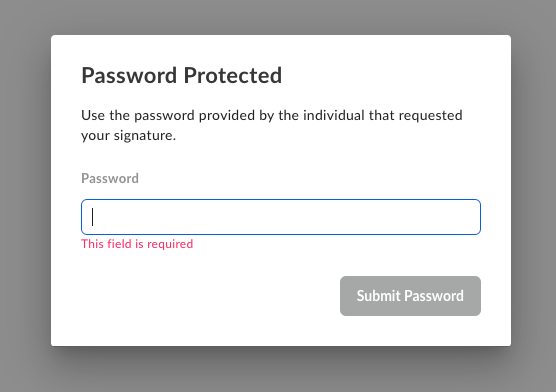 パスワード認証は最初の手順で行われるため、正しいパスワードが入力されるまで、署名者はドキュメントにアクセスできません。
## SMS認証 (レガシー)
また、署名者オブジェクトの`verification_phone_number`パラメータを使用してSMS認証を構成することもできます。この方法は正式にサポートされていますが、新しい統合については、すべての認証タイプで一貫したエクスペリエンスを確保できるよう、代わりに`verification_method`を使用することをお勧めします。
署名者にSMS認証を完了するよう求めるために、電話番号とともに`verification_phone_number`パラメータを渡します。例えば、以下のようになります。
```sh cURL theme={null}
curl --location 'https://api.box.com/2.0/sign_requests' \
--header 'Content-Type: application/json' \
--header 'Authorization: Bearer ej...3t' \
--data-raw '{
"is_document_preparation_needed": true,
"is_phone_verification_required_to_view": true,
"parent_folder": {
"id": "234102987614",
"type": "folder"
},
"source_files": [
{
"id": "1358047520478",
"type": "file"
}
],
"signers": [
{
"email": "verify@example.com",
"role": "signer",
"verification_phone_number": "+15551232190"
}
]
}'
```
```python Python Gen SDK theme={null}
def sign_doc_verify_phone(
client: Client,
document_id: str,
destination_folder_id: str,
signer_email: str,
signer_phone: str,
) -> SignRequest:
# Sign request params
source_file = FileBase(id=document_id, type=FileBaseTypeField.FILE)
destination_folder = FolderMini(
id=destination_folder_id, type=FolderBaseTypeField.FOLDER
)
signer = SignRequestCreateSigner(
email=signer_email,
verification_phone_number=signer_phone,
)
# sign document
sign_request = client.sign_requests.create_sign_request(
signers=[signer],
parent_folder=destination_folder,
source_files=[source_file],
is_phone_verification_required_to_view=True,
)
return sign_request
def main():
...
# Sign with phone verification
sign_with_phone_verification = sign_doc_verify_phone(
client,
SIMPLE_PDF,
SIGN_DOCS_FOLDER,
SIGNER_A,
SIGNER_A_PHONE,
)
check_sign_request(sign_with_phone_verification)
```
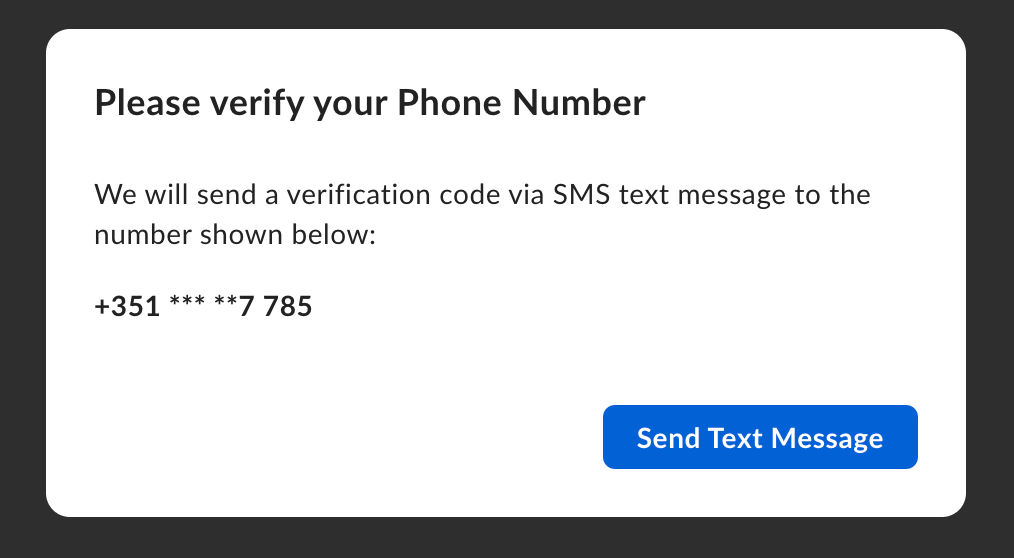
署名者が署名リクエストにアクセスしようとすると、SMS認証のダイアログがポップアップ表示されます。
パスワード認証は最初の手順で行われるため、正しいパスワードが入力されるまで、署名者はドキュメントにアクセスできません。
## SMS認証 (レガシー)
また、署名者オブジェクトの`verification_phone_number`パラメータを使用してSMS認証を構成することもできます。この方法は正式にサポートされていますが、新しい統合については、すべての認証タイプで一貫したエクスペリエンスを確保できるよう、代わりに`verification_method`を使用することをお勧めします。
署名者にSMS認証を完了するよう求めるために、電話番号とともに`verification_phone_number`パラメータを渡します。例えば、以下のようになります。
```sh cURL theme={null}
curl --location 'https://api.box.com/2.0/sign_requests' \
--header 'Content-Type: application/json' \
--header 'Authorization: Bearer ej...3t' \
--data-raw '{
"is_document_preparation_needed": true,
"is_phone_verification_required_to_view": true,
"parent_folder": {
"id": "234102987614",
"type": "folder"
},
"source_files": [
{
"id": "1358047520478",
"type": "file"
}
],
"signers": [
{
"email": "verify@example.com",
"role": "signer",
"verification_phone_number": "+15551232190"
}
]
}'
```
```python Python Gen SDK theme={null}
def sign_doc_verify_phone(
client: Client,
document_id: str,
destination_folder_id: str,
signer_email: str,
signer_phone: str,
) -> SignRequest:
# Sign request params
source_file = FileBase(id=document_id, type=FileBaseTypeField.FILE)
destination_folder = FolderMini(
id=destination_folder_id, type=FolderBaseTypeField.FOLDER
)
signer = SignRequestCreateSigner(
email=signer_email,
verification_phone_number=signer_phone,
)
# sign document
sign_request = client.sign_requests.create_sign_request(
signers=[signer],
parent_folder=destination_folder,
source_files=[source_file],
is_phone_verification_required_to_view=True,
)
return sign_request
def main():
...
# Sign with phone verification
sign_with_phone_verification = sign_doc_verify_phone(
client,
SIMPLE_PDF,
SIGN_DOCS_FOLDER,
SIGNER_A,
SIGNER_A_PHONE,
)
check_sign_request(sign_with_phone_verification)
```
署名者が署名リクエストにアクセスしようとすると、SMS認証のダイアログがポップアップ表示されます。
 その後、署名者はSMSで送信されたコードを入力するよう求められます。
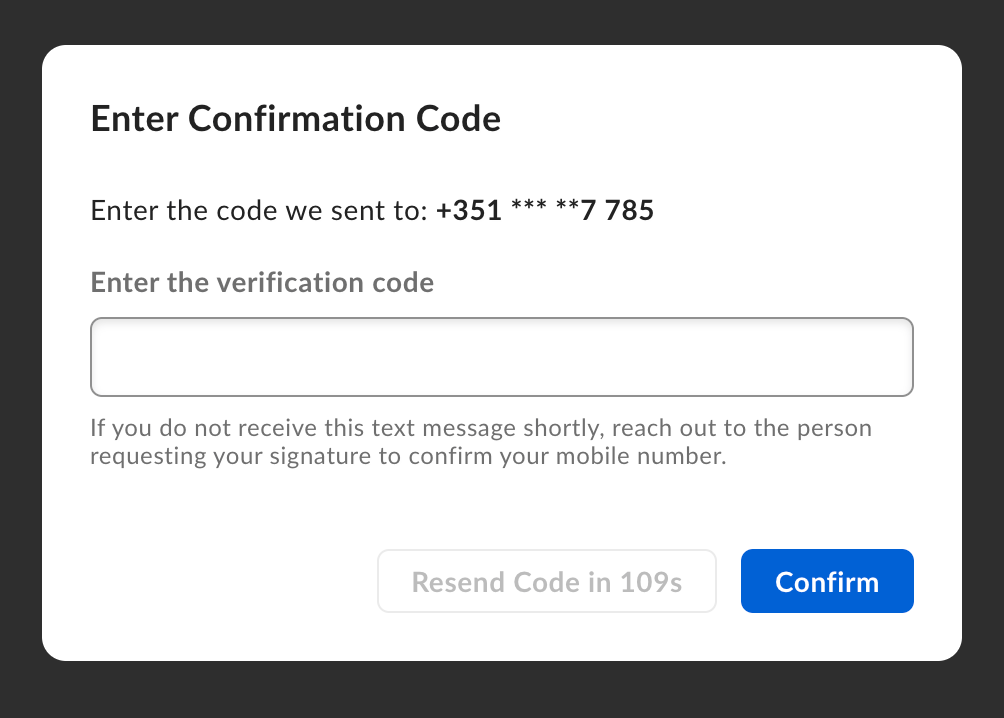 デフォルトでは、SMS認証は署名の手順で求められます。そのため、署名者は認証を行う前にドキュメントを表示できます。署名者がドキュメントを表示する前にSMS認証を求めるには、署名リクエストを作成する際に、`is_phone_verification_required_to_view`パラメータを`true`に設定します。
[2FA]: https://support.box.com/hc/en-us/articles/4406861109907-Additional-Signer-Authentication
デフォルトでは、SMS認証は署名の手順で求められます。そのため、署名者は認証を行う前にドキュメントを表示できます。署名者がドキュメントを表示する前にSMS認証を求めるには、署名リクエストを作成する際に、`is_phone_verification_required_to_view`パラメータを`true`に設定します。
[2FA]: https://support.box.com/hc/en-us/articles/4406861109907-Additional-Signer-Authentication