

FileSelection— global Apex type withselectedFileId/selectedFileName. The value the picker returns.boxFileSelection— Lightning Type that renders theboxFilePickerUI (Recent Items / Browse Box Files / Current Record Folder).
Namespace (subscriber orgs)
Everything is under theboxagents namespace. In a subscriber org, reference packaged components with the prefix — the bare names won’t compile:
Using bare
FileSelection causes Invalid type: FileSelection / InvocableVariable fields do not support type … / Variable does not exist: req.file.
Steps
- Add a
boxagents.FileSelection@InvocableVariableto yourRequest. - Read
req.file.selectedFileId(andselectedFileName). - In Agent Builder, map that input to the
boxagents__boxFileSelectionLightning Type so the picker UI renders.
Mapping the input in Agent assets
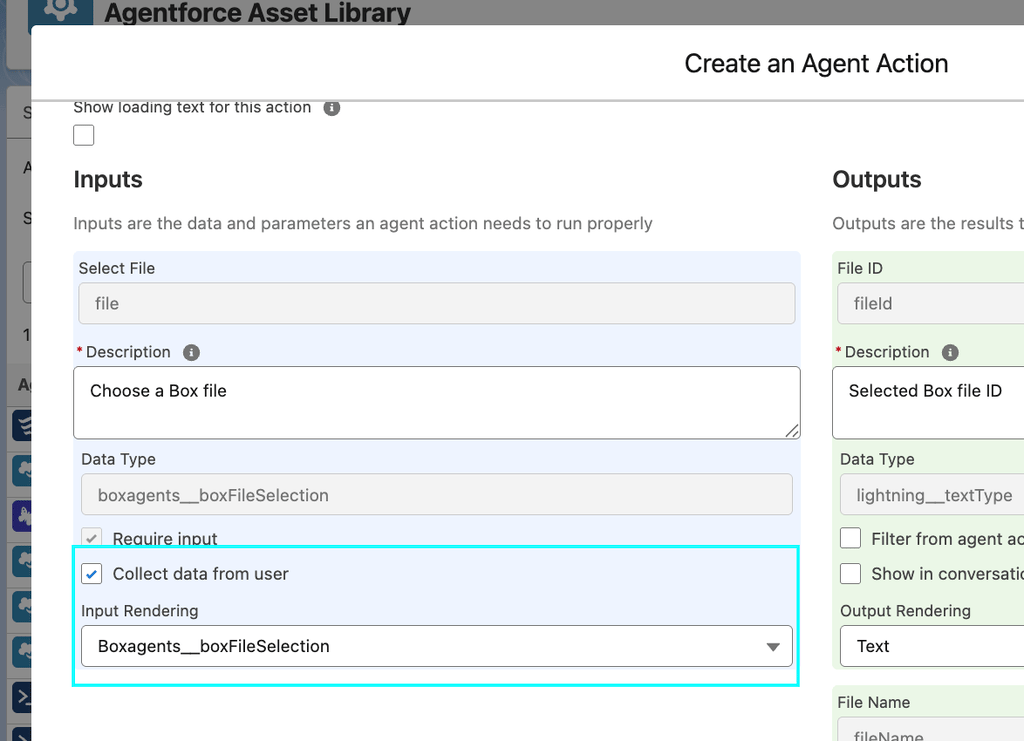
- Open your custom action (Agentforce Studio → Agent Actions, or Flow Builder).
- Select the Select File input.
- Set its reference / Lightning Type to
boxagents__boxFileSelection(Box File Picker). - Save and activate.
Notes
- Namespace prefix in subscriber orgs is the #1 source of errors.
- Null-check
req.file/req.file.selectedFileId. - The ID is what Box APIs need; the name is for display/logging.
- Full references: the shipped
BoxAIAskWithFilePicker,BoxAIGenTextWithFilePicker,BoxAIExtractFieldsWithFilePicker,BoxAIExtractMetadataWithFilePicker.