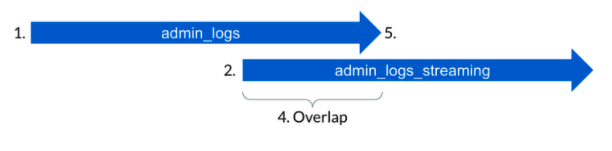
Box recommends that applications subscribing to live events through
admin_logs migrate to admin_logs_streaming. admin_logs_streaming provides
lower and more consistent latency, as well as ensures that late arriving
events are not missed. Events can be deduplicated between admin_logs and
admin_logs_streaming by their event IDs.
Enterprise stream_type comparison
Benefits of admin_logs_streaming
- Ensures late arriving events are not missed by your subscribing application
- Provides 80% lower latency (during normal operations)
- Has much more consistent latency (during normal operations)
- Recovers much more gracefully from a fault, because your service no longer has to manage backfilling late events
Differences between admin_logs and admin_logs_streaming
- Provides two weeks of event history (i.e. retention)
- Does not support the
created_after and created_before filter parameters
- May contain duplicates (provides an ‘at least once’ guarantee)
- No longer returns events in chronological order (events are returned in roughly the order they are processed)
Similarities between admin_logs and admin_logs_streaming
- Shares the same API endpoint
- Returns the same events payload (events can be deduplicated across the two stream types by event ID)
- Enables filtering by
event_type
- Allows paginating through events via a
stream_position
How to migrate from admin_logs to admin_logs_streaming
1. Existing requests will look something like the below
2. Begin overlapping existing requests with admin_logs_streaming
-
Start two weeks ago and backfill:
or
-
Start now and run in parallel:
3. Paginate through results until now and deduplicate with admin_logs events
4. Continue to overlap until confident
5. Turn off old admin_logs requests
Last modified on July 3, 2026