Box AI API を使用すると、指定したファイルからメタデータを抽出し、結果をキー/値ペアの形式で取得することができます。入力には、fieldsパラメータを使用して構造を作成するか、すでに定義済みのメタデータテンプレートを使用できます。テンプレートの作成の詳細については、メタデータテンプレートのカスタマイズ を参照するか、メタデータテンプレート API を使用してください。
サポートされているファイル形式
このエンドポイントでは、以下のファイル形式がサポートされています。
Box AIは、画像ファイル (TIFF、PNG、JPEG) やスキャンしたドキュメントを処理する際、自動的に光学式文字認識 (OCR) を適用します。これにより、抽出前に画像をPDFに変換する必要がなくなるため、時間の節約と統合の簡略化が実現します。
サポートされている言語
Box AIは、以下の言語のドキュメントからメタデータを抽出できます。
キリル文字ベースの言語 (ロシア語、ウクライナ語、ブルガリア語、セルビア語など)
異なる言語や画像形式を使用するために追加の構成は必要ありません。Box AIは、自動的に言語を検出し、必要に応じてOCRを適用します。
開始する前に
Platform アプリを作成して認証するには、Box AI の使い方 に記載されている手順に従っていることを確認してください。
リクエストの送信
リクエストを送信するには、POST /2.0/ai/extract_structuredエンドポイントを使用します。
cURL
Node/TypeScript v10
Python v10
.NET v10
Swift v10
Java v10
Java v5
curl -i -L 'https://api.box.com/2.0/ai/extract_structured' \
-H 'content-type: application/json' \
-H 'authorization: Bearer <ACCESS_TOKEN>' \
-d '{
"items": [
{
"id": "12345678",
"type": "file",
"content": "This is file content."
}
],
"metadata_template": {
"template_key": "",
"type": "metadata_template",
"scope": ""
},
"fields": [
{
"key": "name",
"description": "The name of the person.",
"displayName": "Name",
"prompt": "The name is the first and last name from the email address.",
"type": "string",
"options": [
{
"key": "First Name"
},
{
"key": "Last Name"
}
]
}
],
"ai_agent": {
"type": "ai_agent_extract_structured",
"long_text": {
"model": "azure__openai__gpt_4o_mini"
},
"basic_text": {
"model": "azure__openai__gpt_4o_mini"
}
}
}'
パラメータ
コールを実行するには、以下のパラメータを渡す必要があります。必須のパラメータは太字 で示されています。
items配列に含めることができる要素は 1 つだけです。
パラメータ 説明 例 metadata_template抽出するフィールドを含むメタデータテンプレート。リクエストを機能させるには、metadata_templateまたはfieldsを指定する必要がありますが、両方を指定することはできません。 metadata_template.typeメタデータテンプレートのタイプ。 metadata_templatemetadata_template.scopeメタデータテンプレートのスコープ。globalまたはenterpriseのいずれかになります。global テンプレートは、任意の Box Enterprise で利用できますが、enterpriseテンプレートは特定の Enterprise に関連付けられます。 metadata_templatemetadata_template.template_keyメタデータテンプレートの名前。 invoiceitems.idドキュメントの Box ファイル ID。ID は、拡張子が付いている実際のファイルを参照する必要があります。 1233039227512items.type指定した入力データのタイプ。 fileitems.content項目のコンテンツ (多くの場合はテキストレプリゼンテーション)。 This article is about Box AI.fields.typeフィールドのタイプ。これには、string、float、date、enum、multiSelectが含まれますが、これらに限定されるものではありません。 stringfields.descriptionフィールドの説明。 The person's name.fields.displayNameフィールドの表示名。 Namefields.keyフィールドの一意の識別子。 namefields.optionsこのフィールドのオプションのリスト。ほとんどの場合、enumおよびmultiSelectフィールドタイプと組み合わせて使用します。 [{"key":"First Name"},{"key":"Last Name"}]fields.options.keyフィールドの一意の識別子。 First Namefields.promptキー (識別子) に関する追加のコンテキスト。キーの確認方法や形式を含めることができます。 Name is the first and last name from the email addressai_agentデフォルトのエージェント構成を上書きするために使用される AI エージェント。このパラメータを使用すると、たとえば、model パラメータを使用してデフォルトの LLM をカスタムの LLM に置き換えたり、よりカスタマイズされたユーザーエクスペリエンスを実現できるようにベースとなるprompt を微調整したり、temperatureなどの LLM パラメータを変更して結果の創造性を調整したりすることができます。ai_agentパラメータを使用する前に、GET 2.0/ai_agent_default リクエストを使用してデフォルト構成を取得できます。具体的なユースケースについては、AI モデルの上書きに関するチュートリアル を参照してください。
ユースケース
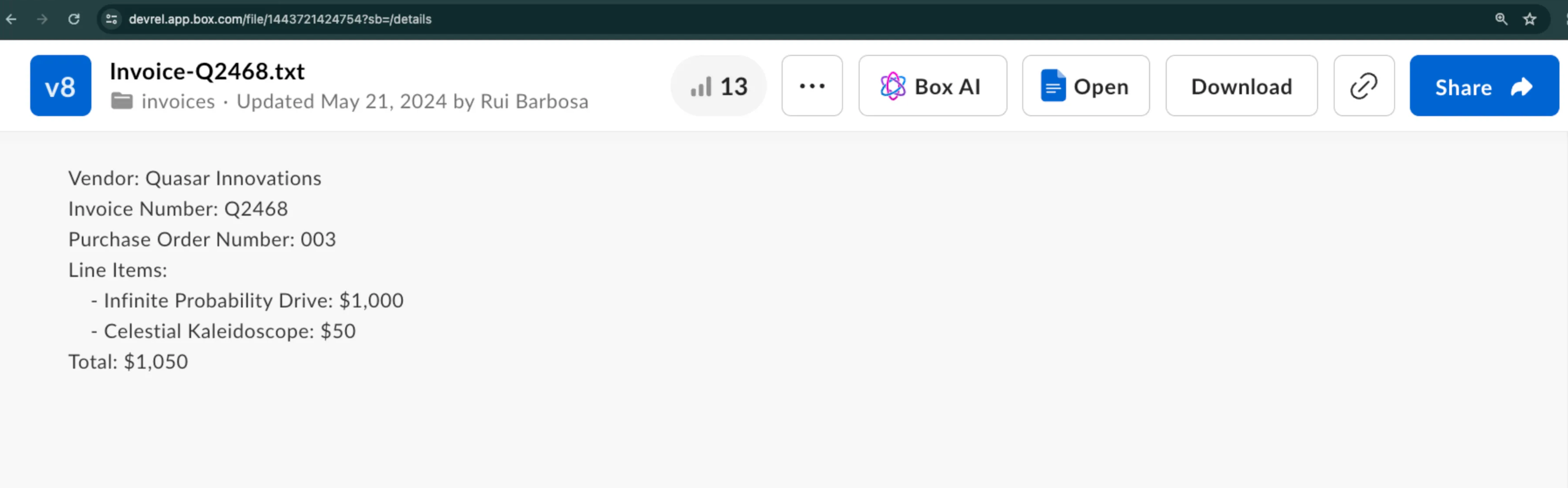
この例では、サンプル請求書から構造化された形でメタデータを抽出する方法を示します。ベンダー名、請求書番号などの詳細情報を抽出する必要があるとします。
リクエストの作成
Box AI から応答を取得するには、以下のパラメータを使用して、POST /2.0/ai/extract_structuredエンドポイントを呼び出します。
items.typeおよびitems.id: データの抽出元となるファイルを指定します。
fields: 指定したファイルから抽出するデータを指定します。
metadata_template: 既存のメタデータテンプレートを指定します。
fieldsとmetadata_templateのどちらかを使用して、構造を指定できます。両方を使用することはできません。
fieldsパラメータの使用
fieldsパラメータを使用すると、抽出するデータを指定できます。各fieldsオブジェクトにはパラメータのサブセットがあり、それを使用して、検索対象のデータに関する情報を追加できます。たとえば、フィールドのタイプや説明、さらには追加のコンテキストを含めたプロンプトを追加することができます。
curl --location 'https://api.box.com/2.0/ai/extract_structured' \
--header 'Content-Type: application/json' \
--header 'Authorization: Bearer <ACCESS_TOKEN>'' \
--data '{
"items" : [
{
"id" : "1517628697289",
"type" : "file"
}
],
"fields" : [
{
"key" : "document_type",
"type" : "enum",
"prompt" : "what type of document is this?",
"options" : [
{
"key" : "Invoice"
},
{
"key" : "Purchase Order"
},
{
"key" : "Unknown"
}
]
},
{
"key" : "document_date",
"type" : "date"
},
{
"key" : "vendor",
"description" : "The name of the entity.",
"prompt" : "Which vendor is sending this document.",
"type" : "string"
},
{
"key" : "document_total",
"type" : "float"
}
]
} '
応答には、以下のように、指定したフィールドとその値が示されます。
{
"document_date" : "2024-02-13",
"vendor" : "Quasar Innovations",
"document_total" : $1050 ,
"document_type" : "Purchase Order"
}
メタデータテンプレートの使用
メタデータテンプレートを使用する場合は、そのtemplate_key、type、scopeを指定します。
curl --location 'https://api.box.com/2.0/ai/extract_structured' \
--header 'Content-Type: application/json' \
--header 'Authorization: Bearer <ACCESS_TOKEN>' \
--data '{
"items": [
{
"id": "1517628697289",
"type": "file"
}
],
"metadata_template": {
"template_key": "rbInvoicePO",
"type": "metadata_template",
"scope": "enterprise_1134207681"
}
}'
応答には、以下のように、メタデータテンプレートに含まれているフィールドとその値が示されます。
{
"documentDate" : "February 13, 2024",
"total" : " $1050 ",
"documentType" : "Purchase Order",
"vendor" : "Quasar Innovations",
"purchaseOrderNumber" : "003"
}
抽出エージェント (強化)
抽出エージェント (強化) を使用するには、次のようにai_agentオブジェクトを指定します。
{
"ai_agent" : {
"type" : "ai_agent_id",
"id" : "enhanced_extract_agent"
}
}
抽出エージェント (強化) を使用してデータを抽出するには、以下のいずれかが必要です。
Box Python SDK を使用したサンプルのコードスニペットを確認してください。
from box_sdk_gen import (
AiAgentReference,
AiAgentReferenceTypeField,
AiItemBase,
AiItemBaseTypeField,
BoxClient,
BoxCCGAuth,
CCGConfig,
CreateAiExtractStructuredMetadataTemplate
)
# Create your client credentials grant config from the developer console
ccg_config = CCGConfig(
client_id = "my_box_client_id" , # replace with your client id
client_secret = "my_box_client_secret" , # replace with your client secret
user_id = "my_box_user_id" , # replace with the box user id that has access
# to the file you are referencing
)
auth = BoxCCGAuth( config = ccg_config)
client = BoxClient( auth = auth)
# Create the agent config referencing the enhanced extract agent
enhanced_extract_agent_config = AiAgentReference(
id = "enhanced_extract_agent" ,
type = AiAgentReferenceTypeField. AI_AGENT_ID
)
# Use the Box SDK to call the extract_structured endpoint
box_ai_response = client.ai.create_ai_extract_structured(
# Create the items array containing the file information to extract from
items = [
AiItemBase(
id = "my_box_file_id" , # replace with the file id
type = AiItemBaseTypeField. FILE
)
],
# Reference the Box Metadata template
metadata_template = CreateAiExtractStructuredMetadataTemplate(
template_key = "InvoicePO" ,
scope = "enterprise"
),
# Attach the agent config you created earlier
ai_agent = enhanced_extract_agent_config,
)
print ( f "box_ai_response: { box_ai_response.answer } " )