

This walkthrough creates a basic request. For every creation option, see
Create a Box Sign request.
Creating a signature request
Use the Box Sign API or one of the available SDKs to create a signature request. See the example:Check the status of the signature request
Creating the signature request is an asynchronous process, and can generate errors. Your application needs to check the status of the request before proceeding, and handle any errors. A signature request can have the following statuses: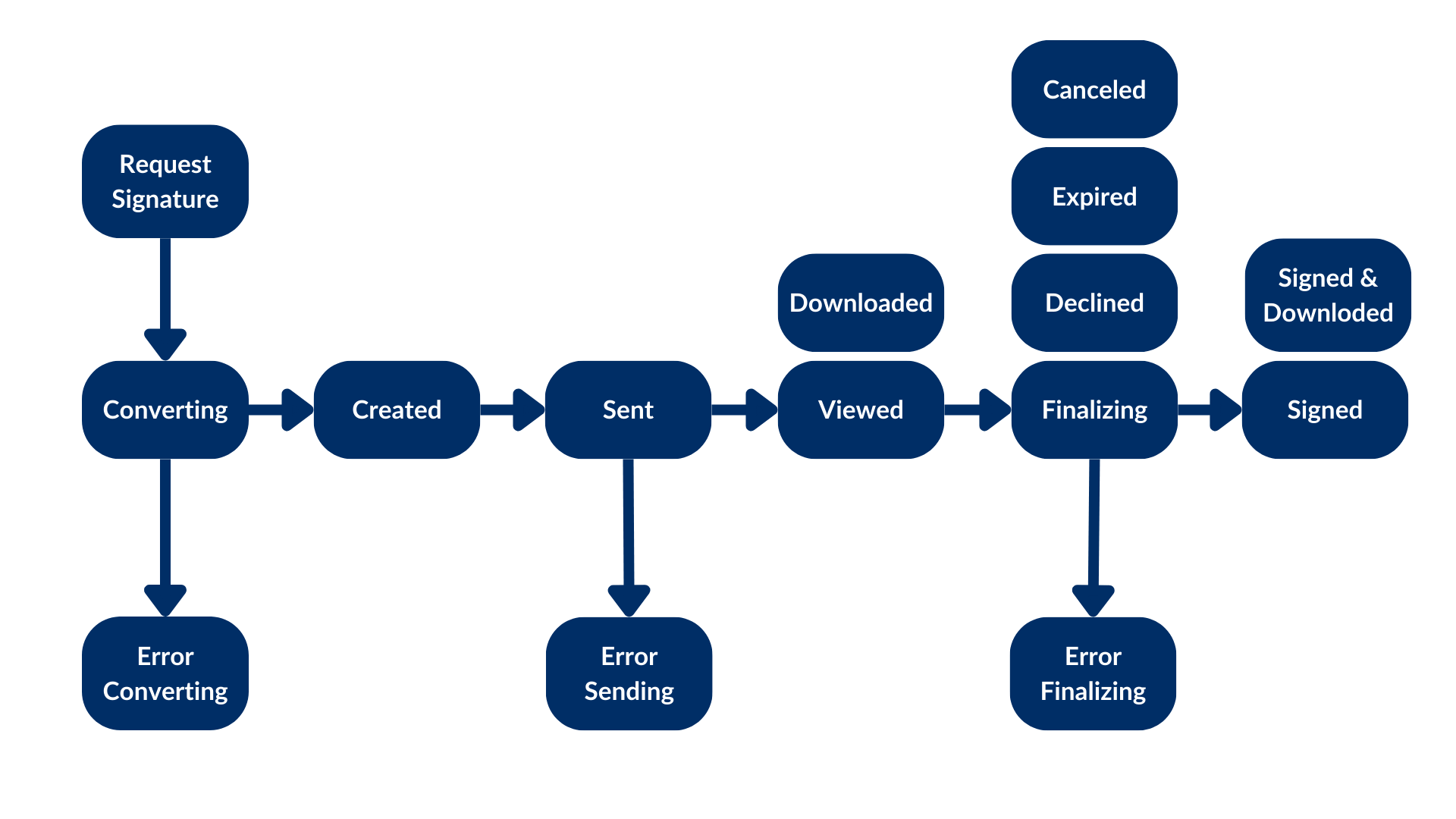
Preparing the document
In this example, we are signing a PDF, and the Box Sign engine has no idea where to place the signature pad field or any other inputs. This is why we used theis_document_preparation_needed flag.
If a prepare URL is present, your application opens the prepare
URL in a browser, where the requester can add the signature pad field and any
other inputs needed for the signer to complete the document.
Once the document is prepared, the requester can send the signature request to
the signer.
This preparation step is not always necessary. Take a look at
document types for more information.
Completing the signature request
The signer then receives an email from Box with a link to the signature request. The signer can select the link and sign the document. When the process is completed, both a signature log containing metadata and the signed document are stored in the destination folder. Congratulations! You have successfully created your first signature request.This is the basic Box Sign create flow. For every creation option, see
Create a Box Sign request.
For document types and other scenarios, see
Document types.