

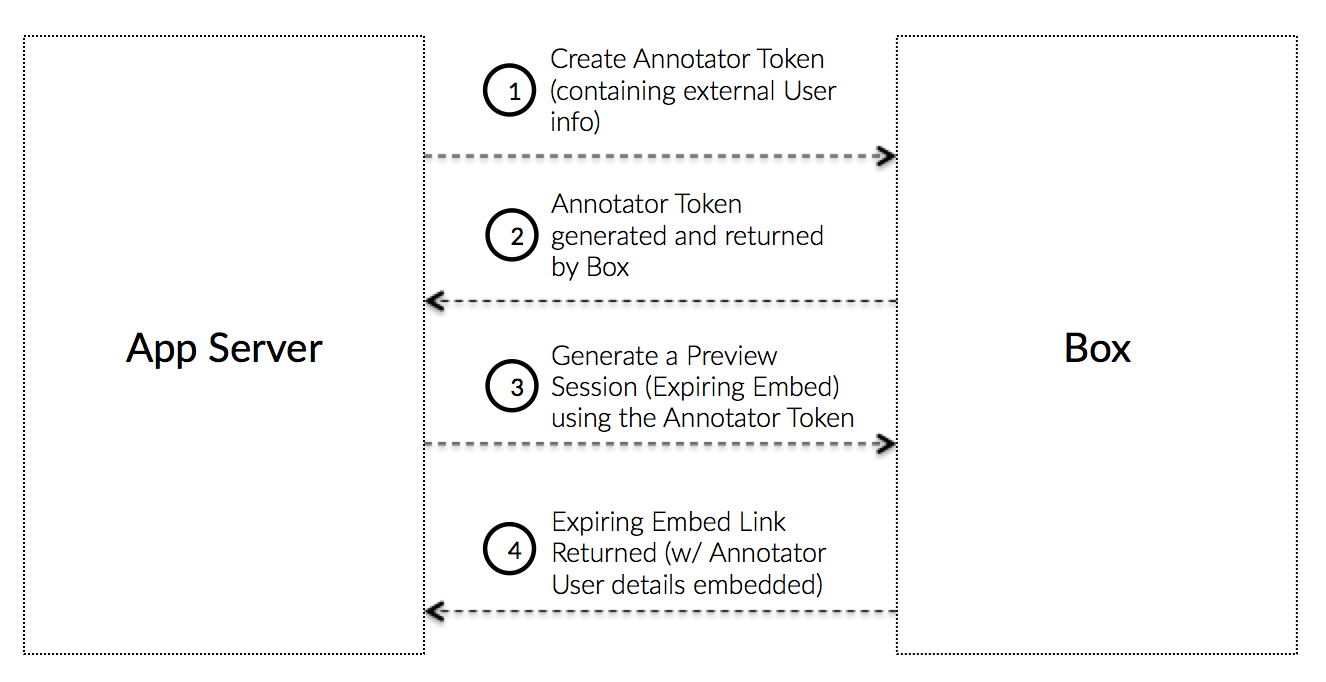
注釈トークンとは
注釈トークンとは、ユーザーが注釈を付けることができるファイルに対してアプリケーションがプレビューの埋め込みリンクを作成できるようにするアクセストークンです。アプリケーションでは、アプリケーションのユーザーそれぞれに新しいApp Userが作成されない可能性があるため、注釈トークンを使用すると、注釈を付けたユーザーを追跡できます。 注釈トークンは、一意のユーザーIDと表示名にリンクされているプレビューセッション (有効期限付き埋め込みリンク) を生成するために、通常のアクセストークンまたはファイルトークンの代わりに使用されます。注釈トークンを使用して生成されたプレビューセッションは特定の外部ユーザーに関連付けられるため、アプリケーションでは、アプリケーションのエンドユーザーごとに異なる注釈トークンを使用して、個別にプレビューセッションを生成することを強くお勧めします。
外部ユーザー情報
注釈に関連付けられた外部の表示名は、実際のところ、注釈に追加されるステートレスな「ラベル」です。つまり、注釈が追加されると、その表示名は完全に注釈と関連付けられるため、注釈を削除し、更新した表示名を使用して再度追加しなければ更新できません。SDKを使用せずに作成
注釈トークンを作成するには、JWTを使用して手動で認証する手順に従いますが、その際、JWTクレームを次のデータに置き換えます。var claims = new List<Claim>{
new Claim("sub", '[EXTERNAL_USER_ID]'),
new Claim("name", '[EXTERNAL_USER_DISPLAY_NAME]'),
new Claim("box_sub_type", "external"),
new Claim("jti", jti),
};
JwtClaims claims = new JwtClaims();
claims.setIssuer(config.boxAppSettings.clientID);
claims.setAudience(authenticationUrl);
claims.setSubject("[EXTERNAL_USER_ID]");
claims.setName("[EXTERNAL_USER_DISPLAY_NAME]");
claims.setClaim("box_sub_type", "external");
claims.setGeneratedJwtId(64);
claims.setExpirationTimeMinutesInTheFuture(0.75f);
claims = {
    'iss': config['boxAppSettings']['clientID'],
    'sub': '[EXTERNAL_USER_ID]',
    'name': '[EXTERNAL_USER_DISPLAY_NAME]',
    'box_sub_type': 'external',
    'aud': authentication_url,
    'jti': secrets.token_hex(64),
    'exp': round(time.time()) + 45
}
let claims = {
    iss: config.boxAppSettings.clientID,
    sub: "[EXTERNAL_USER_ID]",
    name: "[EXTERNAL_USER_DISPLAY_NAME]",
    box_sub_type: "external",
    aud: authenticationUrl,
    jti: crypto.randomBytes(64).toString("hex"),
    exp: Math.floor(Date.now() / 1000) + 45
};
claims = {
  iss: config['boxAppSettings']['clientID'],
  sub: "[EXTERNAL_USER_ID]",
  name: "[EXTERNAL_USER_DISPLAY_NAME]",
  box_sub_type: 'external',
  aud: authentication_url,
  jti: SecureRandom.hex(64),
  exp: Time.now.to_i + 45
}
$claims = [
  'iss' => $config->boxAppSettings->clientID,
  'sub' => '[EXTERNAL_USER_ID]',
  'name' => '[EXTERNAL_USER_DISPLAY_NAME]',
  'box_sub_type' => 'external',
  'aud' => $authenticationUrl,
  'jti' => base64_encode(random_bytes(64)),
  'exp' => time() + 45,
  'kid' => $config->boxAppSettings->appAuth->publicKeyID
];
| パラメータ | 型 | 説明 |
|---|---|---|
sub | String | この注釈を関連付ける外部ユーザーID。このIDには、アプリケーションで追跡される任意のIDを使用できます。 |
box_sub_type | String | 外部ユーザーIDを示す場合はexternal |
box_sub_type | String | この注釈を関連付ける外部ユーザー名。これはBox UIに表示されます。 |
var content = new FormUrlEncodedContent(new[]
{
    new KeyValuePair<string, string>(
        "grant_type", "urn:ietf:params:oauth:grant-type:token-exchange"),
    new KeyValuePair<string, string>(
        "resource", "https://api.box.com/2.0/files/123456"),
    new KeyValuePair<string, string>(
        "subject_token", "[ACCESS_TOKEN]"),
    new KeyValuePair<string, string>(
        "subject_token_type", "urn:ietf:params:oauth:token-type:access_token"),
    new KeyValuePair<string, string>(
        "scope", "item_preview"),
    new KeyValuePair<string, string>(
        "actor_token", "[JWT_ASSERTION_FOR_ANNOTATOR_TOKEN]"),
    new KeyValuePair<string, string>(
        "actor_token_type", "urn:ietf:params:oauth:token-type:id_token"),
});
List<NameValuePair> params = new ArrayList<NameValuePair>();

params.add(new BasicNameValuePair(
    "grant_type", "urn:ietf:params:oauth:grant-type:token-exchange"));
params.add(new BasicNameValuePair(
    "resource", "https://api.box.com/2.0/files/123456"));
params.add(new BasicNameValuePair(
    "subject_token", "[ACCESS_TOKEN]"));
params.add(new BasicNameValuePair(
    "subject_token_type", "urn:ietf:params:oauth:token-type:access_token"));
params.add(new BasicNameValuePair(
    "scope", "item_preview"));
params.add(new BasicNameValuePair(
    "actor_token", "[JWT_ASSERTION_FOR_ANNOTATOR_TOKEN]"));
params.add(new BasicNameValuePair(
    "actor_token_type", "urn:ietf:params:oauth:token-type:id_token"));
params = urlencode({
    'grant_type': 'urn:ietf:params:oauth:grant-type:token-exchange',
    'resource': 'https://api.box.com/2.0/files/123456',
    'subject_token': '[ACCESS_TOKEN]',
    'subject_token_type': 'urn:ietf:params:oauth:token-type:access_token',
    'scope': 'item_preview',
    'actor_token': '[JWT_ASSERTION_FOR_ANNOTATOR_TOKEN]',
    'actor_token_type': 'urn:ietf:params:oauth:token-type:id_token'
}).encode()
let accessToken = await axios
    .post(
        authenticationUrl,
        querystring.stringify({
            grant_type: "urn:ietf:params:oauth:grant-type:token-exchange",
            resource: "https://api.box.com/2.0/files/123456",
            subject_token: "[ACCESS_TOKEN]",
            subject_token_type: "urn:ietf:params:oauth:token-type:access_token",
            scope: "item_preview",
            actor_token: "[JWT_ASSERTION_FOR_ANNOTATOR_TOKEN]",
            actor_token_type: "urn:ietf:params:oauth:token-type:id_token"
        })
    )
    .then(response => response.data.access_token);
params = URI.encode_www_form({
  grant_type: 'urn:ietf:params:oauth:grant-type:token-exchange',
  resource: 'https://api.box.com/2.0/files/123456',
  subject_token: '[ACCESS_TOKEN]',
  subject_token_type: 'urn:ietf:params:oauth:token-type:access_token',
  scope: 'item_preview',
  actor_token: '[JWT_ASSERTION_FOR_ANNOTATOR_TOKEN]',
  actor_token_type: 'urn:ietf:params:oauth:token-type:id_token'
})
$params = [
  'grant_type' => 'urn:ietf:params:oauth:grant-type:token-exchange',
  'resource' => 'https://api.box.com/2.0/files/123456',
  'subject_token' => '[ACCESS_TOKEN]',
  'subject_token_type' => 'urn:ietf:params:oauth:token-type:access_token',
  'scope' => 'item_preview',
  'actor_token' => '[JWT_ASSERTION_FOR_ANNOTATOR_TOKEN]',
  'actor_token_type' => 'urn:ietf:params:oauth:token-type:id_token'
];
| パラメータ | 説明 |
|---|---|
resource | トークンが制限されるファイルへの完全なURLパス (省略可)。 |
actor_token | 以前に作成されたJWTアサーション |
actor_token_type | 常にurn:ietf:params:oauth:token-type:id_tokenに設定します。 |
SDKを使用して作成
SDKを使用してJWT注釈トークンを作成するために、アプリケーションはアクティブなトークンを別のトークンと交換できます。var options = {
actor: {
id: "[EXTERNAL_USER_ID]",
name: "[EXTERNAL_USER_DISPLAY_NAME"
}
};
client
.exchangeToken(
"item_preview",
"https://api.box.com/2.0/files/123456",
options
)
.then(tokenInfo => {
//=> tokenInfo.accessToken
});